AI‑Powered Surveillance and What It Means for NAS

Five years ago, your security cameras did one thing: record video to a hard drive. Today, they recognize faces, distinguish your car from a stranger’s, ignore your cat but alert you to packages, and let you search a month of footage in seconds by typing “person in red shirt.” This transformation from “dumb recording” to intelligent surveillance is revolutionizing home and small business security—but it’s also fundamentally changing what you need from your NAS. The storage system that handled four cameras recording 24/7 may buckle under the demands of AI analytics. This guide explains exactly what’s changed, how much storage you actually need, and how to build a surveillance system that’s both smart and sustainable.
The Surveillance Revolution: From DVRs to AI Analytics
The transformation has been remarkably fast. In 2020, “smart” security cameras meant motion detection that triggered on everything from tree branches to passing clouds. By 2025, AI-powered surveillance revenue exceeded $15 billion globally, driven by demand for predictive analytics, behavior-based threat detection, and intelligent search capabilities.
Every major NAS manufacturer now treats AI surveillance as a core product line, not an afterthought:
- Synology launched the DVA (Deep Video Analytics) series with NIST-ranked facial recognition achieving 97%+ accuracy
- QNAP released their all-new QVR Surveillance platform in November 2025, supporting up to 1,024 channels with license-free AI analytics including facial recognition and people counting
- Dedicated AI NVRs from Hikvision, Uniview, Reolink, and others have made intelligent detection the default rather than the exception
The implication for NAS users is profound: AI doesn’t just change what cameras see—it changes how your entire storage system works. The quiet hard drive that handled sequential video writes now faces simultaneous recording, real-time inference, database indexing, and forensic searches. Understanding this shift is essential for anyone planning a modern surveillance deployment.
What “AI Surveillance” Actually Does
Before diving into hardware requirements, let’s understand exactly what AI brings to surveillance and why it matters for storage infrastructure.
Common AI Features and Their Functions
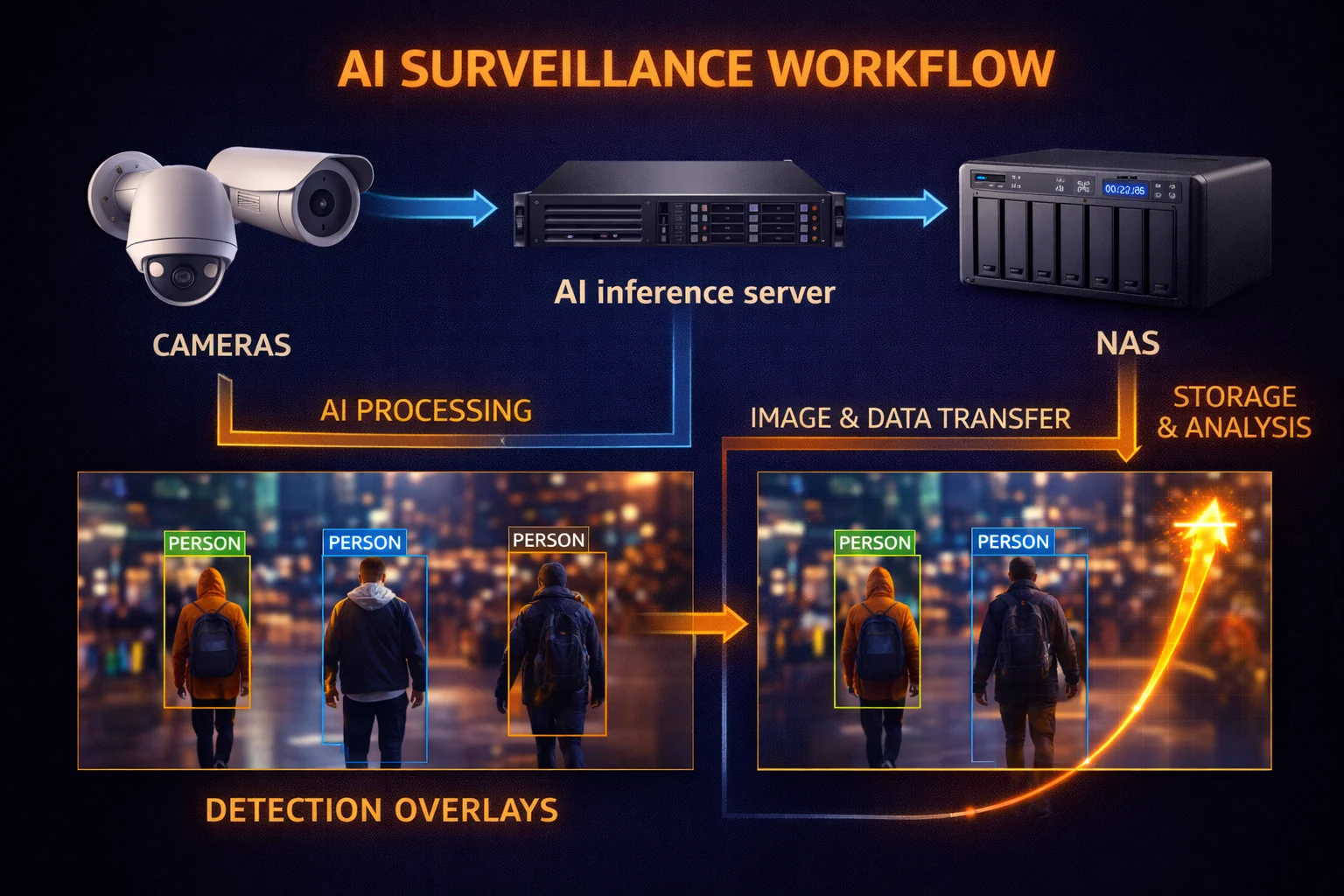
Where AI Processing Happens: Three Architectures
Understanding where AI processing occurs is crucial for planning your hardware. There are three primary architectures, each with different implications for your NAS.
🎯 Edge AI (In-Camera)
AI inference happens inside the camera itself. Camera sends pre-filtered metadata and relevant clips to NAS.
Examples: Reolink AI, UniFi Protect, Hikvision AcuSense
🖥️ NAS-Side AI (Deep Learning NVR)
Raw video streams to NAS. NAS performs all AI inference using dedicated GPU/NPU hardware.
Examples: Synology DVA series, QNAP QVR AI Pack
⚡ Hybrid Architecture
Basic detection at edge (motion, person/vehicle). Advanced analytics (face recognition, forensic search) on NAS.
Best of: Both worlds, more complex setup
Why AI Changes Your Storage Workload
This is where most people underestimate the impact. A traditional NVR has a simple job: write video streams to disk sequentially. The workload is predictable, the IOPS requirements are low, and almost any hard drive handles it fine.
AI surveillance creates a fundamentally different workload pattern:
Workload Pattern Comparison
Traditional NVR
- ● Sequential writes (one stream per camera)
- ● Rare reads (only manual review)
- ● Minimal CPU load
- ● Low IOPS requirement
- ● HDD-only is fine
AI-Enabled NAS/NVR
- ● Simultaneous writes + reads
- ● Continuous metadata indexing
- ● High CPU/GPU load (NAS-side AI)
- ● Medium-High IOPS for searches
- ● SSD cache strongly recommended
The key insight: AI surveillance isn’t just “more data”—it’s a fundamentally different type of workload that benefits from hardware designed for mixed operations, not just sequential writes.
How Much Storage Do You Actually Need?
Let’s cut through the confusion with concrete numbers. Storage requirements depend on resolution, compression, frame rate, and retention period—but AI also introduces new variables that can either increase or decrease your needs.
Base Storage Calculations
Using H.265 compression (the current standard for efficient surveillance), here’s what each camera generates:
Real-World Storage Scenarios
Based on these calculations, here’s what typical deployments require for continuous 24/7 recording:
Storage Requirements by Deployment Size
How AI Changes These Numbers
Here’s where it gets interesting. AI can be both a storage multiplier and a storage reducer, depending on how you configure it.
AI as Storage Multiplier
AI features add overhead to your base storage needs:
- Metadata indexes: 1-3% additional storage for searchable event data
- Face databases: Each face profile requires storage for reference images and embedding vectors
- Thumbnail generation: Quick preview images for timeline scrubbing
- AI event clips: Separate highlight recordings beyond continuous footage
- Analytics data: People counting statistics, heat maps, behavioral logs
AI as Storage Reducer
Intelligent recording can dramatically reduce storage requirements:
- Motion-only recording with AI filtering: 50-70% reduction vs continuous recording
- Human/vehicle-only recording: 70-85% reduction (ignores animals, weather, shadows)
- Event-only recording: 85-95% reduction (only records AI-flagged incidents)
- Auto-deletion of “uninteresting” footage: Keep important events, purge routine recording
Recording Mode Impact: 4 Cameras × 4K × 30 Days
(Human/Vehicle)
(AI Incidents)
The tradeoff is clear: AI-filtered recording can reduce storage by 80%+, but you’re trusting the AI not to miss anything important. Most security professionals recommend continuous recording with AI filtering applied to alerts rather than recording—you capture everything but only get notified about relevant events.
NAS Hardware Requirements: AI vs. Traditional Recording
Now let’s translate these workload differences into concrete hardware specifications. What you need depends on your camera count, whether AI processing happens at the edge or on your NAS, and what features you want to use.
Hardware Specification Comparison
Tiered Hardware Recommendations
Tier 1: Basic (2-4 Cameras with Edge AI)
For home users with AI-capable cameras (Reolink, UniFi, etc.) that handle detection at the edge:
- CPU: Intel Celeron J4125 or Realtek RTD1619B (sufficient since AI is in-camera)
- RAM: 4-8 GB
- Storage: Single 4-8TB surveillance HDD (Seagate IronWolf or SkyHawk)
- SSD Cache: Optional but helpful for smart search
- Example NAS:Synology DS224+, QNAP TS-264
- Budget: $400-600 total (NAS + drives)
Tier 2: Prosumer (4-8 Cameras with Smart Search)
For users who want fast forensic search and timeline scrubbing across multiple cameras:
- CPU: Intel Celeron N5095 or AMD Ryzen Embedded V1500B
- RAM: 8-16 GB
- Storage: 2-4× surveillance HDDs in RAID 5 or RAID 6
- SSD Cache: Strongly recommended (500GB-1TB NVMe for read cache)
- Example NAS:Synology DS923+, QNAP TS-464
- Budget: $800-1,400 total
Tier 3: AI-Ready (8-16 Cameras with NAS-Side AI)
For deployments requiring facial recognition, people counting, and full analytics processed on the NAS:
- CPU: Intel Core i3/i5 or equivalent
- RAM: 16-32 GB (AI models require significant memory)
- Dedicated GPU/NPU: Required for real-time inference
- Storage: 4-6× HDDs + dedicated SSD cache pool
- Example NAS: Synology DVA1622, DVA3221, QNAP TVS-h874
- Budget: $1,500-3,500 total
Tier 4: Enterprise (16+ Cameras with Full AI Suite)
For businesses requiring maximum scalability, reliability, and advanced analytics:
- Platform: Dedicated Deep Learning NVR (rackmount)
- RAM: 32+ GB
- GPU: 190+ TFLOPS (Synology DVA7400 spec)
- Storage: Large SSD tier for hot data + HDD capacity tier
- Example: Synology DVA7400 (up to 128 cameras), QNAP QVR (up to 1,024 channels)
- Budget: $5,000-15,000+
The Synology DVA Premium: What You’re Paying For
Synology’s Deep Learning NVR (DVA) series commands a significant premium over regular NAS models. Here’s what that premium buys:
What the DVA premium buys:
- Dedicated GPU that doesn’t compete with other NAS tasks
- Pre-tuned AI models optimized for Synology’s hardware
- No additional software licenses for AI features
- NIST FRVT ranked facial recognition (>97% accuracy under WILD category)
- Integrated management through Surveillance Station
SSD Cache: The Unsung Hero of AI Surveillance
If there’s one upgrade that dramatically improves AI surveillance performance on a NAS, it’s SSD cache. Here’s why it matters:
- Metadata/Index Storage: Face databases, search indexes, and event markers benefit enormously from SSD speeds
- Playback Acceleration: Smart search scrubs through footage faster when thumbnails and indexes are cached
- Write Buffering: Absorbs burst writes during high-activity periods (multiple motion events)
- Thumbnail Cache: Quick preview generation for timeline navigation
Recommended SSD Cache Sizing:
For NAS surveillance, consider the Seagate IronWolf 525 NVMe—it’s specifically designed for NAS workloads with higher endurance (900 TBW at 1TB) than consumer drives and includes IronWolf Health Management integration.
How People Actually Use NAS for Surveillance
Theory is useful, but real-world usage patterns reveal what actually matters. Based on community surveys, forum discussions, and user feedback from NAS enthusiast communities, here’s how people are deploying surveillance systems in 2025-2026.
User Segmentation: Four Types of NAS Surveillance Users
📹 Basic Recorder
- 2-3 cameras average
- No AI features used
- Motion recording only
- 2-4 TB total storage
- HDD only (no SSD cache)
🏠 Smart Home User
- 4-6 cameras
- Human/vehicle detection
- Smart alerts enabled
- 4-8 TB total storage
- Some use SSD cache
🤖 AI Enthusiast
- 6-12 cameras
- Facial recognition active
- Multiple AI features
- 12-24 TB storage
- SSD cache standard
🏢 SMB/Prosumer
- 12+ cameras
- Full AI analytics suite
- License plate recognition
- 24+ TB storage
- Enterprise hardware
Key Finding: AI Users Average 2.5× More Storage
The most striking pattern across user surveys: those who enable AI features consistently deploy more storage capacity—even when AI filtering should theoretically reduce storage needs.
Why? Several factors:
- Higher resolution cameras: AI users tend to use 4K to maximize detection accuracy
- Longer retention: When you can search footage effectively, you want more history
- Continuous + event recording: Many keep continuous recording as backup while also capturing AI-flagged events separately
- More cameras: AI makes managing larger deployments practical, so users add more cameras
Average Storage Deployed by User Type
Recorder
Home
Enthusiast
Prosumer
Common Pain Points Reported by Users
From forum discussions and user feedback, these are the most frequently cited issues:
- CPU bottlenecks: “My DS920+ struggles with 6 cameras when AI is enabled”
- Database growth: “Face recognition database is now 15GB and growing”
- Search performance: “Smart search is painfully slow without SSD cache”
- False positives: “AI still triggers on my dog despite ‘human only’ setting”
- License costs: “Camera licenses add up fast with Synology/QNAP”
Success stories consistently mention:
- “Reduced false alerts by 90% after switching to AI detection”
- “Found footage of a package thief in 30 seconds using smart search”
- “DVA1622 paid for itself when we identified someone from face recognition”
Privacy and Local AI vs. Cloud Surveillance
One of the most significant trends driving NAS-based surveillance adoption is growing concern about cloud camera privacy. The tension between convenience and control has reached a breaking point for many users.
The Cloud Camera Problem
Subscription costs add up fast:
*After initial hardware investment (~$600-1,500 for NAS + drives)
Privacy Concerns: 2025 Headlines
Privacy issues with cloud cameras have moved from theoretical to headline news:
⚠️ Amazon Ring “Familiar Faces” Controversy (December 2025)
- AI-powered facial recognition rolled out to video doorbells
- Scans and identifies visitors without their consent
- Biometric data processed in Amazon’s cloud
- Senator Ed Markey called for feature to be abandoned
- Banned in Illinois, Texas, and Portland, Oregon under biometric privacy laws
- EFF: “Knocking on a door shouldn’t require abandoning your privacy”
This wasn’t Ring’s first controversy:
- $5.8 million FTC fine (2023): Ring employees and contractors had “broad and unrestricted access to customers’ videos for years”
- Police data sharing: Ring shared footage with law enforcement without user consent in hundreds of cases
- Flock Safety partnership: Amazon partnered with AI surveillance company used by police and ICE
- Exposed home addresses: The Neighbors app revealed users’ precise locations
The Local AI Advantage
Self-hosted NAS surveillance offers compelling benefits for privacy-conscious users:
Video never leaves your network. No third-party servers, no data harvesting.
One-time hardware cost. No monthly fees after initial investment.
You control retention, access, and deletion. Your footage, your rules.
ONVIF cameras work with any NAS. Mix brands freely.
Local processing means no cloud latency. Instant alerts and playback.
Internet outage? Still recording. Cloud service down? Still protected.
As one security researcher noted: “Local AI processes video and audio entirely on-device. No footage leaves your home, eliminating third-party data harvesting risks.”
The Hybrid Compromise
For users who want local control but also off-site backup for disaster recovery, hybrid solutions now exist:
- Synology C2 Surveillance: Encrypted cloud backup controlled by you
- QNAP myQNAPcloud Surveillance Storage: Launched November 2025 alongside QVR Surveillance platform
- Self-hosted replication: Backup to a secondary NAS at another location
The key difference from Ring/Nest: you decide what goes to the cloud, and encryption keys remain under your control.
Practical NAS Recommendations by Use Case
Let’s bring everything together with specific product recommendations matched to common deployment scenarios.
Complete Recommendation Matrix
Budget Build: Under $500 Total
💰 Budget Build
~$400-500~$200
~$190
AI in camera
Prosumer Build: $800-1,400
⭐ Prosumer Build (Best Value)
~$965-1,200AI-Ready Build: $2,000-3,500
🤖 AI-Ready Build
~$2,000-2,700Surveillance Drive Recommendations
Choosing the right drive matters. Surveillance workloads are harsh on storage—24/7 writes with no downtime.
Conclusion: NAS Is Quietly Becoming an AI Appliance
The transition from “dumb recording” to AI-powered surveillance represents one of the most significant shifts in consumer storage in years. What was once a simple write-and-forget workload has become a complex mix of continuous recording, real-time inference, database management, and intelligent search.
Key takeaways for anyone planning a surveillance deployment:
- AI changes everything: Once AI enters the loop, your NAS isn’t “just storage”—it’s a compute + storage node with different hardware requirements
- Hardware matters more than ever: CPU, RAM, and SSD cache become critical factors, not just raw HDD capacity
- Privacy is driving local AI adoption: Cloud camera controversies (Ring’s facial recognition, data sharing with police) are pushing users toward self-hosted solutions
- Plan for growth: AI features tend to increase storage needs AND performance requirements over time as you add cameras and features
- The premium can be worth it: Dedicated AI NVRs like Synology’s DVA series justify their cost for deployments with 8+ cameras or advanced AI requirements
Looking ahead, we expect to see NPUs becoming standard in NAS hardware (similar to their proliferation in smartphones), further reducing cloud dependency for AI features. QNAP’s announcement of 1,024-channel support signals enterprise-level ambitions for NAS-based surveillance, and the integration with smart home ecosystems will only deepen.
For now, the advice is clear: if you’re planning a surveillance system in 2026, plan for AI from the start—even if you’re not using it yet. The hardware that handles 4 basic cameras today will struggle with 4 AI-enabled cameras tomorrow. Invest in headroom, add SSD cache, and choose platforms with clear AI roadmaps.
Your security cameras just got smarter. Make sure your storage can keep up.
Frequently Asked Questions
For 4 cameras recording continuously at 1080p with H.265 compression, plan for approximately 6-8 TB for 30 days of retention. At 4K resolution, that increases to 8-12 TB. If using AI-filtered recording (human/vehicle only), you can reduce this by 50-70%, but most security professionals recommend continuous recording with AI applied to alerts rather than recording itself.
It depends on where AI processing happens. If your cameras have built-in AI (edge AI), any NAS with adequate storage works. However, for NAS-side AI features like facial recognition, people counting, and smart forensic search, you need either a dedicated Deep Learning NVR (like Synology DVA series) or a NAS with sufficient CPU/GPU power. Basic smart search benefits significantly from SSD cache regardless of architecture.
Yes, significantly. With local NAS surveillance, video footage never leaves your network unless you explicitly configure cloud backup. Cloud cameras like Ring process video on remote servers, have faced privacy controversies (including Ring’s $5.8M FTC fine and the 2025 “Familiar Faces” AI controversy), and may share data with third parties or law enforcement. Local AI processing on your NAS eliminates these concerns entirely.
Synology DVA (Deep Video Analytics) models include dedicated GPUs for AI processing, enabling features like facial recognition with 97%+ accuracy, people counting, intrusion detection, and advanced smart search—all processed locally without additional licenses. Regular Synology NAS models can run Surveillance Station for basic recording but lack the hardware for NAS-side AI inference. The DVA premium ($400-1,400 more) buys dedicated AI capability.
Traditional motion detection triggers on any pixel change—tree branches, shadows, weather, animals, passing cars. AI detection uses neural networks trained to recognize specific objects (humans, vehicles, packages) and behaviors. Hikvision claims their AcuSense reduces false alarms by up to 90%. The AI distinguishes between a person approaching your door and a cat walking past, sending alerts only for relevant events.
For basic recording, no—surveillance is primarily sequential writes that HDDs handle well. However, SSD cache becomes valuable when using AI features: smart search performance improves dramatically, metadata indexing is faster, timeline scrubbing is smoother, and face recognition databases benefit from fast random reads. For 4+ cameras with any AI features, SSD cache is strongly recommended. For 8+ cameras, it’s nearly essential.
Not recommended. Desktop drives aren’t designed for continuous 24/7 write operations and may fail within months in surveillance use. Surveillance-optimized drives like Seagate SkyHawk and IronWolf are built for constant streaming writes, support more simultaneous camera streams, include firmware optimizations for video workloads, and have higher workload ratings (180-300 TB/year vs 55 TB/year for desktop drives).
This varies dramatically by NAS model and whether you’re using AI features. Entry-level 2-bay NAS units typically handle 4-8 cameras for basic recording. Mid-range 4-bay units support 8-16 cameras. Synology DVA models support 16-128 cameras with full AI. QNAP’s new QVR Surveillance platform (November 2025) supports up to 1,024 channels on a single NAS. The limiting factors are CPU processing power, RAM, network bandwidth, and storage throughput.
Both approaches have merits. Edge AI (in-camera) reduces NAS load, works even if NAS is offline, and requires less expensive NAS hardware. NAS-side AI offers more advanced analytics (cross-camera tracking, centralized face databases), easier updates to AI models, and consistent processing across mixed camera brands. Many users prefer hybrid: edge AI for basic detection and alerts, NAS-side AI for forensic search and advanced features.
For residential use, 7-30 days is typical—enough time to notice and report incidents. Businesses often retain 30-90 days for liability protection. Some regulated industries (cannabis dispensaries, financial services) may require 6+ months by law. With AI smart search, longer retention becomes more practical since you can quickly find relevant footage. Storage costs have dropped significantly, making 90+ day retention affordable for many users.
Related Resources
Planning your surveillance storage setup? These guides can help:
- RAID Calculator – Calculate usable capacity for different RAID configurations
- Seagate IronWolf Guide – Complete guide to NAS-optimized drives
- IronWolf + Synology Compatibility – Verified drive configurations
- IronWolf 525 NVMe SSD – NAS SSD cache recommendations
- IronWolf 12TB Review – Sweet spot for surveillance capacity
Last updated: February 2026