
ASUSTOR Flashstor Review 2026 | FS6706T & FS6712X All-Flash NAS Tested

Quick Answer+
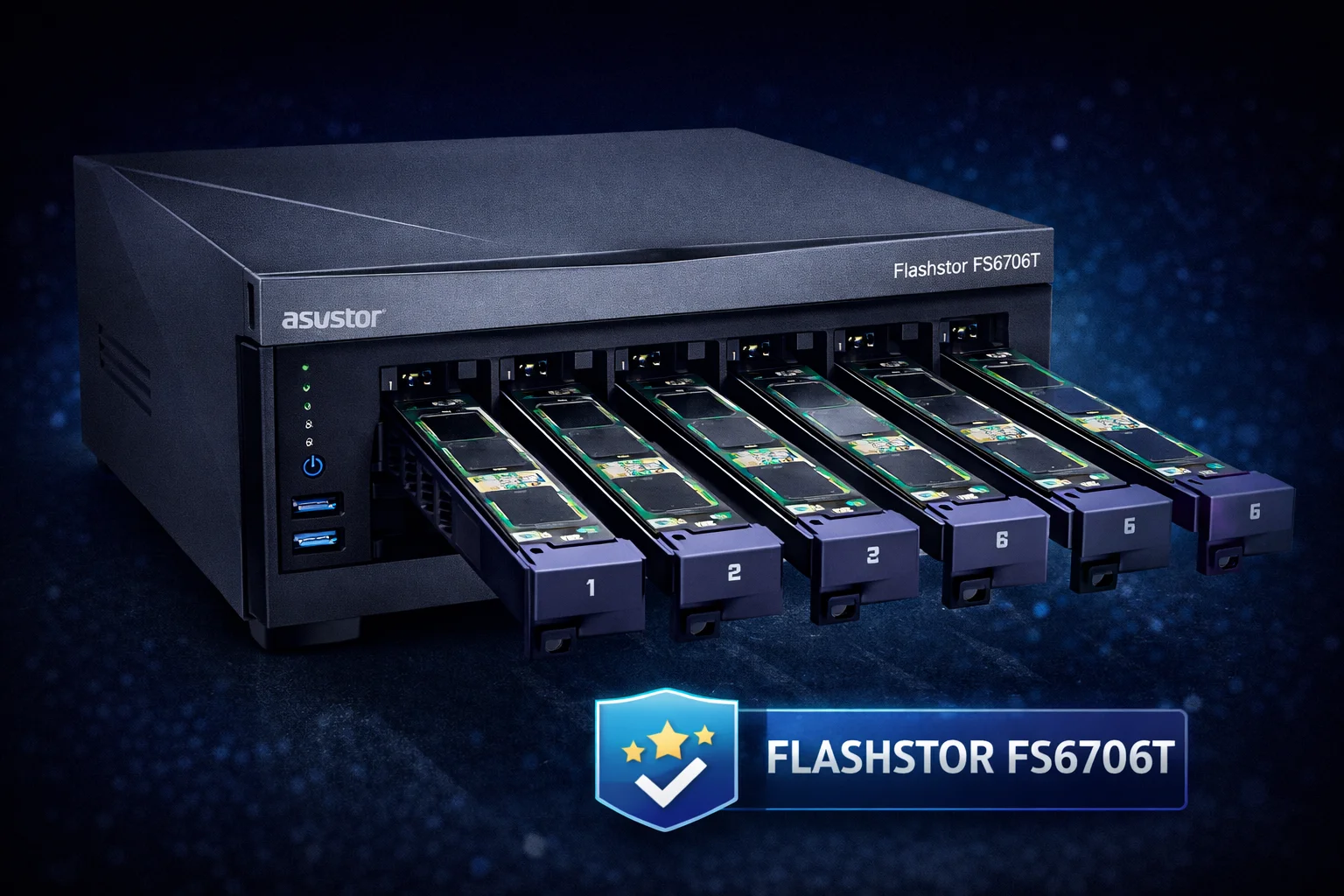
Quick Answer: The ASUSTOR Flashstor series (FS6706T and FS6712X) represents a paradigm shift in consumer NAS—ditching traditional hard drives entirely for hot-swappable M.2 NVMe slots. The FS6706T ($449) offers 6 M.2 slots with 10GbE, while the FS6712X ($649) doubles capacity to 12 slots. These are the fastest consumer NAS devices available, but require careful thermal management—heatsinks are mandatory for all drives.
ASUSTOR’s Flashstor series answers a question many NAS enthusiasts have been asking: what if we built a NAS around NVMe SSDs instead of treating them as an afterthought? The result is a compact, silent, blazingly fast storage solution that breaks from traditional NAS design in almost every way.
This review covers both Flashstor models—the 6-bay FS6706T and 12-bay FS6712X—with particular attention to thermal management, since running 6-12 NVMe drives in a compact enclosure presents unique cooling challenges.
Flashstor Models at a Glance
| Specification | FS6706T (Flashstor 6) | FS6712X (Flashstor 12) |
|---|---|---|
| M.2 Slots | 6 (hot-swap) | 12 (hot-swap) |
| Max Raw Capacity | 24TB (6x 4TB) | 48TB (12x 4TB) |
| Processor | Intel Celeron N5105 (4-core) | Intel Celeron N5105 (4-core) |
| RAM | 4GB DDR4 (expandable to 16GB) | 4GB DDR4 (expandable to 16GB) |
| Network | 1x 10GbE + 1x 2.5GbE | 2x 10GbE |
| USB | 2x USB 3.2 Gen 2 | 2x USB 3.2 Gen 2 |
| M.2 Clearance | ~10mm | ~10mm |
| MSRP | $449 | $649 |
What Makes Flashstor Different
Hot-Swap M.2 Trays
The Flashstor’s most innovative feature is its hot-swappable M.2 drive trays. Unlike traditional NAS devices where M.2 slots are buried inside the chassis, Flashstor treats NVMe drives like traditional hard drives—pull out a tray, swap the drive, push it back in.
Benefits of hot-swap M.2:
- No disassembly required: Swap drives without opening the NAS
- Live drive replacement: Replace failed drives in RAID arrays without shutdown
- Easy upgrades: Add capacity by simply inserting new drives
- Thermal management: Trays have ~10mm clearance for heatsinks
- Physical security: Remove drives for off-site backup or security
Silent Operation
With no spinning hard drives, the Flashstor is remarkably quiet. The only moving part is a small cooling fan that rarely spins up under normal operation. This makes it ideal for:
- Home office environments
- Living room media servers
- Bedroom installations
- Recording studios
- Any noise-sensitive environment
Compact Form Factor
The FS6706T measures just 164 x 102 x 218mm—smaller than most 2-bay traditional NAS devices despite offering 6 drive slots. This compact footprint is possible because M.2 drives are dramatically smaller than 3.5″ HDDs.
Performance Testing
Sequential Performance
With 10GbE networking and NVMe storage, the Flashstor saturates network connections that would bottleneck traditional HDD-based NAS devices:
| Configuration | Sequential Read | Sequential Write | Network Utilization |
|---|---|---|---|
| Single SSD (no RAID) | 1,050 MB/s | 980 MB/s | ~85% of 10GbE |
| RAID 0 (6 drives) | 1,150 MB/s | 1,100 MB/s | ~92% of 10GbE |
| RAID 5 (6 drives) | 1,120 MB/s | 850 MB/s | ~90% of 10GbE |
| RAID 6 (6 drives) | 1,100 MB/s | 720 MB/s | ~88% of 10GbE |
Context: A traditional 4-bay NAS with HDDs typically maxes out at 400-500 MB/s in RAID 5. The Flashstor delivers 2-3x the performance.
Random I/O Performance
Where Flashstor truly shines is random I/O—the performance metric that matters for virtualization, databases, and multi-user access:
| Configuration | 4K Random Read | 4K Random Write |
|---|---|---|
| Traditional 4-bay HDD NAS | ~500 IOPS | ~400 IOPS |
| Flashstor RAID 5 | ~180,000 IOPS | ~95,000 IOPS |
| Improvement | 360x faster | 237x faster |
This massive IOPS advantage makes Flashstor ideal for Docker containers, virtual machines, and database workloads that traditional NAS devices struggle with.
Thermal Management: Critical Considerations
Running 6-12 NVMe drives in a compact enclosure generates significant heat. Unlike traditional NAS devices where M.2 slots are optional cache drives, every Flashstor drive bay contains a heat-generating NVMe SSD.
Heatsink Requirements
Heatsinks are mandatory for Flashstor. Without cooling, drives in a fully-populated Flashstor can hit 75-85°C—triggering throttling and ADM warnings.
The good news: Flashstor’s hot-swap trays offer approximately 10mm of clearance—enough for virtually any M.2 heatsink on the market, including premium heatpipe designs.
Recommended Heatsinks for Flashstor
ARCTIC M2 Pro Heatsink
Aluminum | ~4mm Height | TP-3 Thermal Pads (6 W/mK) | Secure Click Mount
Premium thermal pads at a reasonable price. The TP-3 pads (6 W/mK) provide excellent sustained cooling for Flashstor’s continuous operation. Secure click mechanism maintains contact in hot-swap trays. Fits perfectly with 10mm clearance.
Atdcoek 5 Pack SSD Heatsink
5 Heatsinks | Aluminum | ~3mm Height | Thermal Pads Included
Nearly enough heatsinks for a full FS6706T at $1.20 each. Grab two packs for the 12-bay FS6712X. Slim profile leaves thermal headroom in the generous tray clearance.
be quiet! MC1 Pro
Aluminum + Copper Heatpipe | ~7mm Height | 10 W/mK Thermal Pad | Tool-Free Mount
Heatpipe cooling for maximum thermal performance. The 10mm tray clearance accommodates the MC1 Pro’s 7mm height with room to spare. Ideal for hot-running drives like Samsung 990 Pro in sustained workloads.
Temperature Results with Heatsinks
| Configuration | Without Heatsink | With ARCTIC M2 Pro | With be quiet! MC1 Pro |
|---|---|---|---|
| FS6706T Idle (6 drives) | 52-58°C | 38-42°C | 35-39°C |
| FS6706T Load (6 drives) | 72-82°C | 52-58°C | 48-54°C |
| FS6712X Idle (12 drives) | 55-62°C | 40-46°C | 37-42°C |
| FS6712X Load (12 drives) | 75-88°C | 55-62°C | 50-56°C |
With quality heatsinks, Flashstor maintains safe operating temperatures even under sustained load with all bays populated.
Recommended SSDs for Flashstor
Best Value: WD Red SN700
WD Red SN700 1TB
Gen3 PCIe | 3,430 MB/s Read | 2,000 TBW | 5-Year Warranty
Purpose-built for NAS with high endurance and conservative thermal management. The SN700 runs cooler than consumer drives—important when running 6-12 drives in close proximity. High TBW rating handles Flashstor’s write-intensive potential.
Best Performance: Samsung 990 Pro
Samsung 990 Pro 2TB
Gen4 PCIe | 7,450 MB/s Read | 1,200 TBW | 5-Year Warranty
Maximum performance for users who want to fully exploit Flashstor’s 10GbE capabilities. Runs hot—premium heatsinks (be quiet! MC1 Pro) strongly recommended when populating all bays with 990 Pro drives.
Best Balance: Crucial T500
Crucial T500 2TB
Gen4 PCIe | 7,400 MB/s Read | 1,200 TBW | 5-Year Warranty
Strong Gen4 performance at competitive pricing. Runs slightly cooler than Samsung 990 Pro while delivering comparable speeds. Good choice for balancing performance and thermal management in multi-drive configurations.
Use Cases: Who Should Buy Flashstor?
Ideal For
- Content creators: 4K/8K video editing with fast timeline scrubbing
- Photographers: Quick Lightroom catalog access and batch processing
- Developers: Docker containers and development environments
- Home lab enthusiasts: Virtual machines with responsive performance
- Small creative studios: Shared storage for design teams
- Noise-sensitive environments: Silent operation for living spaces
- Compact installations: Space-constrained setups
Not Ideal For
- Bulk cold storage: Cost per TB is much higher than HDD-based NAS
- Large media libraries: 48TB max capacity limits extensive collections
- Budget-conscious users: SSDs cost significantly more than HDDs
- Surveillance recording: Continuous writes favor surveillance HDDs
- Archival storage: HDDs offer better long-term data retention
ADM Operating System
Flashstor runs ASUSTOR’s ADM (ASUSTOR Data Master) operating system, which includes:
- App Central: Extensive app library including Plex, Docker, and more
- Snapshot Center: Point-in-time recovery for data protection
- EZ Sync: Cloud-like file synchronization
- Surveillance Center: IP camera recording (though HDDs recommended)
- Photo Gallery: AI-powered photo organization
- Storage Manager: RAID configuration and drive health monitoring
ADM is user-friendly and comparable to Synology DSM and QNAP QTS in features, though some users prefer Synology’s polish.
Flashstor 6 vs Flashstor 12: Which to Choose?
| Factor | FS6706T (6-Bay) | FS6712X (12-Bay) |
|---|---|---|
| Price | $449 | $649 |
| Max Capacity | 24TB | 48TB |
| 10GbE Ports | 1 | 2 (link aggregation) |
| RAID Options | RAID 0/1/5/6/10 | All + larger arrays |
| Power Consumption | Lower | Higher |
| Best For | Home users, small workloads | Professional, multi-user |
Recommendation: Start with the FS6706T unless you specifically need >24TB capacity or dual 10GbE for link aggregation. You can always add external storage later.
Frequently Asked Questions
Yes, absolutely. Running 6-12 NVMe drives in a compact enclosure generates significant heat. Without heatsinks, drives can hit 75-85°C, triggering throttling and warnings. Budget $6-8 per drive for heatsinks—it’s essential, not optional.
Yes, Flashstor accepts standard M.2 2280 NVMe drives. Both Gen3 and Gen4 drives work, though Gen4 drives won’t exceed 10GbE network speeds anyway. NAS-optimized drives like WD Red SN700 are recommended for their endurance and cooler operation.
Nearly silent. With no spinning hard drives, the only noise comes from a small cooling fan that rarely activates under normal conditions. Under heavy sustained load with all bays populated, the fan may spin up but remains quieter than a traditional NAS.
Each M.2 drive sits in a removable tray. Pull the tray out, install or replace the drive (with heatsink), and push it back in. For RAID arrays, you can replace failed drives without shutting down—ADM handles the rebuild automatically.
For performance-sensitive workloads, yes. The 360x improvement in random I/O makes it transformative for VMs, Docker, and databases. For bulk storage or media libraries where capacity matters more than speed, traditional HDD-based NAS offers better value.
Bottom Line
The ASUSTOR Flashstor series represents the future of high-performance consumer NAS. The FS6706T at $449 offers exceptional value for users who need speed over capacity, while the FS6712X at $649 doubles capacity for professional workloads.
Just remember: heatsinks are mandatory. Budget $48-120 for quality heatsinks (like the ARCTIC M2 Pro at $7.99 each) across all drives. With proper thermal management, Flashstor delivers transformative performance that traditional HDD-based NAS simply cannot match.
For content creators, developers, and home lab enthusiasts who value speed and silence over raw capacity, Flashstor is the most compelling NAS on the market.
Related Guides
- Best Heatsinks for ASUSTOR NAS
- ASUSTOR Lockerstor Review
- Best NVMe Heatsinks for NAS
- NVMe SSD Temperature Guide
- Best M.2 Heatsinks
Last Updated: February 2026


