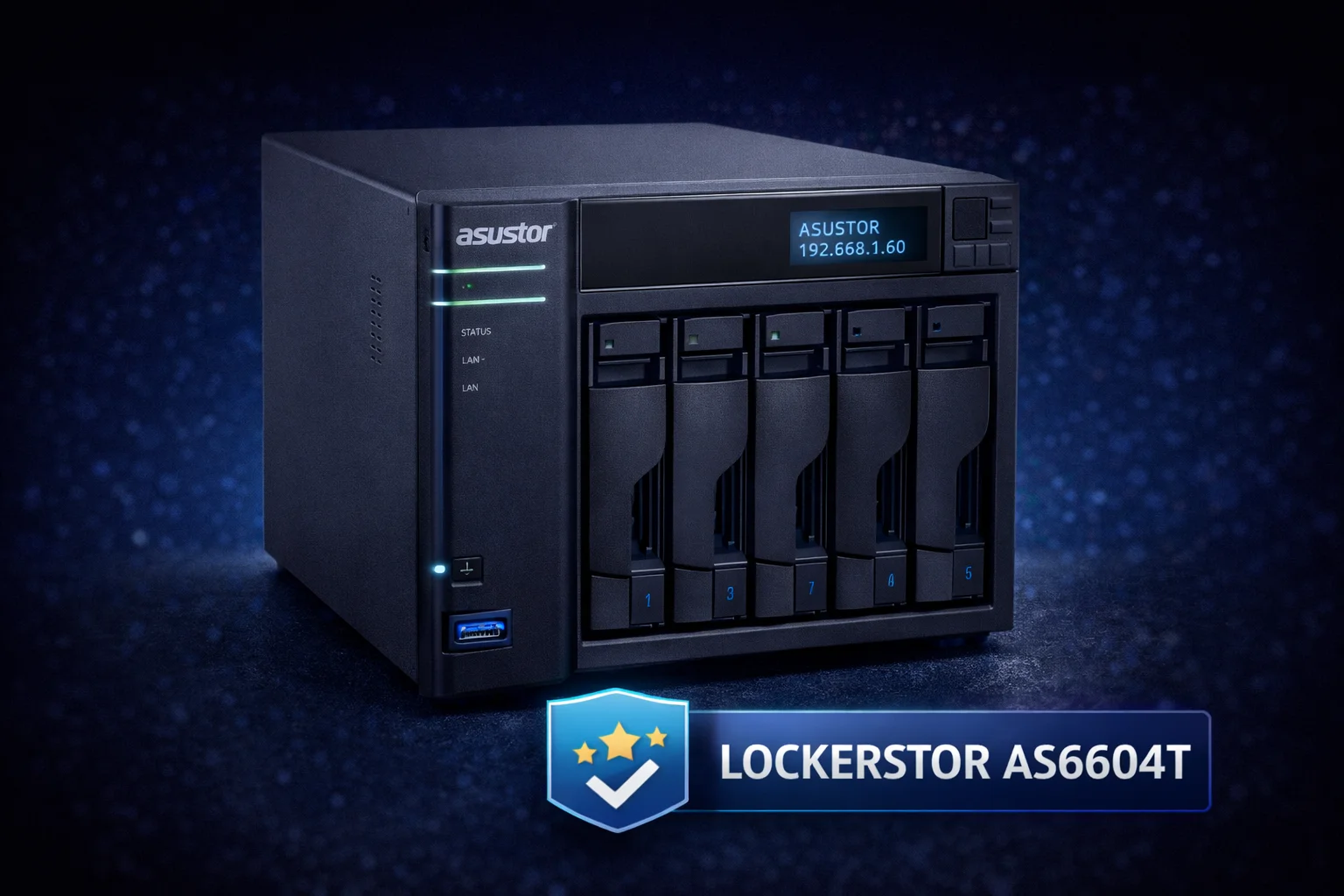
ASUSTOR Lockerstor Review 2026 | AS6602T, AS6604T, AS6706T Tested

Quick Answer+
Quick Answer: The ASUSTOR Lockerstor series delivers premium NAS performance with Intel Celeron processors, 2.5GbE networking, and dual M.2 NVMe slots for SSD caching. The AS6604T (4-bay, ~$549) offers the best balance of capacity and performance, while the AS6602T (2-bay, ~$449) suits smaller deployments. With 6-10mm M.2 clearance, Lockerstor accommodates virtually any heatsink including premium heatpipe options.
ASUSTOR’s Lockerstor series occupies the sweet spot between entry-level NAS devices and enterprise solutions. With Intel Celeron processors, multi-gig networking, and robust M.2 caching support, Lockerstor targets power users who need more than basic file sharing but don’t require rack-mounted infrastructure.
This review covers the Lockerstor lineup—including the 2-bay AS6602T, 4-bay AS6604T, and 6-bay AS6706T—with emphasis on M.2 caching performance and thermal management.
Lockerstor Models Compared
| Specification | AS6602T (Lockerstor 2) | AS6604T (Lockerstor 4) | AS6706T (Lockerstor 6) |
|---|---|---|---|
| Drive Bays | 2x 3.5″/2.5″ | 4x 3.5″/2.5″ | 6x 3.5″/2.5″ |
| M.2 NVMe Slots | 2 | 2 | 2 |
| Processor | Intel Celeron J4125 (4-core) | Intel Celeron J4125 (4-core) | Intel Celeron N5105 (4-core) |
| RAM | 4GB DDR4 (max 8GB) | 4GB DDR4 (max 8GB) | 8GB DDR4 (max 16GB) |
| Network | 2x 2.5GbE | 2x 2.5GbE | 1x 10GbE + 1x 2.5GbE |
| M.2 Clearance | ~8mm | ~8mm | ~10mm |
| MSRP | ~$449 | ~$549 | ~$749 |
What Sets Lockerstor Apart
Intel Celeron Performance
Unlike entry-level NAS devices with Realtek or ARM processors, Lockerstor uses Intel Celeron chips with hardware transcoding support. This matters for:
- Plex transcoding: Hardware acceleration handles 4K to 1080p conversion smoothly
- Encryption: AES-NI acceleration for encrypted volumes without performance penalty
- Docker containers: x86 compatibility for the full Docker ecosystem
- Virtual machines: Enough processing power for light virtualization
- Photo AI: Facial recognition and image classification in ASUSTOR Photo Gallery
Multi-Gig Networking
Every Lockerstor model includes 2.5GbE networking—2.5x faster than traditional gigabit. The AS6706T adds a 10GbE port for even faster transfers:
| Network | Theoretical Max | Real-World Transfer | 4K Stream Capacity |
|---|---|---|---|
| 1GbE (traditional) | 125 MB/s | ~112 MB/s | 1-2 streams |
| 2.5GbE (Lockerstor 2/4) | 312 MB/s | ~280 MB/s | 4-5 streams |
| 10GbE (Lockerstor 6) | 1,250 MB/s | ~1,100 MB/s | 15+ streams |
Link aggregation combines both ports for increased bandwidth or failover redundancy.
Dual M.2 NVMe Caching
Every Lockerstor includes two M.2 NVMe slots for SSD caching—dramatically accelerating HDD storage pools:
- Read cache: Frequently accessed files served from fast SSD
- Read-write cache: Both reads and writes accelerated (mirrored SSDs recommended)
- Tiered storage: Automatic data placement based on access patterns
With SSD caching, a traditional HDD array can approach SSD-like responsiveness for hot data while maintaining HDD capacity and cost efficiency.
M.2 Slot Specifications and Heatsink Requirements
Lockerstor’s M.2 implementation offers generous clearance compared to competitors like Synology:
| Model | M.2 Slots | Location | Clearance | Max Heatsink |
|---|---|---|---|---|
| AS6602T | 2 | Bottom panel | ~8mm | ~7mm |
| AS6604T | 2 | Bottom panel | ~8mm | ~7mm |
| AS6706T | 2 | Internal | ~10mm | ~9mm |
This generous clearance means Lockerstor can accommodate premium heatsinks that won’t fit in Synology’s 3-4mm slots—including heatpipe designs for maximum cooling.
Recommended Heatsinks for Lockerstor
ARCTIC M2 Pro Heatsink
Aluminum | ~4mm Height | TP-3 Thermal Pads (6 W/mK) | Secure Click Mount
Premium thermal pad quality at a reasonable price. The TP-3 pads (6 W/mK) provide excellent sustained cooling for 24/7 NAS cache operation. Fits perfectly within Lockerstor’s 8mm clearance with room to spare.
be quiet! MC1 Pro
Aluminum + Copper Heatpipe | ~7mm Height | 10 W/mK Thermal Pad | Tool-Free Mount
Heatpipe cooling for maximum thermal performance. Lockerstor’s generous clearance accommodates the MC1 Pro’s 7mm height—something Synology users can only dream of. Ideal for hot-running drives like Samsung 990 Pro.
MHQJRH M.2 2280 SSD Heatsink
Aluminum | Dual Thermal Pads | ~4mm Height | Adjustable Screws
Clamshell design for double-sided drives. If using high-capacity SSDs (2TB+) for cache, the MHQJRH ensures complete thermal coverage on both PCB surfaces.
Temperature Results
| Configuration | Without Heatsink | With ARCTIC M2 Pro | With be quiet! MC1 Pro |
|---|---|---|---|
| Samsung 990 Pro Idle | 52-58°C | 38-42°C | 34-38°C |
| Samsung 990 Pro Cache Load | 72-80°C | 52-58°C | 46-52°C |
| WD Red SN700 Idle | 42-48°C | 32-36°C | 30-34°C |
| WD Red SN700 Cache Load | 58-66°C | 44-50°C | 40-46°C |
Performance Testing
Network Transfer Speeds
Testing the AS6604T with 4x Seagate IronWolf 8TB in RAID 5, with and without SSD cache:
| Test | HDD Only | With SSD Cache (Warm) | Improvement |
|---|---|---|---|
| Sequential Read | 275 MB/s | 278 MB/s | Minimal (network limited) |
| Sequential Write | 265 MB/s | 272 MB/s | Minimal |
| Random 4K Read | 1.2 MB/s | 185 MB/s | 154x faster |
| Random 4K Write | 1.5 MB/s | 142 MB/s | 95x faster |
Key insight: SSD caching transforms random I/O performance while sequential transfers remain network-limited. For workloads involving many small files (documents, photos, application data), SSD caching is transformative.
Plex Transcoding
The Intel Celeron J4125/N5105 supports Quick Sync hardware transcoding:
- 4K HDR to 1080p: 1 stream with moderate CPU usage (~40%)
- 4K SDR to 1080p: 2 streams comfortably
- 1080p to 720p: 4-5 simultaneous streams
- Direct play: Unlimited (no transcoding needed)
For most home Plex servers, Lockerstor handles transcoding demands well. Heavy multi-user transcoding may warrant stepping up to QNAP’s higher-end models.
ADM Operating System
Lockerstor runs ASUSTOR Data Master (ADM), a polished NAS operating system comparable to Synology DSM and QNAP QTS:
Key Features
- App Central: 200+ applications including Plex, Docker, Home Assistant
- Portainer integration: User-friendly Docker management
- Snapshot Center: Point-in-time recovery with scheduling
- EZ Sync: Dropbox-like file synchronization
- Photo Gallery 3: AI-powered photo organization with facial recognition
- Surveillance Center: IP camera recording and management
- MyArchive: Removable drive bays for offline archiving
ADM vs Synology DSM
| Aspect | ASUSTOR ADM | Synology DSM |
|---|---|---|
| User Interface | Clean, modern | More polished |
| App Ecosystem | Good (200+) | Excellent (broader) |
| Docker Support | Native + Portainer | Container Manager |
| Mobile Apps | Good | Excellent |
| Community Support | Smaller | Larger |
| Hardware Value | Better specs/dollar | Premium pricing |
ADM is capable and user-friendly, though Synology’s ecosystem is more mature. ASUSTOR compensates with better hardware value—more RAM, faster networking, and better M.2 clearance at comparable prices.
Which Lockerstor Should You Buy?
AS6602T (Lockerstor 2) – ~$449
Best for: Home users, small media libraries, personal backup
- 2-bay limits RAID options (RAID 1 mirror or JBOD)
- Max 32TB raw capacity (2x 16TB)
- Dual 2.5GbE for link aggregation
- Suitable for 1-3 user households
AS6604T (Lockerstor 4) – ~$549
Best for: Power users, growing media libraries, small business
- 4-bay enables RAID 5/6/10 options
- Max 64TB raw capacity (4x 16TB)
- Best balance of capacity and price
- Room for expansion with single-drive failure protection
AS6706T (Lockerstor 6) – ~$749
Best for: Professionals, large media libraries, multi-user environments
- 6-bay for maximum capacity and RAID flexibility
- 10GbE networking saturates NVMe cache speeds
- 8GB RAM handles demanding workloads
- Newer N5105 processor with improved performance
Recommendation: The AS6604T offers the best value for most users—4 bays provide meaningful RAID protection while keeping costs reasonable.
Recommended SSDs for Lockerstor Cache
WD Red SN700 500GB
Gen3 PCIe | 3,430 MB/s Read | 1,000 TBW | 5-Year Warranty
Purpose-built for NAS caching with high endurance and conservative thermal profile. The SN700 runs cooler than consumer drives—important for 24/7 cache operation. Excellent choice for Lockerstor’s M.2 slots.
Samsung 990 Pro 1TB
Gen4 PCIe | 7,450 MB/s Read | 600 TBW | 5-Year Warranty
Maximum cache performance for demanding workloads. Gen4 speeds ensure the cache never bottlenecks. Runs hot—premium heatsink (be quiet! MC1 Pro) recommended.
Frequently Asked Questions
Strongly recommended. While not as critical as the all-flash Flashstor, Lockerstor’s M.2 cache drives run continuously and benefit significantly from heatsinks. Budget $8-20 per drive for quality cooling.
Yes. ADM allows M.2 drives to be configured as storage volumes instead of cache. This is useful for high-speed storage tiers or running applications directly from NVMe. You lose the cache acceleration benefit for HDD pools.
Yes. The Intel Celeron with Quick Sync handles 1-2 4K transcodes or 4-5 1080p transcodes. With SSD cache, library browsing and metadata loading are snappy. For heavy transcoding (5+ simultaneous streams), consider QNAP’s higher-end models.
Lockerstor offers better hardware value: faster stock networking (2.5GbE vs 1GbE), more M.2 clearance (8mm vs 4mm), and comparable pricing. Synology offers a more polished ecosystem and larger community. Both are excellent choices.
Lockerstor is ASUSTOR’s premium line with Intel processors, multi-gig networking, and M.2 slots. Drivestor is the budget line with Realtek processors, gigabit networking, and no M.2 slots. Lockerstor costs more but delivers significantly better performance.
Bottom Line
The ASUSTOR Lockerstor series delivers excellent hardware value for power users who need more than entry-level NAS performance. The AS6604T at ~$549 offers the best balance of capacity, performance, and price for most users.
Key advantages over competitors include 2.5GbE networking standard, generous M.2 clearance (8mm) for premium heatsinks, and Intel Celeron processing power. While Synology’s ecosystem is more polished, Lockerstor compensates with better hardware specifications at comparable prices.
Don’t forget heatsinks for the M.2 cache drives—the ARCTIC M2 Pro at $7.99 provides excellent cooling within Lockerstor’s generous clearance.
Related Guides
- ASUSTOR Flashstor Review
- Best Heatsinks for ASUSTOR NAS
- Best NVMe Heatsinks for NAS
- Synology DS923+ Review
- QNAP TVS Series Review
Last Updated: February 2026