Best QNAP NAS 2026 — Top Models for Home, Plex & Business


Quick Answer+
Quick Answer: The QNAP TS-464 ($636) is the best QNAP NAS for most users—Intel transcoding for Plex, dual 2.5GbE, M.2 caching, and PCIe expansion in a 4-bay package. Budget users should get the TS-233 ($199) for simple backup. Power users wanting AMD Ryzen and ZFS should consider the TS-473A ($897). For 2-bay builds, the TS-264 ($489) offers full Intel features in a compact form.
QNAP makes some of the most feature-rich and expandable NAS devices on the market. With Intel and AMD processors, 2.5GbE networking standard across most models, M.2 NVMe slots, and PCIe expandability, QNAP offers more hardware flexibility than any competitor. But with dozens of models available, choosing the right one can be overwhelming.
This guide covers every current QNAP NAS worth buying in 2026, organized by use case and budget. Whether you need a simple backup solution, a Plex media server, or a business-grade storage system, we’ll help you find the perfect model.
Quick Recommendations
| Use Case | Best Model | Price | Why |
|---|---|---|---|
| Best Budget | QNAP TS-233 | $199 | Cheapest 2-bay, perfect for beginners |
| Best Value | QNAP TS-464 | $636 | Intel CPU, 2.5GbE, M.2, PCIe — does everything |
| Best for Plex | QNAP TS-464 | $636 | Intel QuickSync transcoding, HDMI output |
| Best 2-Bay | QNAP TS-264 | $489 | Full features in compact form |
| Best 6-Bay | QNAP TS-664 | $738 | Large storage with prosumer features |
| Best for Business | QNAP TS-473A | $897 | AMD Ryzen, ZFS support, ECC RAM option |
| Best Silent | QNAP HS-264 | $727 | Fanless design for living rooms |
| Best High-End | QNAP TVS-h674 | $2,199 | 12th Gen Intel, PCIe 4.0, professional grade |
Understanding QNAP Model Names
QNAP’s naming scheme tells you a lot about each NAS once you understand it:
- TS = Tower Station (standard desktop NAS)
- TVS = Tower Versatile Station (high-end with better CPU)
- HS = Home Station (fanless/silent)
- TBS = Tower Business Station (M.2 NVMe only)
The numbers indicate bay count and generation. For example, TS-464 = 4-bay, 6th generation, 4th revision. Higher second digits generally mean newer models with better features.
QNAP NAS Tiers Explained
Budget Tier: ARM-Based Models ($159-$409)
QNAP’s ARM-based NAS devices use energy-efficient processors ideal for basic file storage, backup, and light media streaming. They’re quieter and use less power but can’t handle demanding tasks like Plex transcoding or virtual machines.
Best for: First-time NAS users, simple backup, basic file sharing, low power consumption requirements.
| Model | Bays | CPU | RAM | Network | Price |
|---|---|---|---|---|---|
| TS-133 | 1 | ARM Cortex-A55 | 2GB | 1GbE | $159 |
| TS-233 | 2 | ARM Cortex-A55 | 2GB | 1GbE | $199 |
| TS-216G | 2 | ARM Cortex-A55 | 4GB | 2.5GbE | $269 |
| TS-433 | 4 | ARM Cortex-A55 | 4GB | 1GbE + 2.5GbE | $409 |
QNAP TS-233
2-Bay, ARM Cortex-A55, 2GB RAM, 1GbE
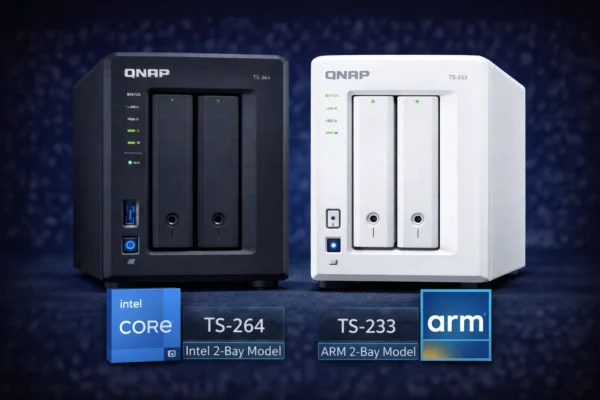
The TS-233 is QNAP’s entry-level 2-bay NAS. Perfect for beginners who want centralized backup and basic file sharing without complexity. The ARM processor keeps it quiet and energy-efficient, though it won’t handle Plex transcoding. Ideal first NAS for home users.
QNAP TS-216G
2-Bay, ARM Cortex-A55, 4GB RAM, 2.5GbE
The TS-216G adds 2.5GbE networking and doubles the RAM compared to the TS-233. The built-in NPU accelerates AI photo recognition in QuMagie. Best budget option if you have or plan to upgrade to 2.5GbE networking.
QNAP TS-433
4-Bay, ARM Cortex-A55, 4GB RAM, 1GbE + 2.5GbE
The TS-433 provides 4 drive bays with ARM efficiency. Dual network ports (1GbE + 2.5GbE) offer flexibility. Built-in NPU for AI photo organization. Best budget choice for users who need more than 2 bays but don’t need Intel features.
Prosumer Tier: Intel x64 Series ($489-$738)
The x64 series represents QNAP’s sweet spot — Intel Celeron N5105/N5095 processors with hardware transcoding, dual 2.5GbE ports, M.2 NVMe slots, and PCIe expandability. These models handle Plex, Docker containers, virtual machines, and demanding workloads.
Best for: Plex users, home labs, Docker/containers, photographers, video editors, power users who want expandability.
| Model | Bays | CPU | RAM | Network | M.2 | PCIe | Price |
|---|---|---|---|---|---|---|---|
| TS-264 | 2 | Intel N5105 | 8GB | 2x 2.5GbE | 2 slots | — | $489 |
| TS-464 | 4 | Intel N5105 | 8GB | 2x 2.5GbE | 2 slots | Gen3 x2 | $636 |
| TS-664 | 6 | Intel N5095 | 8GB | 2x 2.5GbE | 2 slots | Gen3 x2 | $738 |
QNAP TS-264
2-Bay, Intel N5105, 8GB RAM, 2x 2.5GbE, 2x M.2, HDMI 2.1
The TS-264 packs full Intel prosumer features into a 2-bay form factor. Hardware transcoding for Plex, dual 2.5GbE ports, two M.2 NVMe slots for caching, and HDMI 2.1 output. The 8GB RAM handles Docker containers and light VMs. Best choice when you need Intel features but only have space for 2 drives.
QNAP TS-464
4-Bay, Intel N5105, 8GB RAM, 2x 2.5GbE, 2x M.2, PCIe Gen3
The TS-464 is QNAP’s best-selling NAS for good reason. It offers everything: Intel transcoding for Plex, dual 2.5GbE, M.2 caching, PCIe expansion for 10GbE, and HDMI output. The sweet spot for most home users and small offices who want room to grow.
QNAP TS-664
6-Bay, Intel N5095, 8GB RAM, 2x 2.5GbE, 2x M.2, PCIe Gen3
The TS-664 extends the x64 platform to 6 bays for users with larger storage needs. Same Intel CPU and features as the TS-464, but with 50% more drive capacity. Ideal for media libraries, surveillance systems, or growing businesses.
Long-Term Support: x53E Series ($559-$699)
The TS-253E and TS-453E use Intel Celeron J6412 processors guaranteed available until 2029. They’re ideal for businesses deploying multiple units that need matching hardware over time.
| Model | Bays | CPU | RAM | Network | Support Until | Price |
|---|---|---|---|---|---|---|
| TS-253E | 2 | Intel J6412 | 8GB | 2x 2.5GbE | 2029 | $559 |
| TS-453E | 4 | Intel J6412 | 8GB | 2x 2.5GbE | 2029 | $699 |
The x53E series now supports QuTS hero (ZFS-based OS), making them the smallest QNAP models with ZFS capability. This is significant for users wanting enterprise-grade data integrity features without enterprise pricing.
AMD Ryzen: x73A Series ($897-$1,212)
For users who need more CPU power than Intel Celeron but don’t want to jump to expensive Core processors, the AMD Ryzen V1500B series offers excellent performance with ECC memory support and dual operating system options (QTS or QuTS hero with ZFS).
| Model | Bays | CPU | RAM (Max) | PCIe | Price |
|---|---|---|---|---|---|
| TS-473A | 4 | AMD Ryzen V1500B | 8GB (64GB) | 2x Gen3 x4 | $897 |
| TS-673A | 6 | AMD Ryzen V1500B | 8GB (64GB) | 2x Gen3 x4 | $905 |
| TS-873A | 8 | AMD Ryzen V1500B | 8GB (64GB) | 2x Gen3 x4 | $1,212 |
QNAP TS-473A
4-Bay, AMD Ryzen V1500B, 8GB RAM (64GB max), 2x 2.5GbE, 2x PCIe Gen3 x4
The TS-473A brings AMD Ryzen power to QNAP’s prosumer lineup. The quad-core/8-thread V1500B handles virtualization, ZFS deduplication, and heavy workloads. ECC memory support (optional) adds enterprise-grade reliability. Two PCIe x4 slots enable serious expansion. Best choice for small businesses and power users who need more than Intel Celeron.
High-End Intel: TVS-hx74 Series ($1,199-$4,299)
The TVS-hx74 series represents QNAP’s flagship desktop NAS lineup. Powered by 12th Gen Intel Core processors with PCIe Gen 4, these systems handle professional workloads including 4K video editing, large-scale virtualization, and demanding database applications.
| Model | Bays | CPU | RAM | PCIe | Price |
|---|---|---|---|---|---|
| TVS-h474 | 4 | Intel Pentium Gold | 8GB | Gen4 x4 + x16 | $1,199 |
| TVS-h674 | 6 | Intel i5-12400 | 32GB | Gen4 x4 + x16 | $2,199 |
| TVS-h874X | 8 | Intel i9 | 64GB | Gen4 x4 + x16 | $3,199 |
QNAP TVS-h674
6-Bay, Intel i5-12400, 32GB RAM, 2x 2.5GbE, PCIe Gen 4
The TVS-h674 brings workstation-class performance to NAS. The 6-core/12-thread i5-12400 handles 4K video editing workflows, heavy virtualization, and demanding databases. PCIe Gen 4 slots support the fastest 10/25GbE cards and NVMe expansion. QuTS hero with ZFS provides enterprise data integrity. Best for content creators, small studios, and businesses with demanding workloads.
Thunderbolt: TVS-hx74T Series ($2,689-$4,299)
For Mac-based creative workflows, the Thunderbolt 4 variants add direct high-speed connectivity without network configuration. Connect your MacBook directly for near-local disk speeds.
| Model | Bays | CPU | Thunderbolt | Price |
|---|---|---|---|---|
| TVS-h674T | 6 | Intel i5 | 2x TB4 | $2,689 |
| TVS-h874T | 8 | Intel i9 | 2x TB4 | $4,299 |
Specialty Models
QNAP HS-264
2-Bay, Intel N5105, 8GB RAM, 2x 2.5GbE, Dual HDMI 2.0, Fanless
The HS-264 is QNAP’s fanless media center NAS. Zero noise makes it perfect for living rooms. Dual HDMI 2.0 outputs support 4K@60Hz for direct TV connection. Same Intel N5105 as the TS-264 but in a horizontal, silent chassis. Best for home theater setups where noise is unacceptable.
QNAP TBS-464
4x M.2 NVMe, Intel N5105, 8GB RAM, 2x 2.5GbE
The TBS-464 is an all-flash NAS using only M.2 NVMe SSDs. Extremely fast, completely silent, and highly portable. Limited by M.2 drive capacities (max ~16TB total), but perfect for users who prioritize speed over capacity. Ideal for video editing scratch disks or high-IOPS applications.
Best QNAP NAS by Use Case
Best QNAP for Plex
For Plex, you need Intel Quick Sync hardware transcoding. This rules out ARM-based models. Our recommendations:
- Best Value for Plex: QNAP TS-464 ($636) — 4K transcoding, HDMI output, room for media library growth
- Budget Plex: QNAP TS-264 ($489) — Same transcoding power, fewer drive bays
- Large Libraries: QNAP TS-664 ($738) — 6 bays for extensive collections
- Living Room Plex: QNAP HS-264 ($727) — Silent operation, HDMI direct to TV
All Intel-based QNAP models support hardware transcoding in Plex. The N5105/N5095 handles multiple 4K streams with ease. See our QNAP Plex Setup Guide for configuration details.
Best QNAP for Home Use
Home users typically need backup, file sharing, and possibly media streaming. Our recommendations based on household size:
- Single User/Couple: QNAP TS-233 ($199) — Simple, affordable, effective
- Family with Media: QNAP TS-464 ($636) — Handles everything including Plex
- Photo Enthusiasts: QNAP TS-264 ($489) — AI photo organization with QuMagie
- Living Room Setup: QNAP HS-264 ($727) — Silent with direct TV output
Best QNAP for Small Business
Businesses need reliability, performance, and data protection. Consider models with ZFS support (QuTS hero) and ECC memory options:
- Small Office (5-10 users): QNAP TS-473A ($897) — Ryzen power, ZFS support, ECC option
- Growing Business: QNAP TS-673A ($905) — 6 bays, same Ryzen platform
- Professional Workloads: QNAP TVS-h674 ($2,199) — 12th Gen Intel, PCIe 4.0
- Long-Term Deployment: QNAP TS-453E ($699) — Guaranteed support until 2029
Best QNAP for Surveillance
QNAP includes QVR Pro surveillance software with free camera licenses. For dedicated surveillance:
- Home (4-8 cameras): QNAP TS-464 ($636) — Intel for AI analytics
- Business (16+ cameras): QNAP TS-673A ($905) — More storage, processing power
- Enterprise: QNAP TVS-h874 — Maximum performance and storage
Pair with Seagate SkyHawk AI drives ($210 for 8TB) designed for 24/7 surveillance workloads.
QNAP vs Synology
QNAP and Synology are the two dominant NAS brands. Here’s how they compare:
| Factor | QNAP | Synology |
|---|---|---|
| Hardware | More powerful CPUs, better expandability | More conservative, optimized for efficiency |
| Networking | 2.5GbE standard on most models | 1GbE standard, 2.5GbE on Plus models |
| Expandability | PCIe slots, M.2, upgradeable RAM | Limited PCIe, some models have fixed RAM |
| Software | Feature-rich, steeper learning curve | Polished, easier to use |
| Apps | More third-party options | Better first-party apps |
| Price | Generally better value for hardware | Premium pricing |
| Reliability | Good, occasional security concerns | Excellent track record |
Choose QNAP if: You want maximum hardware for the money, need 2.5GbE/10GbE, plan to run VMs or Docker, want PCIe expansion, or prefer more control over your system.
Choose Synology if: You prioritize ease of use, want polished first-party apps, prefer a “set and forget” experience, or value Synology’s security reputation.
See our detailed QNAP vs Synology comparison for more.
What to Look For in a QNAP NAS
CPU: Intel vs ARM
This is the most important decision:
- ARM (Cortex-A55): Lower power, quieter, cheaper. Good for basic file storage and backup. Cannot transcode video or run x86 applications.
- Intel Celeron (N5105/J6412): Hardware transcoding, Docker, VMs, better performance. The sweet spot for most users.
- AMD Ryzen (V1500B): More CPU power, ECC support, no integrated GPU (no hardware transcoding). Best for business workloads.
- Intel Core (i3/i5/i7/i9): Workstation-class performance. For professionals and demanding enterprise use.
RAM
Most QNAP models ship with adequate RAM:
- 2GB: Minimum for basic file storage
- 4GB: Comfortable for home use with apps
- 8GB: Good for Docker, light VMs, ZFS
- 16GB+: Required for ZFS deduplication, heavy virtualization
Many QNAP models support RAM upgrades. Check compatibility before purchasing third-party memory.
Network Speed
QNAP leads the industry in networking:
- 1GbE: Budget models only. ~110MB/s max throughput.
- 2.5GbE: Standard on most QNAP models. ~280MB/s. Works with Cat5e cables.
- 10GbE: Available via PCIe expansion. ~1,000MB/s. Requires Cat6a/Cat7 or fiber.
2.5GbE is a major QNAP advantage over Synology’s base models. To utilize it, you’ll need a 2.5GbE switch ($119 for QNAP QSW-2104-2T) and 2.5GbE adapters for your computers.
M.2 NVMe Slots
Most Intel-based QNAP models include M.2 NVMe slots for:
- SSD Caching: Accelerates random read/write operations
- Qtier Auto-Tiering: Automatically moves hot data to SSDs
- Storage Pool: Use SSDs as primary fast storage
Recommended NVMe SSDs: WD Red SN700 1TB ($360) or Samsung 990 PRO 1TB ($200).
PCIe Expansion
PCIe slots allow adding:
- 10GbE network cards:QNAP QXG-10G1T ($154)
- Additional M.2 slots:QNAP QM2-2P-384A ($234)
- Wi-Fi adapters:QNAP QWA-AC2600 ($259)
- Graphics cards: For GPU transcoding or AI workloads
Recommended Hard Drives for QNAP
QNAP is compatible with most NAS hard drives. Our recommendations by use case:
| Use Case | Drive | Price | Why |
|---|---|---|---|
| Best Value | WD Red Plus 4TB | $113 | CMR, 3-year warranty, reliable |
| Best Performance | Seagate IronWolf 8TB | $200 | 7200RPM, IronWolf Health Management |
| Large Capacity | Seagate IronWolf Pro 16TB | $350 | 5-year warranty, data recovery |
| Budget | Toshiba N300 8TB | $190 | Good value, 7200RPM |
| Enterprise | WD Red Pro 12TB | $300 | 5-year warranty, 300TB/yr workload |
See our QNAP Compatible Hard Drives Guide for detailed recommendations.
Frequently Asked Questions
Neither is objectively better — they serve different priorities. QNAP offers better hardware value with faster CPUs, 2.5GbE standard, and more expandability. Synology offers better software polish and easier setup. Choose QNAP for power and flexibility; choose Synology for simplicity.
The QNAP TS-464 ($636) is the best overall Plex NAS. Its Intel N5105 provides hardware transcoding for multiple 4K streams, while 4 bays offer room for a growing media library. The TS-264 ($489) is a good budget alternative if you only need 2 bays.
A QNAP NAS typically lasts 5-8 years with proper care. QNAP provides firmware updates for about 4-5 years after discontinuation. The hardware itself often outlasts software support. Hard drives are usually the first components to fail (3-5 year average lifespan).
Yes, QNAP works with most SATA hard drives. However, NAS-specific drives are recommended (Seagate IronWolf, WD Red Plus/Pro, Toshiba N300) because they’re designed for 24/7 operation and multi-drive environments. Avoid desktop drives (WD Blue, Seagate Barracuda) and SMR drives.
QNAP has had security vulnerabilities in the past, including ransomware targeting exposed NAS devices. However, QNAP has improved security practices and releases regular patches. Keep firmware updated, use strong passwords, enable 2FA, and avoid exposing your NAS directly to the internet.
QTS uses the ext4 file system — reliable, well-tested, lower resource usage. QuTS hero uses ZFS — offers inline deduplication, better data integrity, and snapshots but requires more RAM (8GB minimum, 16GB+ recommended). Most home users should use QTS; businesses benefit from QuTS hero.
Summary: Which QNAP Should You Buy?
| Budget | Model | Best For |
|---|---|---|
| Under $250 | TS-233 ($199) | Beginners, basic backup |
| $250-$500 | TS-264 ($489) | 2-bay with Intel features |
| $500-$750 | TS-464 ($636) | Most users — best overall value |
| $750-$1,000 | TS-473A ($897) | Business, power users |
| $1,000-$2,500 | TVS-h474/h674 | Professional workloads |
| $2,500+ | TVS-h874T ($4,299) | Creative studios, enterprise |
For most users, the QNAP TS-464 hits the sweet spot — Intel transcoding, 4 bays, 2.5GbE, M.2, and PCIe expansion at a competitive price. If you need fewer bays, the TS-264 offers the same features in a 2-bay form factor. Budget-conscious users who don’t need Plex transcoding can save with the TS-233.
Related Resources
- QNAP TS-264 Review — Best 2-bay
- QNAP TS-464 Review — Best overall
- QNAP Setup Guide — Getting started
- QNAP Plex Setup — Media server configuration
- QNAP Compatible Hard Drives
- QNAP vs Synology — Detailed comparison
- Best Synology NAS 2026
- Best WD My Cloud 2026
Last Updated: February 2026