CPU vs GPU Bottleneck: Which Is Worse for Gaming? (Complete Guide)

Quick Answer+
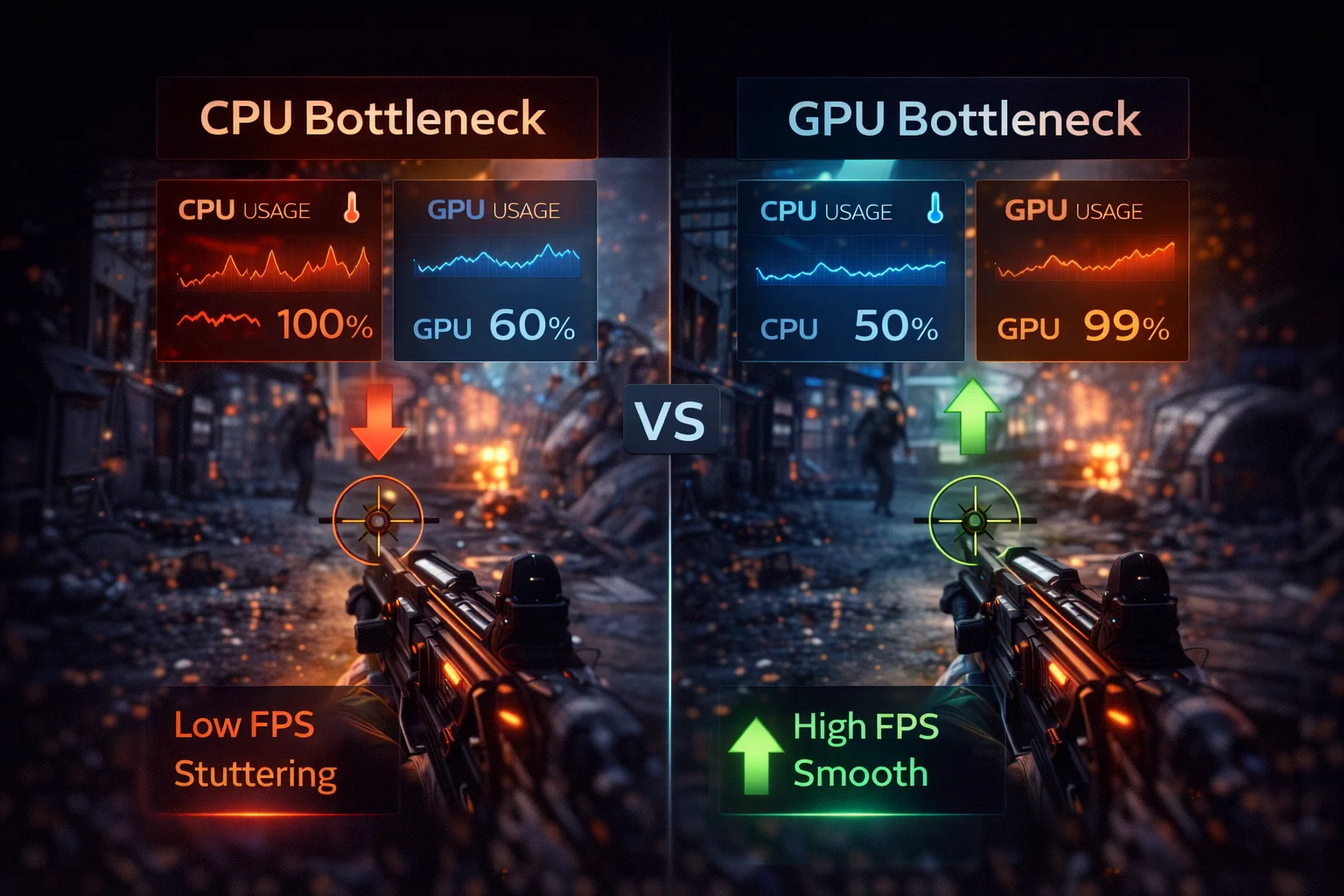
Quick Answer: A GPU bottleneck is preferable to a CPU bottleneck for gaming. When GPU-limited, you can lower settings for more FPS—giving you control over the quality/performance tradeoff. When CPU-limited, graphics settings barely help, and you’re stuck with lower FPS until you upgrade. Build systems with slightly more CPU power than needed so the GPU is always the limiting factor. Check your balance with our Bottleneck Calculator.
You’re comparing two builds or planning an upgrade, and you want to know: is it better to have a CPU bottleneck or a GPU bottleneck? Which one hurts gaming performance more?
The short answer: you want a GPU bottleneck. But understanding why—and the specific tradeoffs involved—helps you make smarter decisions about component selection, settings optimization, and future upgrades.
This guide comprehensively compares CPU and GPU bottlenecks, explaining how each affects your gaming experience, which scenarios favor each type, and how to build systems that stay optimally balanced.
Quick Comparison: CPU vs GPU Bottleneck
| Factor | CPU Bottleneck | GPU Bottleneck |
|---|---|---|
| Which component is maxed? | CPU at 90-100% | GPU at 95-100% |
| Which component is idle? | GPU at 50-80% | CPU at 40-70% |
| Can lowering settings help? | ❌ Minimal improvement | ✅ Significant improvement |
| Can raising resolution help? | ✅ Often helps (shifts load to GPU) | ❌ Makes it worse |
| DLSS/FSR effective? | ❌ Can make it worse | ✅ Very effective |
| Typical user experience | Frustrating, limited options | Flexible, controllable |
| Upgrade complexity | Often needs motherboard too | Simple GPU swap |
| Verdict | ❌ Worse | ✅ Preferable |
Why GPU Bottleneck Is Better
Let’s explore the specific reasons a GPU bottleneck is preferable:
1. You Have Control Over Performance
When GPU-limited, graphics settings become a dial between visual quality and frame rate:
- Want more FPS? Lower shadows, disable ray tracing, reduce resolution
- Want better visuals? Accept lower FPS with higher settings
- Enable DLSS/FSR for the best of both worlds
This flexibility lets you optimize each game for your preferences. Competitive multiplayer? Crank down settings for maximum FPS. Single-player cinematic experience? Max out visuals at 60 FPS.
When CPU-limited, this control vanishes. Lowering settings from Ultra to Low might gain you 5 FPS instead of 50. You’re stuck at whatever frame rate your CPU can manage.
2. DLSS and FSR Actually Work
DLSS and FSR are revolutionary technologies that provide 30-70% FPS gains by reducing GPU workload through intelligent upscaling. They’re incredibly effective when GPU-limited.
But when CPU-limited, these technologies are useless—or worse:
| Scenario | Without DLSS | With DLSS | Result |
|---|---|---|---|
| GPU Bottleneck | 60 FPS (GPU 99%) | 90 FPS (GPU 70%) | ✅ 50% improvement |
| CPU Bottleneck | 60 FPS (CPU 100%) | 60 FPS (CPU 100%) | ❌ No improvement |
DLSS reduces GPU workload, not CPU workload. If the CPU is already the bottleneck, making the GPU even faster just increases how long it waits for the CPU.
3. GPUs Are Easier to Upgrade
Upgrading a graphics card is straightforward:
- Remove old card
- Install new card
- Update drivers
- Done
CPU upgrades are more complex:
- Check motherboard compatibility
- Possibly need new motherboard (different socket/chipset)
- Possibly need new RAM (DDR4 to DDR5 transition)
- Reinstall CPU cooler
- Update BIOS
- Potentially reinstall Windows
A GPU upgrade might cost $400 for the card. A CPU upgrade might cost $300 for the CPU plus $200 for the motherboard plus $150 for new RAM—and several hours of work.
4. You’re Getting Full Value from Your GPU
A GPU running at 99% is doing exactly what you paid for. Every dollar spent on that graphics card is actively working to render your games.
A GPU running at 60% because of a CPU bottleneck? You paid for capability you can’t use. That RTX 4070 Super isn’t performing any better than an RTX 4060 would in the same CPU-limited scenario.
5. Frame Pacing Is Typically Better
GPU bottlenecks usually produce consistent, stable frame times. The GPU is working at a steady pace rendering frames as fast as it can.
CPU bottlenecks often cause erratic frame times. The CPU might handle simple scenes fine, then choke on complex physics or AI calculations, causing sudden FPS drops and stuttering even when average FPS looks acceptable.
This is why “1% low” FPS matters. A CPU-bottlenecked system might average 100 FPS but have 1% lows of 40 FPS—feeling stuttery despite the high average. A GPU-bottlenecked system with 80 FPS average and 65 FPS 1% lows feels much smoother.
Why CPU Bottleneck Is Worse
Understanding why CPU bottlenecks are problematic helps you avoid them:
1. Limited Optimization Options
When CPU-bottlenecked, your options are limited:
- Lower graphics settings: Minimal impact (settings mostly affect GPU)
- Enable DLSS/FSR: No improvement or worse
- Close background apps: Small improvement
- Overclock CPU: Moderate improvement (5-15%)
- Raise resolution: Can help by shifting some load to GPU
None of these provide the dramatic improvements available to GPU-bottlenecked users.
2. Expensive to Fix
A meaningful CPU upgrade often requires platform changes:
| Upgrade Path | Components Needed | Approximate Cost |
|---|---|---|
| i5-10400 → i5-12400 | CPU + Motherboard | $250-350 |
| i5-10400 → i5-14600K | CPU + Motherboard + Cooler | $400-500 |
| Ryzen 5 3600 → Ryzen 7 7800X3D | CPU + Motherboard + DDR5 RAM | $600-800 |
Compare to a GPU upgrade: $400 gets you from an RTX 3060 to an RTX 4070, dramatically improving performance with no other changes needed.
3. Stuttering and Inconsistent Performance
CPU bottlenecks manifest as:
- Stuttering during explosions, physics events, and particle effects
- FPS drops when entering new areas (streaming/loading)
- Performance degradation with many NPCs or players
- Inconsistent frame times even at lower FPS
These feel worse than consistent lower FPS. Players often prefer smooth 60 FPS over fluctuating 80-40 FPS.
4. Wasted GPU Investment
The most frustrating aspect: you bought a capable GPU that’s sitting partially idle. You see other users with the same card getting much higher FPS because their CPU can keep up.
A $500 GPU performing like a $300 GPU because of CPU limitations is $200 wasted.
Detailed Comparison by Scenario
Let’s examine how each bottleneck type affects specific gaming scenarios:
Scenario 1: Playing AAA Single-Player Games
Games: Cyberpunk 2077, Hogwarts Legacy, Red Dead Redemption 2
| Aspect | CPU Bottleneck | GPU Bottleneck |
|---|---|---|
| Typical FPS at 1080p | 60-80 FPS (capped by CPU) | 60-120 FPS (setting dependent) |
| Typical FPS at 4K | 55-75 FPS (slight improvement) | 30-60 FPS (GPU-heavy) |
| Ray tracing option | Useless (won’t improve visuals) | Available (trade FPS for visuals) |
| DLSS effectiveness | None | +40-60% FPS |
| Overall experience | Frustrating—can’t use GPU power | Flexible—optimize as desired |
Winner: GPU Bottleneck — AAA games are meant to stress GPUs. A GPU bottleneck is the intended experience.
Scenario 2: Competitive Esports at High Refresh
Games: Counter-Strike 2, Valorant, Apex Legends targeting 240+ FPS
| Aspect | CPU Bottleneck | GPU Bottleneck |
|---|---|---|
| Typical FPS at 1080p Low | 180-250 FPS (CPU-capped) | 400+ FPS (if GPU strong enough) |
| Frame time consistency | Poor—spikes during action | Excellent—stable delivery |
| Competitive disadvantage? | Yes—stutters at crucial moments | No—consistent performance |
| Optimization path | Need faster CPU | Can lower settings further |
Winner: GPU Bottleneck — But note that esports titles are CPU-sensitive. Even mid-range GPUs can push 200+ FPS, so the real challenge is having a CPU that doesn’t limit those frames.
Scenario 3: Open World Games
Games: Elden Ring, GTA V, Starfield
| Aspect | CPU Bottleneck | GPU Bottleneck |
|---|---|---|
| City/populated areas | Severe stuttering | Stable but lower FPS |
| Empty wilderness | Better, GPU might engage | Stable, consistent |
| NPC-heavy scenes | Major FPS drops | Mild FPS drops |
| Draw distance setting | Reducing helps (CPU-bound) | Reducing helps (GPU-bound) |
Winner: GPU Bottleneck — Open world games vary between CPU and GPU-heavy scenes. A GPU bottleneck provides more consistent experience across all areas.
Scenario 4: Strategy Games
Games: Total War: Warhammer III, Civilization VI, Cities: Skylines II
| Aspect | CPU Bottleneck | GPU Bottleneck |
|---|---|---|
| Early game (small scale) | Runs well | Runs well |
| Late game (large scale) | Severe slowdown | Moderate slowdown |
| Turn processing time | Very slow | Normal |
| Battle with many units | Slideshow | Playable |
Winner: Neither is great — Strategy games are inherently CPU-heavy. The genre practically demands strong CPUs. A GPU bottleneck is still preferable, but expect CPU stress regardless.
How Resolution Affects the CPU vs GPU Balance
Resolution dramatically shifts which component becomes the bottleneck:
1080p: CPU-Limited Territory
At 1080p, modern GPUs render frames very quickly. The GPU finishes its work and waits for the CPU to prepare the next frame. This is where CPU bottlenecks are most common.
Who experiences CPU bottleneck at 1080p:
- Anyone pairing RTX 4060+ with older quad-core CPUs
- Budget builds with GPU prioritized over CPU
- High refresh rate gamers (144Hz+) pushing maximum frames
1440p: The Balanced Sweet Spot
1440p increases GPU workload by 78% compared to 1080p. Most systems become GPU-limited here, which is why 1440p is often called the “sweet spot” resolution.
A system that’s CPU-bottlenecked at 1080p often becomes balanced or GPU-bottlenecked at 1440p—without changing any hardware.
4K: GPU-Limited for Everyone
4K requires 4x the GPU work of 1080p. Even flagship GPUs like the RTX 4090 struggle to maintain 60 FPS with max settings in demanding games. CPU bottlenecks essentially disappear at 4K.
This is why budget CPU + high-end GPU can work for 4K gaming—the resolution itself prevents CPU bottlenecks.
Resolution Impact Summary
| Resolution | GPU Load | Typical Bottleneck | CPU Importance |
|---|---|---|---|
| 1080p | Low-Medium | Often CPU | Very High |
| 1440p | Medium-High | Usually Balanced/GPU | Moderate |
| 4K | Very High | Almost Always GPU | Low |
Building for the Right Bottleneck
Smart system building means intentionally creating a mild GPU bottleneck:
The Ideal Balance Strategy
Spend 10-20% more on CPU than strictly necessary.
This ensures:
- GPU stays fully utilized now
- Headroom for future GPU upgrades
- Better performance in CPU-heavy titles
- Smoother multitasking while gaming
Example Balanced Builds
| Budget | CPU | GPU | Target Resolution |
|---|---|---|---|
| $800 | Ryzen 5 7600X ($180) | RTX 4060 ($300) | 1080p |
| $1200 | Ryzen 7 7800X3D ($380) | RTX 4070 Super ($600) | 1440p |
| $2000 | Ryzen 7 9800X3D ($450) | RTX 4080 Super ($1000) | 1440p/4K |
| $3000+ | Ryzen 9 9950X ($520) | RTX 4090 ($1600) | 4K |
Use our Bottleneck Calculator to verify your planned combination is balanced.
Future-Proofing Considerations
GPUs improve faster than CPUs in gaming performance. A top CPU from 2020 is still viable in 2026, while a top GPU from 2020 is now mid-range.
This means:
- Invest in a strong CPU platform that lasts 5+ years
- Upgrade GPUs every 2-3 generations
- A CPU bottleneck gets worse over time as games demand more
- A mild GPU bottleneck stays manageable or improves with driver optimization
When CPU Bottleneck Might Be Acceptable
There are limited scenarios where a CPU bottleneck is tolerable:
1. Upgrading GPU First, CPU Later
If you’re planning to upgrade both components but can only afford one now, buying the GPU first makes sense. You’ll have a temporary CPU bottleneck, but once the CPU upgrade happens, you’re set.
2. 4K Gaming with Budget CPU
At 4K, even modest CPUs rarely bottleneck because GPU workload is so high. A Ryzen 5 5600 with an RTX 4080 is CPU-bottlenecked at 1080p but perfectly balanced at 4K.
3. GPU-Bound Games Only
If you exclusively play GPU-heavy titles at high resolutions (no esports, no strategy games), a weaker CPU matters less.
4. Very Tight Budget
Sometimes you must prioritize GPU for immediate gaming capability. A CPU bottleneck is annoying but games still run. No GPU means no gaming at all.
Frequently Asked Questions
GPU bottleneck is better. When GPU-limited, you can lower graphics settings for more FPS, DLSS/FSR work effectively, and upgrades are simpler. When CPU-limited, settings changes barely help, upscaling doesn’t work, and fixing requires potentially replacing your motherboard and RAM too.
A 5-10% bottleneck in either direction is acceptable and often unavoidable. You lose minimal performance and the system is effectively balanced. Bottlenecks above 15% start becoming noticeable, and above 25% significantly impacts performance. Use a bottleneck calculator to check your specific combination.
No. Bottlenecks don’t cause any hardware damage. A CPU at 100% utilization or GPU at 99% utilization is working exactly as designed. The only concern is heat—ensure adequate cooling. A bottleneck simply means one component limits overall performance; it doesn’t harm anything.
Partially. You can: raise resolution (shifts load to GPU), overclock CPU (5-15% gain), upgrade RAM speed (5-10% gain), close background apps, enable Game Mode. These help but won’t eliminate a severe bottleneck. For significant improvement, CPU upgrade is ultimately needed.
Because GPU bottleneck means your graphics card is fully utilized (you’re getting what you paid for), you have control via settings adjustment, DLSS/FSR can boost performance further, and GPU upgrades are simple. It represents the intended gaming scenario where the graphics card is the performance-defining component.
For gaming-focused builds, allocate roughly 30-35% of your component budget to CPU (including cooler) and 45-50% to GPU. This typically creates a slight GPU bottleneck—the ideal scenario. Adjust based on resolution: 1080p needs more CPU investment, 4K needs more GPU investment.
Yes, significantly. Streaming adds CPU load (especially with x264 encoding). A system that’s balanced for gaming alone may become CPU-bottlenecked when streaming. If you stream, invest more in CPU or use GPU encoding (NVENC) which has minimal performance impact.
Bottom Line
When comparing CPU vs GPU bottleneck, GPU bottleneck is clearly preferable for gaming. It provides flexibility through settings adjustment, enables DLSS/FSR to work their magic, produces more consistent frame times, and is cheaper and easier to upgrade away from.
The ideal build strategy: Invest slightly more in CPU than your current GPU strictly requires. This ensures the GPU stays fully utilized, provides headroom for future GPU upgrades, and avoids the frustrating limitations of CPU bottlenecks.
Key takeaways:
- GPU bottleneck = good (controllable, fixable, intended scenario)
- CPU bottleneck = problematic (limited options, expensive to fix, frustrating)
- 5-10% bottleneck either way is acceptable
- Higher resolution favors GPU bottleneck (which is good)
- Always verify balance with a Bottleneck Calculator before buying
Related Guides
- Bottleneck Calculator – Check Your CPU & GPU Pairing
- FPS Calculator – Estimate Gaming Frame Rates
- What Is a CPU Bottleneck? How to Identify & Fix It
- What Is a GPU Bottleneck? Signs & Solutions
- How to Check if Your PC Has a Bottleneck
- Best SSD for Gaming 2026
Last Updated: February 2026