i5-14600K vs Ryzen 5 7600X 2026 | Complete CPU Comparison

Quick Answer+
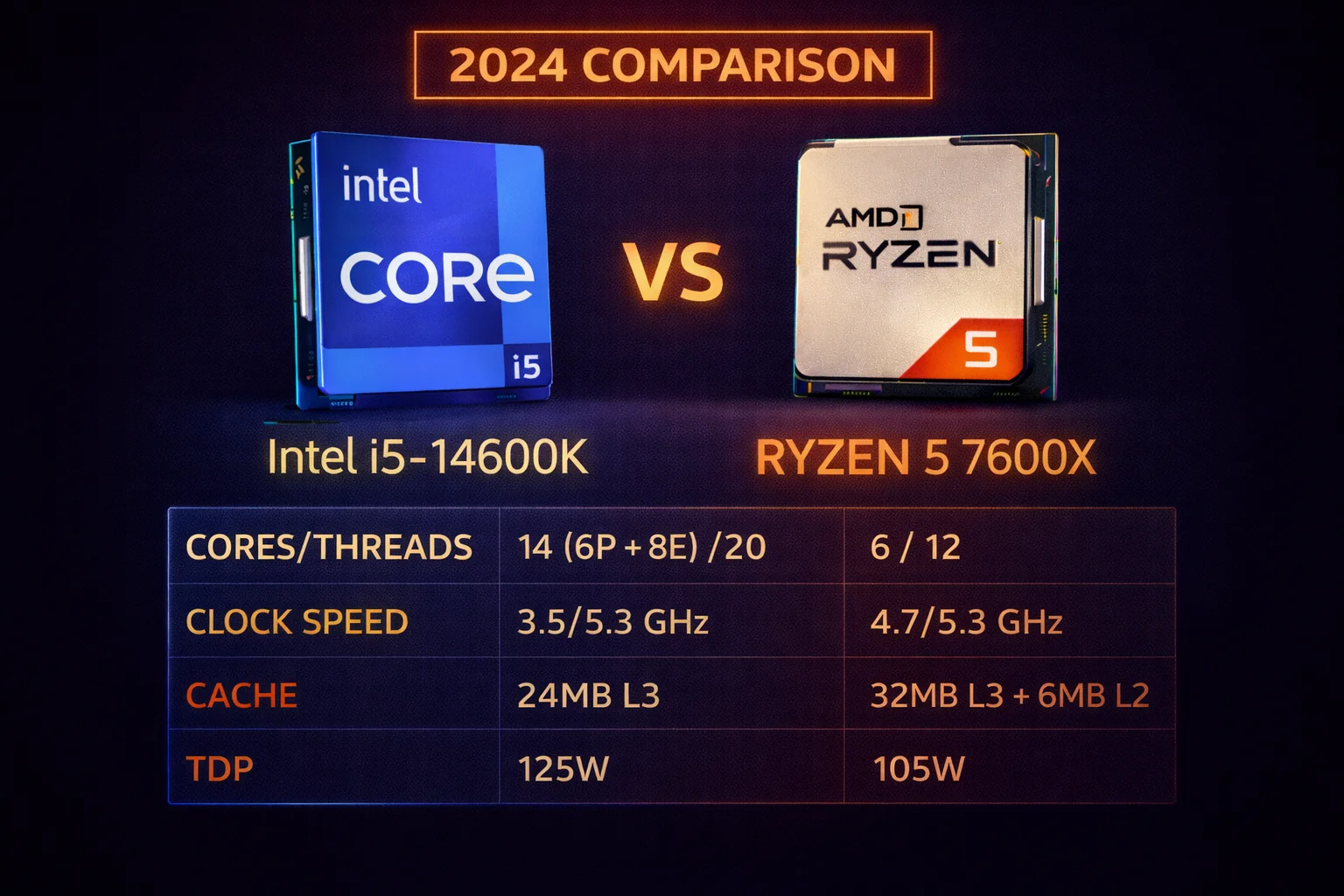
Quick Answer: The Ryzen 5 7600X (~$178) wins for pure gaming value with SAM benefits when paired with AMD GPUs. The i5-14600K (~$312) wins for productivity and multitasking with 40% more multi-threaded performance. For gaming-only builds, save $134 with the 7600X.
The Intel Core i5-14600K and AMD Ryzen 5 7600X represent two fundamentally different approaches to the mid-range CPU market. Intel offers more cores and threads at a higher price point, targeting users who need both gaming and productivity performance. AMD delivers exceptional gaming efficiency at a significantly lower cost, with a superior upgrade path on the AM5 platform.
This comprehensive comparison examines gaming performance, productivity capabilities, platform costs, power consumption, thermal characteristics, and upgrade paths to help you make the best decision for your specific needs and budget. Use our Bottleneck Calculator to test specific GPU pairings with either CPU, or check our FPS Calculator for game-specific performance estimates.
The CPUs at a Glance
Intel Core i5-14600K
14 Cores (6P+8E) | 20 Threads | 5.3 GHz Boost | 24MB Cache | LGA 1700
Intel’s mid-range powerhouse with 14 cores and 20 threads. Excels in productivity workloads while delivering strong gaming performance. Hybrid architecture with P-cores and E-cores.
AMD Ryzen 5 7600X
6 Cores | 12 Threads | 5.3 GHz Boost | 32MB Cache | AM5
AMD’s efficient gaming champion. Excellent single-threaded performance with SAM benefits when paired with AMD GPUs. Best upgrade path on AM5 platform.
Specifications Comparison
| Specification | Intel i5-14600K | AMD Ryzen 5 7600X |
|---|---|---|
| Architecture | Raptor Lake Refresh | Zen 4 |
| Cores / Threads | 14 (6P + 8E) / 20 | 6 / 12 |
| P-Cores | 6 (Performance) | N/A (all equal) |
| E-Cores | 8 (Efficiency) | N/A |
| Base Clock | 3.5 GHz | 4.7 GHz |
| Boost Clock | 5.3 GHz | 5.3 GHz |
| L3 Cache | 24MB | 32MB |
| L2 Cache | 20MB | 6MB |
| TDP | 125W (181W PL2) | 105W |
| Platform | LGA 1700 | AM5 |
| Memory Support | DDR4 / DDR5 | DDR5 only |
| PCIe | 5.0 (x16 + x4) | 5.0 (x24) |
| Integrated Graphics | Intel UHD 770 | Radeon (RDNA 2) |
| Manufacturing Process | Intel 7 (10nm) | TSMC 5nm |
| Price | ~$312 | ~$178 |
| Price Difference | Baseline | $134 less |
Understanding Intel’s Hybrid Architecture
The i5-14600K uses Intel’s hybrid architecture combining 6 Performance cores (P-cores) and 8 Efficiency cores (E-cores). P-cores handle demanding single-threaded tasks like gaming, while E-cores manage background processes and multi-threaded workloads efficiently. This approach allows Intel to pack more threads into the package while maintaining strong gaming performance.
The trade-off: E-cores are less powerful individually than P-cores, and some older applications don’t schedule across hybrid architectures efficiently. Modern games and Windows 11 handle this well, but it’s worth noting for specific workloads.
AMD’s Zen 4 Efficiency
The Ryzen 5 7600X features 6 identical high-performance cores built on TSMC’s efficient 5nm process. Every core is equally capable, eliminating scheduling complexity. The 32MB L3 cache (larger than Intel’s 24MB) helps gaming performance, though it’s significantly smaller than the 96MB+ found in X3D processors.
AMD’s approach prioritizes efficiency and gaming value over raw multi-threaded throughput. For gaming-focused builds, this philosophy delivers better performance per dollar.
Gaming Performance Comparison
For gaming, the gap between these CPUs is surprisingly narrow despite the significant price difference. The i5-14600K is only 5-10% faster in most games, because games primarily benefit from fast single-threaded performance and cache—not raw core count. Both CPUs hit 5.3 GHz boost, and the 7600X’s larger L3 cache partially compensates for fewer cores.
1080p Gaming Benchmarks (CPU-Limited)
Testing at 1080p with an RTX 4080 Super to minimize GPU bottlenecks and expose CPU performance differences:
| Game (1080p Ultra) | i5-14600K | Ryzen 5 7600X | Difference |
|---|---|---|---|
| Cyberpunk 2077 | 165 FPS | 155 FPS | +6% Intel |
| Hogwarts Legacy | 145 FPS | 138 FPS | +5% Intel |
| Starfield | 120 FPS | 112 FPS | +7% Intel |
| Call of Duty MW3 | 285 FPS | 268 FPS | +6% Intel |
| Spider-Man 2 | 175 FPS | 165 FPS | +6% Intel |
| Fortnite (Competitive) | 380 FPS | 355 FPS | +7% Intel |
| Counter-Strike 2 | 450 FPS | 420 FPS | +7% Intel |
| Baldur’s Gate 3 | 135 FPS | 128 FPS | +5% Intel |
| Alan Wake 2 | 125 FPS | 118 FPS | +6% Intel |
| Avatar: Frontiers | 115 FPS | 108 FPS | +6% Intel |
At 1080p with a high-end GPU, the i5-14600K averages 5-7% higher frame rates. This translates to 10-20 extra FPS in demanding titles—measurable in benchmarks but rarely game-changing in actual gameplay. The difference between 155 FPS and 165 FPS is imperceptible to most players.
1440p Gaming Benchmarks (Balanced)
At 1440p, the GPU handles more of the workload, reducing CPU differences:
| Game (1440p Ultra) | i5-14600K | Ryzen 5 7600X | Difference |
|---|---|---|---|
| Cyberpunk 2077 | 95 FPS | 94 FPS | +1% Intel |
| Hogwarts Legacy | 88 FPS | 87 FPS | +1% Intel |
| Starfield | 75 FPS | 74 FPS | +1% Intel |
| Call of Duty MW3 | 165 FPS | 162 FPS | +2% Intel |
| Spider-Man 2 | 110 FPS | 108 FPS | +2% Intel |
| Counter-Strike 2 | 385 FPS | 375 FPS | +3% Intel |
| Baldur’s Gate 3 | 92 FPS | 91 FPS | +1% Intel |
| Alan Wake 2 | 72 FPS | 71 FPS | +1% Intel |
At 1440p, the difference shrinks to 1-3%—essentially identical performance. The GPU becomes the bottleneck, and both CPUs deliver frames faster than the graphics card can render them. For 1440p gaming, the $134 saved with the 7600X represents pure value with no meaningful performance sacrifice.
4K Gaming
At 4K resolution, both CPUs perform identically within margin of error. The GPU is always the limiting factor at 4K, with CPU choice making zero measurable difference in frame rates. This is true even with flagship GPUs like the RTX 4090 or RTX 5080. For 4K builds, save money with the 7600X—the extra investment in the 14600K provides no gaming benefit at this resolution.
SAM Benefits: AMD’s Secret Weapon
When pairing the Ryzen 5 7600X with an AMD GPU (RX 7800 XT, RX 7900 XTX, etc.), Smart Access Memory (SAM) provides 3-8% additional gaming performance. This free technology allows the CPU to access the GPU’s entire frame buffer, improving efficiency in many games.
| Game | 7600X + 7800 XT (No SAM) | 7600X + 7800 XT (SAM) | SAM Benefit |
|---|---|---|---|
| Assassin’s Creed Mirage | 92 FPS | 99 FPS | +8% |
| Forza Horizon 5 | 125 FPS | 133 FPS | +6% |
| F1 24 | 145 FPS | 154 FPS | +6% |
| Resident Evil 4 | 158 FPS | 168 FPS | +6% |
| Hitman 3 | 165 FPS | 178 FPS | +8% |
With SAM enabled, the 7600X paired with an AMD GPU often matches or exceeds the i5-14600K in gaming performance—while costing $134 less. The i5-14600K has no equivalent technology with either AMD or NVIDIA GPUs. For all-AMD builds, this tips the gaming value equation firmly in AMD’s favor.
1% Low Frame Analysis
Frame time consistency matters for smooth gameplay. Both CPUs deliver excellent 1% lows:
| Game (1440p) | i5-14600K 1% Low | 7600X 1% Low | Difference |
|---|---|---|---|
| Cyberpunk 2077 | 72 FPS | 70 FPS | Similar |
| Hogwarts Legacy | 65 FPS | 64 FPS | Similar |
| Starfield | 58 FPS | 56 FPS | Similar |
| Call of Duty MW3 | 125 FPS | 122 FPS | Similar |
Both CPUs deliver smooth frame pacing without significant stuttering. The i5-14600K shows marginally better 1% lows, but the difference is imperceptible during gameplay.
Productivity Performance
This is where the i5-14600K justifies its higher price. With 14 cores and 20 threads versus 6 cores and 12 threads, it dominates multi-threaded workloads by a substantial margin.
Multi-Threaded Benchmarks
| Application | i5-14600K | Ryzen 5 7600X | Difference |
|---|---|---|---|
| Cinebench R23 (Multi) | 24,500 | 15,100 | +62% Intel |
| Cinebench R23 (Single) | 2,050 | 1,980 | +4% Intel |
| Blender (Classroom) | 285 sec | 420 sec | +47% faster Intel |
| 7-Zip Compression | 125,000 MIPS | 85,000 MIPS | +47% Intel |
| Handbrake (4K Encode) | 52 FPS | 38 FPS | +37% Intel |
| Adobe Premiere Export | 4:20 | 5:45 | +33% faster Intel |
| DaVinci Resolve Render | 3:55 | 5:10 | +32% faster Intel |
| Visual Studio Compile | 145 sec | 195 sec | +34% faster Intel |
The i5-14600K is 35-62% faster in multi-threaded workloads—a massive advantage. For content creators, streamers, developers, or anyone who regularly uses CPU-intensive applications, this performance difference is substantial and easily justifies the $134 price premium.
Single-Threaded Performance
| Benchmark | i5-14600K | Ryzen 5 7600X | Difference |
|---|---|---|---|
| Cinebench R23 Single | 2,050 | 1,980 | +4% Intel |
| Geekbench 6 Single | 2,850 | 2,720 | +5% Intel |
| CPU-Z Single | 825 | 785 | +5% Intel |
Single-threaded performance is much closer—only 4-5% Intel advantage. Since games and many applications rely heavily on single-threaded performance, this explains why gaming differences are smaller than the core count disparity would suggest.
Streaming While Gaming
The i5-14600K handles x264 CPU encoding while gaming smoothly—the extra E-cores manage encoding without impacting gameplay. You can stream at Medium or Slow preset while maintaining high frame rates in demanding games.
The 7600X can stream using NVENC (GPU encoding) without issues, but struggles with high-quality CPU encoding during demanding games. The 6 cores become saturated trying to handle both gaming and x264 encoding simultaneously.
Recommendation: For streamers who prefer CPU encoding for maximum quality, the i5-14600K is the better choice. For streamers using NVENC or AMF (GPU encoding), either CPU works fine—the GPU handles encoding with minimal CPU overhead.
Platform Cost Comparison
CPU price is only part of the equation. Platform costs—motherboard and RAM—significantly impact total build cost and must be factored into any comparison.
Intel LGA 1700 Platform Options
| Component | DDR4 Build | DDR5 Build |
|---|---|---|
| CPU (i5-14600K) | $312 | $312 |
| Motherboard (B760/Z790) | $120 | $180 |
| RAM (32GB) | $55 | $110 |
| Cooler (Required) | $45 | $45 |
| Platform Total | $532 | $647 |
AMD AM5 Platform
| Component | DDR5 Build |
|---|---|
| CPU (Ryzen 5 7600X) | $178 |
| Motherboard (B650) | $150 |
| RAM (32GB DDR5-5600) | $100 |
| Cooler (Optional upgrade) | $35 |
| Platform Total | $463 |
Platform Cost Analysis
Intel DDR4 vs AMD DDR5: Intel DDR4 build costs $532 versus AMD’s $463—a $69 Intel premium. Intel with DDR4 sacrifices 3-5% gaming performance versus DDR5, partially negating Intel’s slight CPU advantage.
Intel DDR5 vs AMD DDR5: Intel DDR5 build costs $647 versus AMD’s $463—a $184 Intel premium. This is a substantial difference, especially for gaming-focused builds where performance differences are minimal.
The i5-14600KF Option: Intel offers the i5-14600KF at ~$243, saving $69 by removing integrated graphics. For builds with dedicated GPUs, this creates a more competitive comparison:
Intel Core i5-14600KF
14 Cores (6P+8E) | 20 Threads | 5.3 GHz Boost | No iGPU
Same performance as i5-14600K without integrated graphics. Best Intel value for dedicated GPU builds. Requires discrete graphics card.
With the 14600KF, Intel DDR4 platform drops to ~$463—matching AMD. However, you lose the iGPU for troubleshooting and lose 3-5% gaming performance from DDR4.
Value Verdict: For pure gaming, AMD offers substantially better value. The $69-184 platform savings can fund a better GPU, which has far more impact on gaming performance than CPU choice.
Power Consumption and Thermals
Power consumption affects electricity costs, cooling requirements, noise levels, and system longevity. These CPUs differ significantly in efficiency.
| Metric | i5-14600K | Ryzen 5 7600X |
|---|---|---|
| TDP (Base) | 125W | 105W |
| PL2 / PPT (Max) | 181W | 142W |
| Gaming Power Draw | 85-120W | 65-85W |
| Multi-threaded Load | 175-185W | 135-145W |
| Idle Power | 45-55W (system) | 40-50W (system) |
| Peak Temperature | 85-95°C | 75-85°C |
| Stock Cooler Adequate? | No | Barely (recommend upgrade) |
| Recommended Cooler | Tower Air / 240mm AIO | Budget Tower Air |
Cooling Requirements
i5-14600K: Requires an aftermarket cooler—Intel’s stock cooler (if included) cannot adequately cool this CPU under load. Budget $40-80 for a quality tower cooler or entry-level AIO. Popular choices include the Thermalright Peerless Assassin (~$40), DeepCool AK620 (~$55), or Arctic Liquid Freezer II 240 (~$85).
Ryzen 5 7600X: The included Wraith Stealth cooler technically handles stock operation, though it runs warm and loud under load. A $30-40 tower cooler (Thermalright Assassin X, DeepCool AK400) provides significantly better temperatures and acoustics. This is recommended but not strictly required.
Long-Term Efficiency Costs
Over a year of heavy use (4 hours daily gaming), the i5-14600K’s extra power consumption adds approximately $15-25 to electricity costs depending on your local rates. Not dramatic, but worth noting for efficiency-conscious builders. The 7600X’s lower power draw also means less heat in your room during summer gaming sessions.
Upgrade Path Comparison
Platform longevity matters for builders who upgrade incrementally rather than replacing entire systems.
Intel LGA 1700 (End-of-Life)
The LGA 1700 platform is at end-of-life. Intel’s next generation (Arrow Lake and beyond) uses the new LGA 1851 socket. Upgrading from an i5-14600K means buying a new motherboard and potentially new RAM.
Available LGA 1700 Upgrades:
- i7-14700K/KF (+20% gaming, +60% productivity) – ~$380
- i9-14900K/KF (+10% gaming, +40% productivity) – ~$500
These upgrades provide minimal gaming improvement—the 14600K already delivers excellent gaming performance. The productivity gains are more meaningful but require significant investment for an end-of-life platform.
AMD AM5 (Long-Term Support)
AMD has committed to supporting AM5 through 2027 and beyond. The 7600X can upgrade to significantly faster processors without changing motherboards:
Available AM5 Upgrades:
- Ryzen 7 7700X (+15% productivity, similar gaming) – ~$275
- Ryzen 7 7800X3D (+15-25% gaming, 96MB cache) – ~$386
- Ryzen 9 9800X3D (+20-30% gaming, 104MB cache) – ~$444
- Future Zen 5/Zen 6 processors (TBA)
The upgrade path from 7600X to 7800X3D or 9800X3D is genuinely compelling—you can start with a $178 CPU today and drop in a $400+ gaming monster later without changing your motherboard or RAM. This flexibility provides significant long-term value.
Upgrade Path Verdict: AM5 offers significantly better long-term value. The ability to upgrade to X3D processors or future generations without rebuilding the platform is a meaningful advantage that justifies AMD’s DDR5-only approach.
Overclocking Potential
Both CPUs are unlocked for overclocking, though gains are modest with modern boost algorithms.
i5-14600K Overclocking
- Typical OC: 5.5-5.6 GHz P-cores, 4.3-4.4 GHz E-cores
- Performance Gain: 3-5% in games, 5-8% in productivity
- Requirements: Z790 motherboard for full OC support, quality cooler (240mm+ AIO recommended)
- Power Increase: +30-50W under load
Ryzen 5 7600X Overclocking
- Typical OC: 5.4-5.5 GHz all-core (limited headroom)
- Performance Gain: 2-4% (Precision Boost already pushes near maximum)
- Requirements: Works on B650 or X670 boards, modest tower cooler
- Better Approach: PBO (Precision Boost Overdrive) + Curve Optimizer for automated optimization
For most users, stock performance is adequate. The extra heat, power, noise, and potential stability issues from manual overclocking rarely justify the 3-5% gains. PBO on AMD provides most of the benefit automatically.
GPU Pairing Recommendations
Both CPUs pair well with mid-to-high-end GPUs. Here are optimal pairings for each:
Best GPUs for Ryzen 5 7600X
PowerColor Hellhound RX 7800 XT
16GB GDDR6 | 256-bit | FSR 3 | PCIe 4.0 | 263W TDP
The ideal 7600X pairing. SAM provides 3-8% bonus FPS. 16GB VRAM for 1440p gaming. Excellent price-to-performance ratio.
- Best Value: RX 7800 XT ($490) – SAM benefits, 1440p sweet spot, 0% bottleneck
- Budget: RX 7700 XT ($380) – SAM benefits, excellent 1440p, 0% bottleneck
- NVIDIA Option: RTX 4070 Super ($550) – no SAM but excellent DLSS 3
- High-End: RX 7900 XTX ($900) – 0-2% bottleneck at 4K, SAM benefits
- Extreme Budget: Arc B580 ($250) – excellent 1080p/1440p value
Best GPUs for i5-14600K
ASUS Dual RTX 4070 Super
12GB GDDR6X | 192-bit | DLSS 3 | PCIe 4.0 | 220W TDP
Excellent 14600K pairing for 1440p gaming. DLSS 3 for demanding titles. Zero bottleneck at any resolution.
- Best Value: RTX 4070 Super ($594) – zero bottleneck, excellent DLSS 3
- Budget: RTX 4060 Ti ($380) – excellent 1080p/1440p
- High-End: RTX 4080 Super ($1,000) – zero bottleneck
- Maximum: RTX 5080 ($1,359) – 0-2% bottleneck at 1080p competitive
Who Should Buy Each CPU
Choose Ryzen 5 7600X If:
- Gaming is your primary focus (90%+ of usage)
- You’re pairing with an AMD GPU for SAM benefits
- You want the best gaming value per dollar spent
- You plan to upgrade to X3D processors within the AM5 ecosystem later
- Power efficiency and low noise matter to you
- You game at 1440p or 4K where CPU matters less
- Budget is a primary consideration—savings can fund better GPU
- You stream using NVENC/AMF GPU encoding
Choose i5-14600K If:
- You do significant content creation, video editing, or 3D rendering
- Multi-threaded productivity matters alongside gaming
- You want maximum 1080p competitive gaming performance
- You need DDR4 compatibility to reuse existing RAM
- You stream with CPU encoding (x264) for maximum quality
- You compile code, run VMs, or do development work
- Future CPU upgrades aren’t a priority (end-of-life platform acceptable)
- You use NVIDIA GPUs where SAM doesn’t apply
Complete Build Comparisons
$1,200 Gaming Build Comparison
AMD Build ($1,178):
- Ryzen 5 7600X – $178
- RX 7800 XT – $490
- B650 DDR5 Motherboard – $150
- 32GB DDR5-5600 – $100
- 1TB NVMe SSD – $70
- 650W 80+ Bronze PSU – $65
- Mid-Tower Case – $70
- Tower Cooler – $40
- Gaming Performance: Excellent 1440p, SAM-enhanced
Intel Build ($1,197):
- i5-14600K – $312
- RX 7700 XT – $380 (budget constrained by CPU cost)
- B760 DDR4 Motherboard – $110
- 32GB DDR4-3600 – $55
- 1TB NVMe SSD – $70
- 650W 80+ Bronze PSU – $65
- Mid-Tower Case – $70
- Tower Cooler – $50
- Gaming Performance: Good 1440p, no SAM
Result: At the same budget, the AMD build gets a significantly better GPU (7800 XT vs 7700 XT), resulting in 15-20% higher gaming performance. The i5-14600K’s extra cores don’t compensate for the weaker GPU in a gaming-focused build. The AMD build also benefits from SAM, widening the gap further.
$1,500 Productivity + Gaming Build
Intel Productivity Build ($1,485):
- i5-14600K – $312
- RTX 4070 Super – $594
- B760 DDR5 Motherboard – $160
- 32GB DDR5-5600 – $100
- 1TB NVMe SSD – $70
- 750W 80+ Gold PSU – $85
- Mid-Tower Case – $80
- 240mm AIO Cooler – $85
- Best for: Content creators, streamers, developers who also game
For users who genuinely need productivity performance alongside gaming, the i5-14600K build makes sense. The 40% multi-threaded advantage meaningfully accelerates video editing, rendering, and compilation workflows.
Frequently Asked Questions
Marginally. The i5-14600K is 5-7% faster at 1080p, but identical at 1440p and 4K. The 7600X with AMD GPU and SAM often matches or beats the i5-14600K. For pure gaming value, the 7600X wins decisively.
The 7600X offers better gaming value at $134 less. The i5-14600K offers better productivity value with 40% more multi-threaded performance. Choose based on your primary use case.
Yes, for SAM benefits. The 7600X with AMD GPU gains 3-8% gaming performance from Smart Access Memory. This can make the 7600X match or exceed the i5-14600K in gaming.
i5-14600K for CPU encoding (x264). Its extra cores handle encoding without impacting gameplay. For GPU encoding (NVENC/AMF), both work equally well—choose based on gaming priorities.
AM5 (Ryzen) has significantly better upgrade path. AMD supports AM5 through 2027+. The 7600X can upgrade to 7800X3D, 9800X3D, or future Zen 5/6 CPUs. LGA 1700 is end-of-life with no future generations.
For reusing existing RAM, yes. DDR4 saves ~$50-70 on platform costs. However, DDR4 loses 3-5% gaming performance versus DDR5. New builds should generally use DDR5.
The Ryzen 5 7600X runs significantly cooler (75-85°C vs 85-95°C) and uses 30-40W less power. The 7600X can use stock cooler; the i5-14600K requires aftermarket cooling.
The KF lacks integrated graphics and costs ~$70 less (~$243). For builds with a dedicated GPU, the KF offers identical gaming performance at lower cost. Choose KF unless you need iGPU for troubleshooting.
Final Verdict
The Ryzen 5 7600X wins decisively for gaming-focused builds. At $134 less than the i5-14600K, it delivers nearly identical gaming performance at 1440p and 4K, gains 3-8% SAM benefits with AMD GPUs, and offers a genuinely superior upgrade path on AM5. The savings can fund a significantly better GPU—which has far more impact on gaming than CPU choice ever could.
The i5-14600K wins for productivity-gaming hybrids. Its 40% multi-threaded advantage makes a real difference for content creation, video editing, streaming with CPU encoding, software development, and heavy multitasking. If your workflow genuinely demands those extra cores alongside gaming, the $134 premium is justified by meaningful productivity gains.
For the vast majority of gamers, especially those at 1440p or 4K, the Ryzen 5 7600X is the smarter choice. Invest the savings in GPU where it actually impacts your gaming experience. Reserve the i5-14600K for builds where productivity performance genuinely matters—not just as a theoretical nice-to-have.
Related Resources
- PC Bottleneck Calculator
- FPS Calculator
- Best GPU for i5-14600K
- Best GPU for Ryzen 5 7600X
- i7-14700K vs Ryzen 7 7800X3D
- Ryzen 5 5600 vs i5-12400F
Last Updated: February 2026