IronWolf Health Management 2026 | Setup, Features & Monitoring Guide

Quick Answer+
Quick Answer: IronWolf Health Management (IHM) is Seagate’s advanced drive monitoring system exclusive to IronWolf and IronWolf Pro drives. It provides enhanced health monitoring beyond standard SMART, including workload analysis, temperature tracking, vibration detection, and predictive failure warnings. IHM integrates directly with Synology DSM and QNAP QTS—no additional software needed. While standard SMART monitoring is sufficient for most users, IHM offers peace of mind with deeper drive insights and connects to Seagate’s Rescue Data Recovery service on Pro drives.
IronWolf Health Management is one of the key features that differentiates Seagate’s IronWolf NAS drives from competitors and enterprise alternatives like Exos. But what exactly does IHM do, how do you use it, and is it worth paying extra for? This comprehensive guide covers everything you need to know about IHM.
What Is IronWolf Health Management?
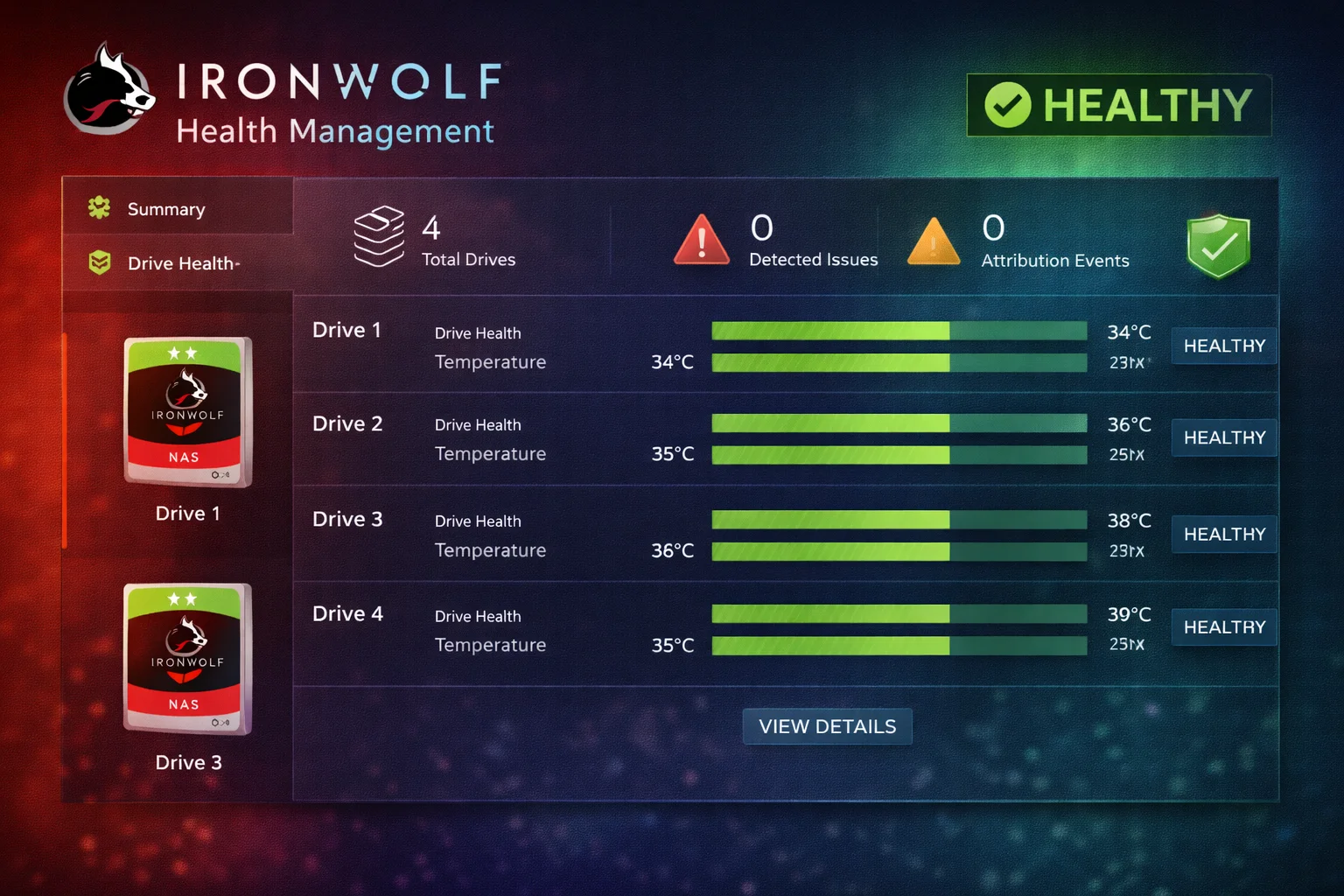
IronWolf Health Management (IHM) is Seagate’s proprietary drive monitoring technology built into every IronWolf and IronWolf Pro drive. It goes beyond standard SMART (Self-Monitoring, Analysis, and Reporting Technology) to provide NAS-specific health insights.
IHM’s Three-Pillar Approach
Seagate markets IHM around three core functions:
1. Prevention
- Continuous monitoring of drive parameters
- Environmental analysis (temperature, vibration)
- Workload tracking to ensure you’re within rated limits
- Recommendations for optimal operating conditions
2. Intervention
- Early warning alerts before failures occur
- Actionable recommendations when issues are detected
- Guidance on when to backup and replace drives
- Integration with NAS notification systems
3. Recovery
- Connection to Seagate Rescue Data Recovery (Pro drives)
- Streamlined process for data recovery claims
- Drive health history for recovery technicians
What IHM Monitors
IHM tracks numerous parameters that affect drive health and longevity:
| Parameter | What It Measures | Why It Matters |
|---|---|---|
| Temperature | Real-time drive temp (°C) | High temps reduce lifespan |
| Workload | TB read/written per year | Ensures you’re within rated limits |
| Vibration | Rotational vibration levels | Multi-bay arrays cause vibration stress |
| Read/Write Errors | Error rates and trends | Early failure indicators |
| Spin-Up/Down Cycles | Power cycles count | Mechanical wear tracking |
| Power-On Hours | Total operating time | Lifespan estimation |
| Reallocated Sectors | Bad sector count | Drive degradation indicator |
| Command Timeout | Failed command responses | Communication issues |
| Head Flying Hours | Head positioning time | Mechanical component wear |
| Load/Unload Cycles | Head parking events | Mechanical stress tracking |
IHM vs Standard SMART Monitoring
Every hard drive has SMART monitoring. Here’s how IHM compares:
| Feature | Standard SMART | IronWolf Health Management |
|---|---|---|
| Basic health status | ✅ Yes | ✅ Yes |
| Temperature monitoring | ✅ Basic reading | ✅ Enhanced with recommendations |
| Error tracking | ✅ Raw counts | ✅ Trend analysis |
| Predictive failure | ⚠️ Limited | ✅ Advanced algorithms |
| Workload tracking | ❌ No | ✅ TB/year monitoring |
| Vibration analysis | ❌ No | ✅ Yes |
| NAS-specific optimization | ❌ No | ✅ Yes |
| Actionable recommendations | ❌ No | ✅ Yes |
| Rescue service integration | ❌ No | ✅ Yes (Pro) |
| NAS software integration | ✅ Basic | ✅ Deep integration |
Key difference: SMART tells you IF something is wrong. IHM helps predict WHEN something might go wrong and WHAT to do about it.
IHM on Synology (DSM)
IronWolf Health Management integrates seamlessly with Synology’s DiskStation Manager:
How to Access IHM in DSM
Step 1: Install IronWolf drives in your Synology NAS
Step 2: Open DSM and navigate to Storage Manager
Step 3: Select HDD/SSD from the left menu
Step 4: Click on an IronWolf drive
Step 5: Select the Health Info tab
Step 6: IHM data displays automatically for IronWolf drives
IHM Features in DSM
- Health status: Overall drive health assessment
- Temperature history: Graphical temperature trends
- IHM attributes: Extended parameters beyond SMART
- Recommendations: Suggested actions when issues arise
- Alerts: Integration with DSM notification system
Compatible Synology Models
IHM works with all Synology NAS running DSM 6.2 or later:
See: Complete IronWolf Synology Compatibility Guide
IHM on QNAP (QTS)
QNAP’s QTS also supports IronWolf Health Management:
How to Access IHM in QTS
Step 1: Install IronWolf drives in your QNAP NAS
Step 2: Open QTS and navigate to Storage & Snapshots
Step 3: Select Disks/VJBOD from the menu
Step 4: Click on an IronWolf drive to view details
Step 5: IHM data displays in the disk information panel
Compatible QNAP Models
IHM works with all QNAP NAS running QTS 4.3.4 or later:
- TS-233, TS-253E, TS-264
- TS-464, TS-473A
- TS-673A, TS-873A
- TVS series
- Enterprise models
See: Complete IronWolf QNAP Compatibility Guide
IHM on Other Platforms
ASUSTOR (ADM)
ASUSTOR’s ADM supports IHM in Storage Manager. Navigate to Storage Manager → Disks to view IHM data for IronWolf drives.
TrueNAS / FreeNAS
TrueNAS uses standard SMART monitoring. While IronWolf drives work perfectly, the enhanced IHM features aren’t exposed in the TrueNAS interface. Basic SMART data is still available.
Unraid
Unraid provides SMART monitoring but doesn’t have native IHM integration. IronWolf drives work well, with standard SMART data available.
Windows / Linux Direct
For direct-attached or software RAID setups, use Seagate’s SeaTools software to access IHM data on Windows. Linux users can access some IHM attributes via smartctl, though not all features are exposed.
Which Drives Support IHM?
| Drive Family | IHM Support | Rescue Integration |
|---|---|---|
| IronWolf | ✅ Yes | Optional add-on |
| IronWolf Pro | ✅ Yes | ✅ Included (3 years) |
| IronWolf 525 NVMe | ✅ Yes | Varies by model |
| Seagate Exos | ❌ No | ❌ No |
| Seagate SkyHawk | ✅ SkyHawk Health Mgmt | Optional |
| Seagate Barracuda | ❌ No | ❌ No |
| WD Red | ❌ No (WDDA instead) | ❌ No |
Note: WD Red drives have their own monitoring system called Western Digital Device Analytics (WDDA), which provides similar functionality to IHM.
Seagate Rescue Data Recovery Service
IHM connects to Seagate’s Rescue Data Recovery service, which is included with IronWolf Pro drives:
What Rescue Covers
- Mechanical failures: Head crashes, motor failures
- Electronic failures: PCB damage, firmware corruption
- Accidental damage: Drops, power surges
- Natural disasters: Fire, flood, earthquake
- Virus/malware: Data recovery after attacks
Rescue Service Comparison
| Drive | Rescue Included | Coverage Period | Retail Value |
|---|---|---|---|
| IronWolf | ❌ Optional purchase | 2 years if purchased | ~$30-50 |
| IronWolf Pro | ✅ Included | 3 years | ~$100+ value |
Key insight: The included Rescue service is a significant part of IronWolf Pro’s value proposition. Professional data recovery can cost $500-$1,500+ without coverage.
Is IHM Worth It?
This is the practical question. Here’s our assessment:
IHM Is Worth It If:
- You use Synology or QNAP: Full integration provides easy access to data
- You want peace of mind: Deeper monitoring beyond basic SMART
- You’re buying IronWolf anyway: IHM is included at no extra cost
- You have critical data: Earlier failure prediction protects important files
- You want Rescue service: IHM streamlines the recovery process (Pro)
IHM Isn’t a Deciding Factor If:
- Budget is priority:Exos offers better $/TB without IHM
- You have good backups: Proper 3-2-1 backup strategy matters more than monitoring
- Standard SMART is sufficient: Most failures are still detected by SMART
- Using TrueNAS/Unraid: Limited IHM integration on these platforms
Bottom line: IHM is a nice-to-have feature, not a must-have. It shouldn’t be the sole reason to choose IronWolf over alternatives, but it’s a genuine benefit if you’re already leaning toward IronWolf for other reasons (quiet operation, NAS optimization, etc.).
Recommended IronWolf Drives with IHM
Seagate IronWolf 12TB
12TB | 7200 RPM | 256MB Cache | CMR | 180TB/yr | 3-Year Warranty | IHM
Best $/TB in the IronWolf lineup with full IronWolf Health Management. Integrates with Synology DSM and QNAP QTS for enhanced drive monitoring. Ideal for serious home NAS builds.
Seagate IronWolf Pro 16TB
16TB | 7200 RPM | 256MB Cache | CMR | 300TB/yr | 5-Year Warranty | IHM | Rescue Included
Complete protection package: IronWolf Health Management plus 3 years of Rescue Data Recovery service included. Best for business NAS and critical data storage.
Current IronWolf Pricing
| Product | Capacity | Price | $ / TB | Price Drop | Brand | Interface |
|---|---|---|---|---|---|---|
| Seagate 6TB IronWolf NAS SATA 6Gb/s NCQ 128MB Cache 3.5-Inch Internal Hard Drive (ST6000VN0041) (Renewed) | 6.00 TB | $169.99 | $28.33 | +0% | Seagate | SATA |
| Seagate IronWolf 2TB NAS Internal Hard Drive HDD – 3.5 Inch SATA 6Gb/s 7200 RPM 256MB Cache for RAID Network Attached Storage (ST2000VN004) (Renewed) | 2.00 TB | $129.00 | $64.50 | +0% | Seagate | SATA |
IHM Best Practices
1. Check IHM Data Regularly
Make it a habit to review IHM data monthly:
- Check temperature trends (should stay under 45°C)
- Monitor workload (stay under 180TB/year for standard, 300TB for Pro)
- Watch for any warnings or recommendations
2. Configure Notifications
Set up email/push alerts in your NAS:
- DSM: Control Panel → Notification → Email
- QTS: Control Panel → Notification Center
- Enable alerts for disk health warnings
3. Schedule SMART Tests
IHM complements regular SMART testing:
- Quick SMART test: Weekly
- Extended SMART test: Monthly
- Both contribute to overall health assessment
4. Maintain Proper Environment
IHM can only report problems—prevention is better:
- Ensure adequate NAS ventilation
- Keep ambient temperature reasonable (15-30°C)
- Use UPS to prevent power-related issues
- Minimize vibration sources near NAS
5. Don’t Rely on Monitoring Alone
IHM is one layer of protection—maintain proper backups:
- Follow 3-2-1 backup rule
- Use Hyper Backup for offsite copies
- RAID is not backup—IHM helps but doesn’t replace backups
Frequently Asked Questions
IronWolf Health Management (IHM) is Seagate’s advanced drive monitoring technology exclusive to IronWolf and IronWolf Pro drives. It provides enhanced health monitoring beyond standard SMART, including workload tracking, vibration analysis, and predictive failure warnings. IHM integrates with Synology DSM and QNAP QTS.
Yes, IHM fully integrates with Synology DSM 6.2 and later. When you install IronWolf drives, DSM automatically detects them and displays IHM data in Storage Manager. No additional software installation required.
Yes, QNAP QTS 4.3.4 and later supports IHM. IronWolf drives are automatically detected, and IHM data is available in Storage & Snapshots. The integration provides enhanced health monitoring within the QTS interface.
IHM includes all SMART data plus additional NAS-specific parameters like workload tracking and vibration analysis. It also provides actionable recommendations rather than just raw data. IHM is an enhancement to SMART, not a replacement.
No, IHM is exclusive to IronWolf and IronWolf Pro drives. Exos drives use standard SMART monitoring. This is one reason IronWolf costs slightly more than Exos—you’re paying for NAS-specific features including IHM.
Yes, IHM is included with every IronWolf and IronWolf Pro drive at no additional cost. It’s a built-in feature of the drive firmware that works with compatible NAS software (DSM, QTS, ADM).
IHM can provide early warning signs of potential failures by analyzing trends in temperature, errors, and workload. However, no monitoring system can predict all failures—sudden mechanical failures can still occur. IHM improves your chances of catching problems early.
IHM alone probably shouldn’t be the deciding factor. If budget is tight, Exos offers better $/TB with standard SMART monitoring. However, if you’re already considering IronWolf for its quiet operation and NAS optimization, IHM is a nice bonus that adds value.
Conclusion
IronWolf Health Management is a valuable feature that enhances the monitoring capabilities of IronWolf drives beyond standard SMART. With deep integration into Synology DSM and QNAP QTS, IHM provides peace of mind through workload tracking, vibration analysis, and predictive failure warnings.
While IHM shouldn’t be the sole reason to choose IronWolf over alternatives, it’s a genuine benefit for users who want enhanced drive monitoring—especially when combined with IronWolf Pro’s included Rescue Data Recovery service.
Key takeaways:
- IHM is free: Included with every IronWolf drive
- Works with major NAS brands: Synology, QNAP, ASUSTOR
- Goes beyond SMART: Workload, vibration, and trend analysis
- Best with Pro: Rescue service integration adds significant value
- Not a backup replacement: Always maintain proper backups
Related Resources
- Seagate IronWolf Complete Guide
- Seagate IronWolf Pro Guide
- IronWolf vs IronWolf Pro
- IronWolf Synology Compatibility
- IronWolf QNAP Compatibility
- IronWolf vs Exos
- IronWolf 12TB Guide
- IronWolf 16TB Guide
- Synology Hyper Backup Guide
- RAID Calculator
Last Updated: February 2026