QNAP TS-264 vs TS-233: Intel vs ARM — Which 2-Bay NAS Should You Buy?

Quick Answer+
Quick Answer: The QNAP TS-264 ($449) offers Intel transcoding, 8GB RAM, dual 2.5GbE, and M.2 slots for power users. The TS-233 ($239) is a budget ARM NAS for basic file storage only — no Plex transcoding, limited Docker. Choose TS-264 if you need Plex, Docker, or VMs. Choose TS-233 only for simple backup/file sharing on a tight budget. Verdict: TS-264 for most users; TS-233 for budget-only basics.
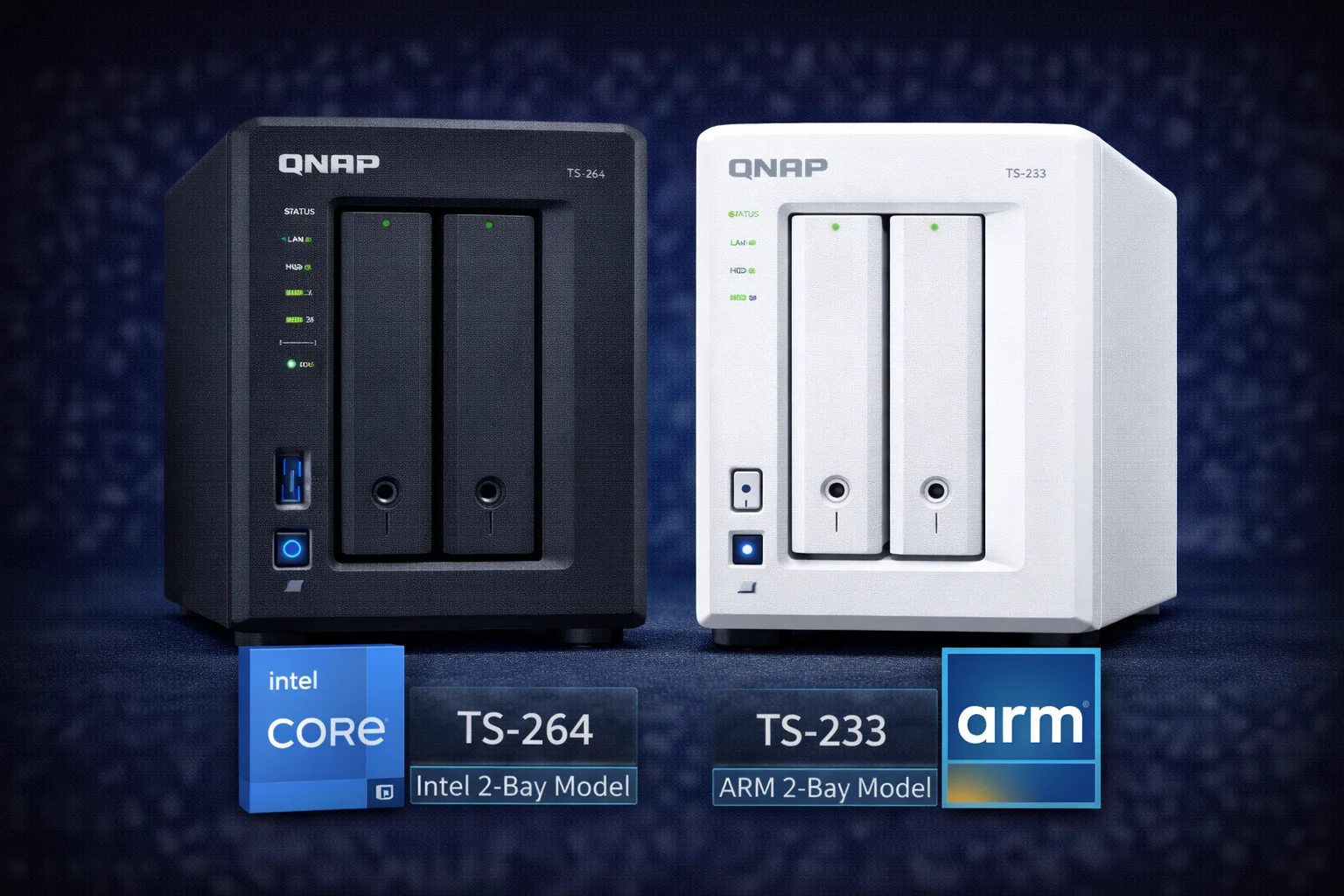
QNAP’s two most popular 2-bay NAS units — the TS-264 and TS-233 — represent completely different approaches to home storage. The TS-264 packs Intel power with hardware transcoding and M.2 slots, while the TS-233 offers ARM efficiency at nearly half the price. This comprehensive comparison helps you decide which 2-bay NAS matches your needs and budget.
Quick Verdict
Choose the QNAP TS-264 if: You want Plex transcoding, plan to run Docker containers or VMs, need M.2 SSD caching, or want maximum future-proofing. The Intel N5105 processor handles everything a home power user could need.
Choose the QNAP TS-233 if: You primarily need file storage and backup, have a strict budget, want lower power consumption, or your Plex clients support direct play. It’s an excellent entry-level NAS at a compelling price.
Specifications Comparison
| Specification | QNAP TS-264 | QNAP TS-233 |
|---|---|---|
| Price | $449 | $239 |
| CPU | Intel Celeron N5105 (4-core, 2.0-2.9GHz) | ARM Cortex-A55 Quad-core 2.0GHz |
| Architecture | x86-64 (Intel) | ARM 64-bit |
| RAM (Default) | 8GB DDR4 | 2GB DDR4 |
| Max RAM | 16GB | 2GB (not expandable) |
| Drive Bays | 2x 3.5″/2.5″ SATA | 2x 3.5″/2.5″ SATA |
| M.2 Slots | 2x M.2 2280 NVMe PCIe Gen3 | None |
| Network | 2x 2.5GbE | 1x 1GbE |
| USB Ports | 2x USB 3.2 Gen 2 (10Gbps) | 3x USB 3.2 Gen 1 (5Gbps) |
| HDMI | 1x HDMI 2.0 (4K 60Hz) | None |
| Hardware Transcoding | Yes (Intel Quick Sync) | No |
| Max 4K Transcodes | 2-3 simultaneous | 0 (direct play only) |
| Virtualization | Yes (Virtualization Station) | No |
| Power Consumption | ~15W idle, ~25W active | ~8W idle, ~15W active |
| Dimensions | 168 × 105 × 226 mm | 90 × 156 × 168 mm |
| Warranty | 2 years | 2 years |
Price difference: The TS-264 costs $210 more (88% premium) than the TS-233. That premium buys you Intel x86 architecture, 4x the RAM, M.2 slots, 2.5GbE networking, HDMI output, and hardware transcoding — a substantial feature gap.
Processor Deep Dive: Intel N5105 vs ARM Cortex-A55
The CPU is the most fundamental difference between these NAS units, affecting everything from app compatibility to transcoding capability. Understanding this difference is crucial for making the right choice.
Intel Celeron N5105 (TS-264)
The N5105 is a 10nm Jasper Lake processor designed for efficiency while maintaining strong single-threaded performance. Key characteristics:
- 4 cores, 4 threads at 2.0GHz base, 2.9GHz boost
- Intel UHD Graphics with Quick Sync for hardware transcoding
- x86-64 architecture — runs virtually all NAS applications
- AES-NI encryption acceleration — fast encrypted transfers
- 10W TDP — efficient for an Intel processor
The N5105 handles multiple simultaneous tasks effortlessly: Plex transcoding while running Docker containers, file transfers, and surveillance recording. Its single-threaded performance ensures responsive web interface and quick app launches.
ARM Cortex-A55 Quad-Core (TS-233)
The Cortex-A55 is an efficiency-focused ARM processor designed for low-power embedded applications:
- 4 cores at 2.0GHz (no turbo boost)
- No integrated GPU for transcoding
- ARM 64-bit architecture — some Docker images not available
- Hardware encryption acceleration — decent encrypted performance
- Very low power draw — under 10W idle
The ARM processor handles basic NAS tasks well: file serving, backup, photo management, and light Docker workloads. It struggles with CPU-intensive tasks like transcoding, heavy Docker applications, and multiple simultaneous users.
CPU Benchmark Comparison
| Benchmark | TS-264 (N5105) | TS-233 (A55) | Difference |
|---|---|---|---|
| Geekbench 5 Single | ~870 | ~280 | 3.1x faster |
| Geekbench 5 Multi | ~2,800 | ~950 | 2.9x faster |
| 7-Zip Compression | ~8,500 MIPS | ~2,800 MIPS | 3x faster |
| AES-256 Encryption | ~2.5 GB/s | ~800 MB/s | 3.1x faster |
| PHP/Web Performance | Excellent | Adequate | Noticeably faster UI |
The Intel N5105 is roughly 3x faster than the ARM Cortex-A55 across most workloads. This translates to faster app installations, quicker photo indexing, snappier web interface, and the ability to run demanding applications.
Plex Media Server Performance
Plex capability is often the deciding factor between these two NAS units. The difference is dramatic.
TS-264: Full Transcoding Capability
The Intel N5105’s Quick Sync video engine handles hardware transcoding efficiently:
| Scenario | TS-264 Performance | CPU Usage |
|---|---|---|
| 4K HDR → 1080p (1 stream) | ✅ Smooth | ~15% |
| 4K HDR → 1080p (2 streams) | ✅ Smooth | ~30% |
| 4K HDR → 1080p (3 streams) | ✅ Smooth with occasional stutter | ~45% |
| 1080p → 720p (4 streams) | ✅ Smooth | ~35% |
| 4K Direct Play (multiple) | ✅ Excellent | ~5% |
| HDR tone mapping | ✅ Supported | ~25% |
| Subtitle burn-in | ✅ Hardware accelerated | Minimal impact |
The TS-264 comfortably handles a household with multiple users streaming different content to different devices. Remote streaming to phones on cellular networks (requiring transcoding) works flawlessly.
TS-233: Direct Play Only
Without hardware transcoding, the TS-233 struggles with any transcoding workload:
| Scenario | TS-233 Performance | CPU Usage |
|---|---|---|
| 4K HDR → 1080p (1 stream) | ❌ Unwatchable (1-3 fps) | 100% |
| 1080p → 720p (1 stream) | ⚠️ Choppy, buffering | 100% |
| 720p → 480p (1 stream) | ⚠️ Marginal | ~95% |
| 4K Direct Play (1 stream) | ✅ Smooth | ~10% |
| 1080p Direct Play (3 streams) | ✅ Smooth | ~20% |
| HDR tone mapping | ❌ Not possible | N/A |
| Subtitle burn-in | ❌ Software only (very slow) | 100% |
TS-233 Plex verdict: Works well for direct play to capable devices (smart TVs, Apple TV, Shield, Fire Stick 4K). Not suitable for transcoding, remote streaming to phones, or HDR tone mapping. If your clients support direct play and you’re on local network, it’s perfectly adequate.
Plex Recommendation Summary
| Use Case | TS-264 | TS-233 |
|---|---|---|
| Single user, direct play | ✅ Overkill | ✅ Perfect |
| Family, multiple TVs, direct play | ✅ Great | ✅ Good |
| Remote streaming to phones | ✅ Excellent | ❌ Not recommended |
| Friends/family sharing (remote) | ✅ Great | ❌ Won’t work well |
| 4K HDR with tone mapping | ✅ Full support | ❌ Not possible |
| Subtitle burn-in needed | ✅ Hardware accelerated | ❌ Too slow |
Memory and Expandability
RAM differences significantly impact what each NAS can handle.
TS-264: 8GB Default, 16GB Maximum
The TS-264 ships with 8GB DDR4, expandable to 16GB with a single SO-DIMM upgrade. This generous RAM enables:
- Multiple Docker containers running simultaneously
- Virtual machines (though limited by 2 cores per VM)
- Large photo libraries with fast QuMagie AI indexing
- Aggressive file caching for better performance
- Memory-intensive apps like databases or development tools
For typical home use, 8GB is plenty. Upgrade to 16GB if running multiple VMs or many Docker containers.
TS-233: 2GB Fixed
The TS-233’s 2GB is soldered and cannot be upgraded. This limits:
- Container Station — runs but limited to 1-2 light containers
- Photo indexing — slower, may timeout on large libraries
- Simultaneous apps — fewer can run at once
- No virtualization — Virtualization Station not available
2GB is adequate for basic NAS functions: file sharing, backup, light media serving. Don’t expect to run demanding applications or multiple services simultaneously.
Storage and Expansion Options
HDD Capacity
Both units accept the same 3.5″ drives with identical maximum capacities:
| Configuration | Raw Capacity | Usable (RAID 1) |
|---|---|---|
| 2x 8TB IronWolf | 16TB | 8TB |
| 2x 12TB IronWolf | 24TB | 12TB |
| 2x 16TB IronWolf Pro | 32TB | 16TB |
| 2x 20TB IronWolf Pro | 40TB | 20TB |
M.2 NVMe Slots (TS-264 Only)
The TS-264’s two M.2 2280 NVMe slots provide significant advantages:
- SSD Caching: Dramatically improve random read/write performance
- Qtier Auto-Tiering: Automatically move hot data to fast SSDs
- All-SSD Storage Pool: Create a fast SSD-only volume
- Plex Metadata: Store Plex database on SSD for instant library browsing
The TS-233 has no M.2 slots — performance is limited to HDD speeds for all operations.
Expansion Options
Both can connect to QNAP expansion units via USB, but the TS-264 is better suited for expansion due to its faster USB ports (10Gbps vs 5Gbps) and more powerful processor to handle additional drives.
Network Performance
TS-264: Dual 2.5GbE
Two 2.5 Gigabit Ethernet ports provide several advantages:
- 2.5Gbps throughput: ~280 MB/s to compatible devices
- Link aggregation: Combine ports for redundancy or increased bandwidth
- Port separation: Isolate traffic (e.g., management on one, data on other)
- Backward compatible: Works with standard 1GbE networks
With 2.5GbE, the TS-264 can saturate even fast NVMe SSDs and handle multiple simultaneous file transfers without bottlenecking.
TS-233: Single 1GbE
The single Gigabit port limits maximum throughput to ~110 MB/s. This is adequate for:
- Single-user file transfers
- Media streaming (even 4K only needs ~25 Mbps)
- Backup operations (time isn’t critical)
The 1GbE becomes a bottleneck when multiple users access the NAS simultaneously or when transferring large files frequently.
Real-World Transfer Speeds
| Scenario | TS-264 (2.5GbE) | TS-233 (1GbE) |
|---|---|---|
| Large file transfer (sequential) | ~280 MB/s | ~112 MB/s |
| Small file transfer (random) | ~150 MB/s (with SSD cache) | ~50 MB/s |
| Encrypted transfer | ~250 MB/s | ~100 MB/s |
| Time to transfer 100GB | ~6 minutes | ~15 minutes |
| Time to transfer 1TB | ~60 minutes | ~2.5 hours |
Docker and Container Support
Both NAS units support Container Station (QNAP’s Docker interface), but with significant differences.
TS-264: Full Docker Capability
The x86 architecture and 8GB RAM make the TS-264 excellent for Docker:
- Universal image compatibility: Nearly all Docker images are available for x86
- Popular apps: Home Assistant, Pi-hole, Nextcloud, Jellyfin, Grafana, all work
- Development tools: Run development environments, databases, build servers
- Multiple containers: Run 10+ containers with 8GB RAM
TS-233: Limited Docker
ARM architecture and 2GB RAM significantly limit Docker use:
- Limited image availability: Many images aren’t compiled for ARM
- Memory constraints: 2GB limits you to 1-3 light containers
- Works: Pi-hole, some home automation, lightweight services
- Struggles: Home Assistant with many integrations, Nextcloud, databases
Docker Compatibility Comparison
| Application | TS-264 | TS-233 |
|---|---|---|
| Home Assistant | ✅ Excellent | ⚠️ Works but limited |
| Pi-hole | ✅ Excellent | ✅ Good |
| Nextcloud | ✅ Excellent | ⚠️ Slow, limited |
| Jellyfin | ✅ With transcoding | ⚠️ Direct play only |
| Portainer | ✅ Excellent | ✅ Good |
| Grafana | ✅ Excellent | ⚠️ Works |
| InfluxDB | ✅ Excellent | ⚠️ Limited |
| Node-RED | ✅ Excellent | ✅ Good |
Virtualization
TS-264: Supports Virtualization Station for running Windows, Linux, or other operating systems in virtual machines. With 8GB RAM (or 16GB upgraded), you can run a light VM for testing, development, or running specific applications.
TS-233: Does not support Virtualization Station. The ARM processor and 2GB RAM are insufficient for virtualization.
Power Consumption and Noise
For a device running 24/7, power consumption affects long-term costs.
| Metric | TS-264 | TS-233 |
|---|---|---|
| Idle (drives spinning) | ~15W | ~8W |
| Idle (drives sleep) | ~10W | ~5W |
| Active (file transfer) | ~22W | ~14W |
| Maximum load | ~28W | ~18W |
| Annual cost (idle, $0.12/kWh) | ~$16/year | ~$8/year |
| Annual cost (active, $0.12/kWh) | ~$23/year | ~$15/year |
| Noise (idle) | ~22 dB | ~20 dB |
| Noise (active) | ~28 dB | ~25 dB |
The TS-233 uses approximately half the power of the TS-264, saving roughly $8-10 per year. Both are quiet enough for living spaces — drive noise is the primary sound source on either unit.
HDMI Output
TS-264: Includes HDMI 2.0 output supporting 4K at 60Hz. This enables:
- Direct connection to TV for HD Station media playback
- Using NAS as an HTPC with Kodi
- Photo slideshows directly from NAS
- Display dashboard or surveillance feeds
TS-233: No HDMI output. Media must be streamed to separate devices.
Software and App Compatibility
Both run QTS (QNAP’s operating system), but app availability differs slightly:
| App/Feature | TS-264 | TS-233 |
|---|---|---|
| QTS Core Apps | ✅ All | ✅ All |
| Plex Media Server | ✅ Full | ✅ Direct play only |
| QuMagie (Photo AI) | ✅ Fast indexing | ✅ Slow indexing |
| Surveillance Station | ✅ Up to 8 cameras | ✅ Up to 4 cameras |
| Virtualization Station | ✅ Yes | ❌ No |
| Container Station | ✅ Full | ✅ Limited |
| HD Station (HDMI apps) | ✅ Yes | ❌ No |
| Qsync | ✅ Yes | ✅ Yes |
| HBS 3 (Backup) | ✅ Yes | ✅ Yes |
Total Cost of Ownership
Let’s compare complete system costs including drives:
Budget Build (8TB Usable)
| Component | TS-264 Build | TS-233 Build |
|---|---|---|
| NAS Unit | $449 | $239 |
| 2x IronWolf 8TB | $400 | $400 |
| Total | $849 | $639 |
| Difference | — | Save $210 |
Mid-Range Build (12TB Usable)
| Component | TS-264 Build | TS-233 Build |
|---|---|---|
| NAS Unit | $449 | $239 |
| 2x IronWolf 12TB | $538 | $538 |
| Total | $987 | $777 |
| Difference | — | Save $210 |
TS-264 with SSD Cache
| Component | Cost |
|---|---|
| TS-264 | $449 |
| 2x IronWolf 8TB | $400 |
| 1x WD Red SN700 1TB (cache) | $120 |
| Total | $969 |
Use Case Recommendations
Choose QNAP TS-264 For:
- Plex with transcoding: Remote streaming, multiple users, HDR tone mapping
- Docker enthusiasts: Running multiple containers reliably
- Home automation: Home Assistant with many integrations
- Fast file transfers: 2.5GbE networking, SSD caching
- Future-proofing: More headroom for growing needs
- Power users: Those who tinker, experiment, run multiple services
- HTPC use: Connect directly to TV via HDMI
- Surveillance: More cameras, better encoding
Choose QNAP TS-233 For:
- File storage and backup: The core NAS function works great
- Plex direct play: Local streaming to capable devices
- Budget-conscious: Maximum value for basic needs
- Low power priority: Minimize electricity costs
- Simple setups: File sharing, Time Machine, photo backup
- First-time NAS users: Learn NAS basics without major investment
- Remote/vacation home: Set and forget backup destination
Upgrade Path Considerations
Consider where you might be in 2-3 years:
Starting with TS-233: If you outgrow it (need transcoding, more Docker capacity), you’ll need to buy a new NAS entirely. The TS-233 can become a backup target or secondary NAS.
Starting with TS-264: You can expand with more RAM (8GB → 16GB), add SSD cache, add expansion units. It handles growing needs without replacement.
The math: TS-233 ($239) now + TS-464 later ($499) = $738 total. TS-264 now ($449) = one purchase that handles most home users’ long-term needs.
Surveillance Station Comparison
Both NAS units support QNAP Surveillance Station for home security camera recording:
| Feature | TS-264 | TS-233 |
|---|---|---|
| Free Camera Licenses | 2 | 2 |
| Max Recommended Cameras | 6-8 | 2-4 |
| 1080p Recording (simultaneous) | 6+ streams | 3-4 streams |
| 4K Recording (simultaneous) | 3-4 streams | 1-2 streams |
| AI Analytics | Faster processing | Slower, limited |
| Motion Detection | Hardware accelerated | Software only |
For basic home surveillance (2-4 cameras), both work adequately. For more cameras or AI-powered features, the TS-264’s Intel processor handles the workload significantly better.
Photo Management Performance
QuMagie (QNAP’s photo management app) performance varies significantly:
| Task | TS-264 | TS-233 |
|---|---|---|
| Initial 10,000 photo indexing | ~2-3 hours | ~8-12 hours |
| Face recognition (1,000 photos) | ~15 minutes | ~45-60 minutes |
| Thumbnail generation | Fast | Slow |
| Browse responsiveness | Instant | Slight delay |
| Large library (50,000+ photos) | Handles well | May struggle |
If you have a large photo library or want quick AI-powered face recognition, the TS-264’s faster CPU makes a noticeable difference.
Backup Capabilities
Both units support HBS 3 (Hybrid Backup Sync) for comprehensive backup:
- Local backup: To external USB drives
- Remote backup: To another QNAP NAS
- Cloud backup: AWS S3, Azure, Google Cloud, Backblaze B2
- Rsync: Standard rsync to any compatible server
The TS-264’s faster CPU and 2.5GbE networking enable significantly faster backup operations, especially for initial large backups.
Frequently Asked Questions
Yes, for direct play. If your Plex clients (smart TV, Apple TV, Fire Stick 4K, Shield) can play your media formats natively without transcoding, the TS-233 works well. It only struggles when transcoding is required (remote streaming, incompatible clients, HDR tone mapping).
For most users, yes. The $210 premium gets you hardware transcoding, 4x more RAM, 2.5GbE networking, M.2 slots, HDMI, and full Docker/VM support. If you only need basic file storage and direct-play Plex, save the money with TS-233.
No. The TS-233’s 2GB RAM is soldered to the motherboard and cannot be upgraded. The TS-264’s RAM can be expanded from 8GB to 16GB.
TS-264 is significantly better. QuMagie’s AI face/object recognition is CPU-intensive. The TS-264 indexes photos 3-4x faster and handles large libraries without timing out. TS-233 works but is noticeably slower with large collections.
Yes, but differently. TS-264 runs virtually any Docker container with plenty of resources. TS-233 is limited by ARM compatibility (fewer images available) and 2GB RAM (only 1-3 light containers). For serious Docker use, get the TS-264.
Both are very quiet. The TS-233 is slightly quieter due to lower power consumption and smaller fan, but both are living-room appropriate. Hard drive noise is the primary sound on either unit.
Final Verdict
QNAP TS-264: The better NAS for most users. The Intel processor, generous RAM, 2.5GbE networking, M.2 slots, and hardware transcoding make it capable of handling virtually any home NAS workload. The $210 premium over the TS-233 buys meaningful, practical capabilities you’ll use.
QNAP TS-233: An excellent budget NAS if you understand its limitations. For pure file storage, backup, and direct-play media streaming, it delivers great value. Don’t expect transcoding, heavy Docker use, or future expandability.
Our recommendation: If you can afford it, buy the TS-264. The feature gap is substantial, and you’ll avoid the frustration of hitting limitations. If budget is tight and you only need basic NAS functions with local Plex direct play, the TS-233 is a solid choice that won’t disappoint within its capabilities.
Where to Buy
QNAP TS-264 8GB
Intel N5105, 8GB RAM, 2x 2.5GbE, 2x M.2 NVMe, HDMI 2.0, Hardware Transcoding
The better choice for most users. Intel hardware transcoding handles Plex, Docker runs everything, and 2.5GbE + M.2 slots provide excellent performance. Worth the premium for the capability gap.
QNAP TS-233
ARM Cortex-A55, 2GB RAM, 1x 1GbE, No M.2, No HDMI, No Hardware Transcoding
Great value for basic NAS needs: file storage, backup, direct-play Plex. Don’t expect transcoding or heavy Docker use. Perfect budget entry point or secondary NAS.
Related Comparisons
- QNAP TS-264 Review — Full review
- QNAP TS-233 Review — Full review
- TS-464 vs TS-433 — 4-bay Intel vs ARM comparison
- TS-264 vs Synology DS224+ — Cross-brand comparison
- Best QNAP NAS 2026 — Complete buying guide
- QNAP Compatible Hard Drives — Drive recommendations
Last Updated: February 2026