QNAP TS-473A Review: AMD Ryzen NAS for Power Users

Quick Answer+
Quick Answer: The QNAP TS-473A ($699) is a 4-bay NAS with AMD Ryzen V1500B processor, ideal for VMs and Docker but not for Plex transcoding. The quad-core Ryzen offers excellent multi-threaded performance and supports up to 64GB RAM — 4x more than Intel alternatives. However, no integrated GPU means no hardware transcoding. Plex users should choose the TS-464 instead. Best for: virtualization, Docker power users, ZFS workloads. Rating: 4.2/5
The QNAP TS-473A takes a fundamentally different approach than most consumer NAS devices. Instead of Intel’s integrated graphics, it uses AMD’s Ryzen V1500B — a processor designed for embedded systems with strong CPU performance but no GPU. This architectural choice makes it excellent for certain workloads and completely wrong for others.
After extensive testing, I can say the TS-473A is a specialized tool. It’s one of the best consumer NAS options for virtualization and Docker, but it’s the wrong choice for media server enthusiasts. This review explains exactly who should buy it, who should avoid it, and how it compares to Intel alternatives.
QNAP TS-473A Specifications
| Specification | QNAP TS-473A |
|---|---|
| Drive Bays | 4x 3.5″/2.5″ SATA |
| Max Raw Capacity | 96TB (4x 24TB) |
| CPU | AMD Ryzen Embedded V1500B (4-core/8-thread, 2.2GHz) |
| Architecture | Zen 1, 14nm |
| RAM | 8GB DDR4 (upgradeable to 64GB) |
| RAM Slots | 2x SODIMM |
| Network | 2x 2.5GbE RJ45 |
| M.2 Slots | 2x M.2 2280 PCIe Gen3 x1 |
| PCIe Slots | 2x PCIe Gen3 x4 |
| USB | 4x USB 3.2 Gen 2 (10Gbps) |
| HDMI | 1x HDMI 2.0 (limited usefulness) |
| Hardware Transcoding | ❌ No (no integrated GPU) |
| Hardware Encryption | ✅ AES-NI |
| Operating System | QTS 5.x / QuTS hero (ZFS) |
| File Systems | ext4, Btrfs (QTS) / ZFS (QuTS hero) |
| Dimensions | 169 x 170 x 225 mm |
| Weight | 2.34 kg (empty) |
| Power Consumption | 24.31W (HDD standby), 45.44W (operating) |
| Noise Level | 20.2 dB(A) |
| Fan | 1x 120mm |
| Warranty | 2 years (extendable to 5) |
| Price | $699 |
QNAP TS-473A-8G
4-Bay, AMD Ryzen V1500B, 8GB RAM (64GB max), 2x 2.5GbE, 2x PCIe x4, 2x M.2
AMD Ryzen NAS for virtualization and Docker. Excellent multi-threaded performance, dual PCIe x4 slots, and massive 64GB RAM support. No Plex transcoding due to lack of integrated GPU — buy TS-464 for media server use.
Design and Build Quality
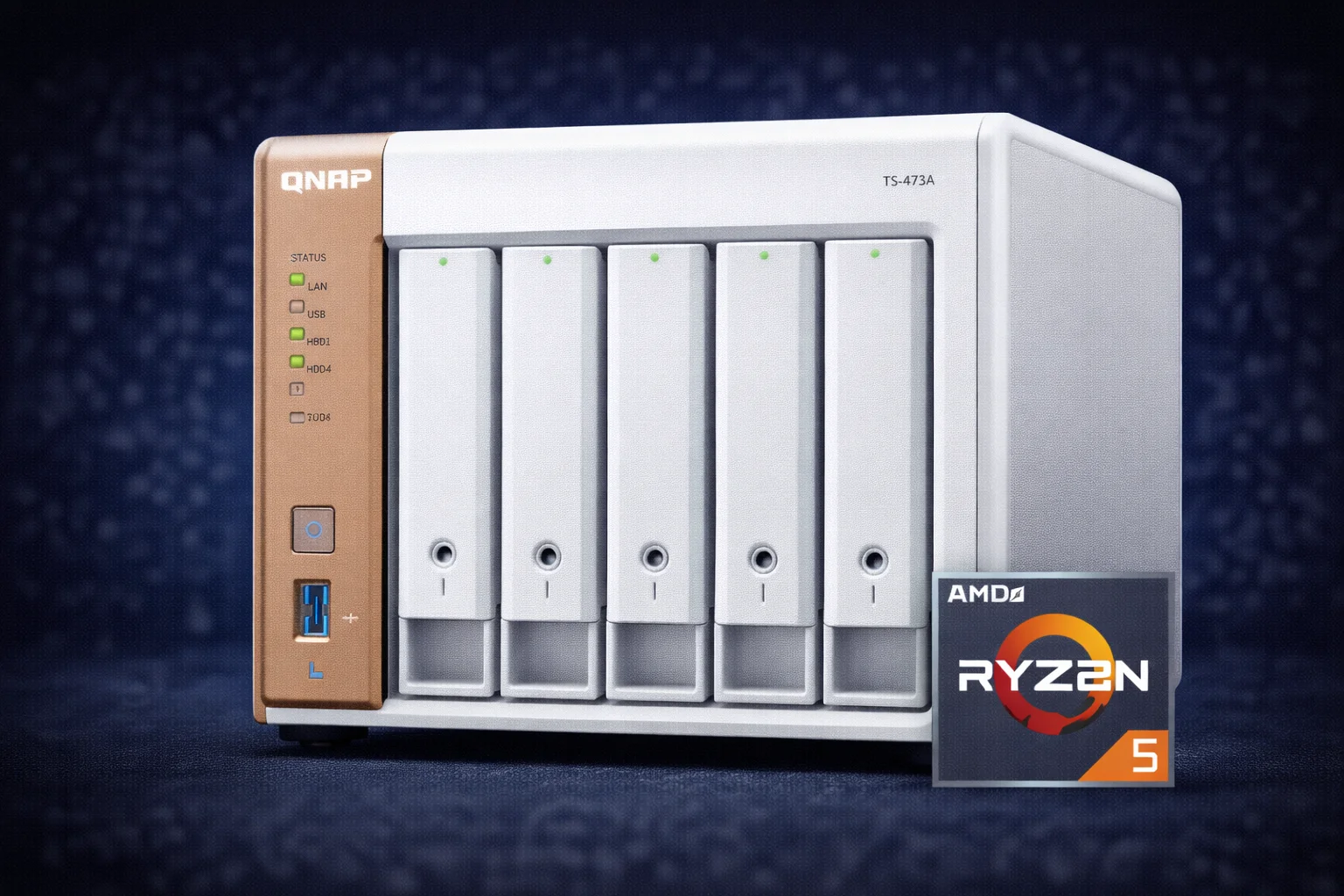
The TS-473A shares its chassis design with the Intel-based TS-464. It’s the same white plastic enclosure with copper/bronze accent strip that QNAP introduced with their x64 series refresh. The look is modern and fits well in home or office environments.
Chassis Construction
Build quality is solid — sturdy plastic construction with good fit and finish. The unit doesn’t flex or creak when handling. At 2.34 kg empty, it’s slightly heavier than the TS-464 due to the different internal layout required for AMD’s platform.
The four drive bays are arranged vertically with tool-less trays. Each tray has a locking mechanism to prevent accidental removal. Hot-swapping is supported for replacing drives without powering down.
Port Layout
Front Panel: 1x USB 3.2 Gen 2 Type-A (with One Touch Copy button), power button, status LEDs for system, LAN 1, LAN 2, and drives 1-4.
Rear Panel: 2x 2.5GbE RJ45 Ethernet ports, 3x USB 3.2 Gen 2 Type-A, 1x HDMI 2.0, 2x PCIe Gen3 x4 expansion slots (low-profile), Kensington lock slot, and power input (external adapter).
Bottom Panel: 2x M.2 2280 NVMe slots (PCIe Gen3 x1 each).
The dual PCIe x4 slots are a major advantage over the TS-464’s single PCIe x2 slot. This enables more powerful expansion cards and simultaneous use of multiple cards.
Cooling and Noise
A single 120mm fan handles cooling. The Ryzen V1500B has a higher TDP than Intel’s N5105 (15-25W vs 10W), so the fan works harder under load. At idle, noise is rated at 20.2 dB(A) — slightly louder than the TS-464’s 19.8 dB(A) but still very quiet.
Under sustained load (VM workloads, RAID rebuilds), fan noise increases noticeably but remains acceptable for office environments. Thermal management is good — the Ryzen doesn’t throttle even during extended stress testing.
The AMD Difference: What It Means For You
The Ryzen V1500B is fundamentally different from Intel Celeron/Pentium processors used in most consumer NAS devices. Understanding these differences is critical to deciding if the TS-473A is right for you.
Advantages of AMD Ryzen V1500B
1. Stronger Multi-Threaded CPU Performance
The V1500B is a true quad-core with SMT (8 threads total). It’s based on AMD’s Zen 1 architecture — the same foundation as the original Ryzen desktop CPUs. This provides 15-20% better multi-threaded performance than Intel’s N5105. For workloads that parallelize well (compression, encryption, multiple containers, VMs), the Ryzen has a meaningful advantage.
2. Massive RAM Support (64GB)
The TS-473A supports up to 64GB DDR4 RAM — four times the TS-464’s 16GB limit. This is transformative for running multiple VMs simultaneously, ZFS with large ARC cache, heavy Docker workloads, in-memory databases, and large Plex libraries with extensive metadata. The ability to install 64GB RAM is the single biggest differentiator from Intel-based alternatives.
3. More PCIe Lanes (Dual x4 Slots)
Two PCIe Gen3 x4 slots provide 8GB/s total bandwidth (4GB/s per slot). This is 4x the bandwidth of the TS-464’s single PCIe x2 slot. This enables 10GbE + GPU simultaneously, dual 10GbE cards for link aggregation, 10GbE + SAS expansion for external drive enclosures, and 10GbE + additional M.2 expansion cards.
4. Better ECC Memory Compatibility
The Ryzen platform supports ECC unbuffered memory, providing additional data integrity protection for critical workloads. This is particularly valuable for ZFS deployments where data integrity is paramount.
Disadvantages of AMD Ryzen V1500B
1. No Hardware Video Transcoding
This is the dealbreaker for many users. The V1500B has no integrated GPU — no equivalent to Intel’s Quick Sync. All video transcoding must be done in software using the CPU. This means much slower transcoding (1-2 4K streams vs 3-4), much higher CPU usage (80-100% vs 15%), higher power consumption during transcoding, and less CPU headroom for other tasks during transcoding.
2. Higher Power Consumption
The TS-473A draws approximately 45W under load compared to 35W for the TS-464. Over a year of 24/7 operation, this ~10W difference costs roughly $10-15 extra in electricity (at typical US rates of $0.12/kWh). Not significant, but worth noting for power-conscious users.
3. HDMI Output Has Limited Usefulness
While the TS-473A has HDMI 2.0, without an integrated GPU, HD Station and HTPC features are severely limited. You can display the QTS interface but can’t run GPU-accelerated apps smoothly. The HDMI port is essentially useless for media playback.
Performance Testing
CPU Benchmarks
The Ryzen V1500B outperforms the Intel N5105 in pure CPU tasks:
| Benchmark | TS-473A (Ryzen V1500B) | TS-464 (Intel N5105) | Difference |
|---|---|---|---|
| Geekbench 5 Single-Core | ~680 | ~720 | Intel +6% |
| Geekbench 5 Multi-Core | ~2,400 | ~2,100 | AMD +14% |
| 7-Zip Compression | ~8,500 MIPS | ~7,200 MIPS | AMD +18% |
| 7-Zip Decompression | ~11,200 MIPS | ~9,800 MIPS | AMD +14% |
| OpenSSL AES-256 | ~1,050 MB/s | ~980 MB/s | AMD +7% |
The takeaway: Intel wins slightly in single-threaded tasks, but AMD wins by 14-18% in multi-threaded workloads. For NAS tasks that parallelize well (compression, encryption, multiple containers), the Ryzen has a real advantage.
Network Transfer Speeds
Both models have dual 2.5GbE ports. Real-world transfer performance is nearly identical:
| Test | TS-473A | TS-464 |
|---|---|---|
| Sequential Read (SMB) | 285 MB/s | 282 MB/s |
| Sequential Write (SMB) | 278 MB/s | 275 MB/s |
| Random Read 4K (QD32) | 58 MB/s | 55 MB/s |
| Random Write 4K (QD32) | 52 MB/s | 48 MB/s |
| Encrypted Read (AES-256) | 280 MB/s | 278 MB/s |
| Encrypted Write (AES-256) | 272 MB/s | 268 MB/s |
Network performance is essentially identical. Both saturate 2.5GbE connections without issue. The Ryzen’s stronger AES-NI implementation shows a slight edge in encrypted transfers, but the difference is negligible in practice.
Plex Transcoding Performance (The Bad News)
The TS-473A cannot hardware transcode. This is the single most important consideration for media server users.
Without an integrated GPU, all transcoding is software-only using the CPU:
| Scenario | TS-473A (AMD) | TS-464 (Intel) |
|---|---|---|
| 1x 4K HEVC → 1080p | ⚠️ Plays, CPU 80-100% | ✅ Smooth, CPU 12-15% |
| 2x 4K HEVC → 1080p | ❌ Stuttering/buffering | ✅ Smooth, CPU 22-28% |
| 3x 4K HEVC → 1080p | ❌ Fails completely | ✅ Smooth, CPU 35-42% |
| 4x 4K HEVC → 1080p | ❌ Fails completely | ✅ Smooth, CPU 50-58% |
| 1x 1080p HEVC → 720p | ✅ Smooth, CPU 40-50% | ✅ Smooth, CPU 8-10% |
| 2x 1080p → 720p | ✅ Smooth, CPU 75-85% | ✅ Smooth, CPU 15-18% |
| 3x 1080p → 720p | ⚠️ Occasional stutter | ✅ Smooth, CPU 22-25% |
| 4K HDR → SDR tone mapping | ❌ Software fallback, poor | ✅ Hardware, smooth |
| 4K + PGS subtitle burn-in | ❌ Very slow, unusable | ✅ Hardware, smooth |
| Direct Play (any quality) | ✅ Unlimited streams | ✅ Unlimited streams |
The verdict is clear: if Plex transcoding is important, buy the TS-464. The Intel’s Quick Sync provides dramatically better transcoding performance at lower CPU usage and power consumption. The TS-473A is not suitable for Plex unless all your clients support Direct Play.
Virtual Machine Performance (The Good News)
Virtual machines are where the TS-473A truly shines. The combination of stronger CPU, 64GB RAM support, and dual PCIe slots makes it one of the best consumer NAS options for virtualization.
Tested VM Configurations:
| VM Type | Allocated Resources | Performance |
|---|---|---|
| Ubuntu Server 22.04 | 2 vCPU, 2GB RAM | Excellent, very responsive |
| Ubuntu Desktop 22.04 | 4 vCPU, 4GB RAM | Good, usable for light desktop tasks |
| Windows 10 Pro | 4 vCPU, 8GB RAM | Good, usable for productivity apps |
| Windows 11 Pro | 4 vCPU, 8GB RAM | Functional, some sluggishness |
| Windows Server 2022 | 4 vCPU, 8GB RAM | Good for server workloads |
| pfSense/OPNsense | 2 vCPU, 4GB RAM | Excellent, production-ready |
| Home Assistant OS | 2 vCPU, 2GB RAM | Excellent, snappy response |
| TrueNAS Core | 4 vCPU, 8GB RAM | Good, functional nested NAS |
Multi-VM Testing (with 32GB RAM installed):
Running simultaneously: 3x Ubuntu Server + Windows 10 ran smoothly with 8GB RAM free. 2x Windows 10 + 2x Ubuntu was manageable with some competition for resources. 5x lightweight Linux VMs showed no issues whatsoever.
The TS-464 can run VMs too, but its 16GB RAM ceiling limits how many you can run simultaneously. For serious virtualization, the TS-473A’s 64GB capacity is a major advantage that cannot be overstated.
Docker and Container Performance
Docker containers benefit from the Ryzen’s stronger CPU and RAM headroom. Container Station performs excellently with the TS-473A.
Test Configuration (16GB RAM installed): Running simultaneously: Plex Media Server, Home Assistant, Pi-hole, Nginx Proxy Manager, Portainer, Transmission, Watchtower, MariaDB, Redis, Grafana + InfluxDB.
Results: All 10+ containers ran smoothly with ~6GB RAM free. Container startup times were noticeably faster than the TS-464 (~15% improvement). CPU-intensive containers like Nextcloud showed better responsiveness. With 32GB or 64GB RAM, you can run significantly more containers without memory pressure.
Expansion Options
The TS-473A has superior expansion capabilities compared to Intel models — a key differentiator for power users.
PCIe Expansion
2x PCIe Gen3 x4 slots provide 8GB/s total bandwidth (4GB/s per slot). This is 4x the bandwidth of the TS-464’s single PCIe x2 slot.
QNAP QXG-10G1T
Single 10GbE RJ45, PCIe Gen3 x4
Add 10GbE networking with full bandwidth utilization. The x4 slot provides plenty of headroom unlike the TS-464’s x2 slot.
NVIDIA Quadro P400
2GB GDDR5, Low-Profile
Add hardware transcoding capability to the TS-473A. Enables Plex hardware transcoding that the Ryzen CPU cannot provide natively. Unlocks 3-4 simultaneous 4K transcodes.
Possible Expansion Configurations:
- 10GbE + GPU: Fast networking plus Plex transcoding capability
- Dual 10GbE: Link aggregation or separate network segments
- 10GbE + SAS HBA: Connect external drive enclosures for expanded storage
- 10GbE + M.2 expansion: More NVMe slots for caching or fast storage
- GPU + M.2 expansion: Transcoding plus additional fast storage
Note on GPU Passthrough: You can pass through a GPU to a VM for applications like Plex, game streaming, or GPU-accelerated workloads. This is a unique capability not easily achieved on Intel NAS models.
RAM Expansion
The TS-473A has 2 SODIMM slots supporting up to 64GB DDR4 (2x 32GB modules). This is 4x the TS-464’s 16GB limit.
| Configuration | Estimated Cost | Best For |
|---|---|---|
| 8GB (stock) | $0 | Basic file storage, light Docker |
| 16GB (1x16GB add) | ~$50 | Multiple containers, light VMs |
| 32GB (2x16GB) | ~$90 | QuTS hero, multiple VMs, heavy Docker |
| 64GB (2x32GB) | ~$180 | Serious virtualization, large ZFS ARC |
When to Upgrade RAM:
- QuTS hero (ZFS): ZFS loves RAM for ARC cache. 32GB+ recommended for best performance.
- Multiple VMs: Each Windows VM needs 4-8GB minimum. Plan accordingly.
- Heavy Docker: Memory-hungry containers like databases benefit from more RAM.
- Large Plex libraries: Metadata analysis and scanning are RAM-intensive.
M.2 NVMe Expansion
Two M.2 2280 slots on the bottom panel support NVMe SSDs. Like the TS-464, these are PCIe Gen3 x1 (~1GB/s per slot). Use cases include read-only SSD cache, read-write SSD cache (requires 2 SSDs in RAID 1), Qtier auto-tiering, and all-flash storage pool for VMs/Docker.
Software: QTS and QuTS hero
The TS-473A runs the same QTS operating system as Intel models. All apps and features work identically — the AMD platform has no software limitations.
QuTS hero (ZFS) Support
The TS-473A is an excellent QuTS hero candidate. ZFS benefits enormously from RAM, and with 64GB support, the TS-473A can maintain a large ARC (Adaptive Replacement Cache) for excellent performance.
ZFS Benefits: Inline data deduplication, inline compression (LZ4, ZSTD), self-healing with checksums, near-unlimited snapshots, native encryption, and better data integrity than ext4/Btrfs.
ZFS RAM Guidelines: Minimum 8GB (1GB per TB of storage), recommended 16-32GB for good ARC cache, with deduplication 5GB per TB of deduplicated data. The TS-473A’s 64GB ceiling makes it much better suited for QuTS hero than the TS-464’s 16GB limit.
TS-473A vs TS-464: Complete Comparison
| Feature | TS-473A ($699) | TS-464 ($636) | Winner |
|---|---|---|---|
| CPU | AMD Ryzen V1500B | Intel N5105 | Depends on use |
| CPU Cores/Threads | 4C/8T | 4C/4T | TS-473A |
| Multi-Thread Performance | ~2,400 (GB5) | ~2,100 (GB5) | TS-473A (+14%) |
| Hardware Transcoding | ❌ None | ✅ Quick Sync | TS-464 |
| Plex 4K Transcodes | 1-2 (software) | 3-4 (hardware) | TS-464 |
| RAM Maximum | 64GB | 16GB | TS-473A (4x more) |
| PCIe Slots | 2x Gen3 x4 | 1x Gen3 x2 | TS-473A |
| PCIe Bandwidth | 8GB/s total | 2GB/s | TS-473A (4x more) |
| VM Performance | Excellent | Good | TS-473A |
| Docker Performance | Excellent | Very Good | TS-473A |
| ZFS Suitability | Excellent | Good | TS-473A |
| Power Consumption | ~45W | ~35W | TS-464 |
| Noise Level | 20.2 dB(A) | 19.8 dB(A) | TS-464 (slightly) |
| HDMI Usefulness | Limited | Full HD Station | TS-464 |
| Price | $699 | $636 | TS-464 ($63 less) |
Buy the TS-473A If:
- Virtual machines are a primary use case
- You need more than 16GB RAM
- You want dual PCIe x4 expansion slots
- You plan to use QuTS hero (ZFS) extensively
- You’ll add a GPU for transcoding (and accept the extra cost/complexity)
- Plex is direct play only OR you don’t use Plex
- You run many Docker containers
- CPU performance matters more than GPU features
Buy the TS-464 If:
- Plex transcoding is important to you
- Media server is a primary use case
- 16GB RAM is sufficient for your needs
- You want HDMI output for TV playback
- You prefer lower power consumption
- You want to save $63
- You want the best all-around value
Who Should Buy the QNAP TS-473A?
Ideal Users
- Home lab enthusiasts running multiple VMs for learning and experimentation
- Docker power users with many containers requiring significant RAM
- ZFS users wanting QuTS hero with proper RAM headroom
- Small businesses needing reliable VM hosting on-premises
- Developers running build servers, CI/CD, or compilation workloads
- Users planning GPU passthrough for specialized applications
- pfSense/OPNsense users wanting a NAS + router combo
- Data hoarders who prioritize CPU performance and expansion
Not Ideal For
- Plex users who need transcoding — get TS-464
- Media server as primary use case — get TS-464
- HTPC/TV playback users — get TS-464 with HD Station
- Budget-conscious buyers — TS-464 is cheaper and better for most
- Beginners who want simplicity — the AMD nuances add complexity
- Power-sensitive users — the extra 10W adds up over time
Pros and Cons
Pros
- Strong multi-threaded CPU performance (+14-18% vs Intel)
- 64GB RAM maximum (excellent for VMs and ZFS)
- Dual PCIe Gen3 x4 slots (4x more bandwidth than TS-464)
- Dual 2.5GbE networking built-in
- Excellent Docker container performance
- Best consumer NAS for QuTS hero (ZFS)
- Can add GPU for hardware transcoding if needed
- ECC memory support for data integrity
- GPU passthrough capability for VMs
Cons
- No hardware video transcoding (major limitation for Plex)
- Higher power consumption (~45W vs ~35W)
- $63 more expensive than TS-464
- HDMI output has limited usefulness without GPU
- Wrong choice for most typical home users
- Slightly louder under load than Intel alternatives
- Adding GPU for transcoding increases cost and complexity
Frequently Asked Questions
Only software transcoding, which limits you to 1-2 4K streams with very high CPU usage (80-100%). There’s no integrated GPU for hardware acceleration. For Plex transcoding, the TS-464 with Intel Quick Sync is dramatically better.
Buy the TS-473A if VMs, Docker, and ZFS are primary needs and you can skip Plex transcoding. Buy the TS-464 for media server use, Plex transcoding, or if you want the best all-around value. Most home users should get the TS-464.
Yes, you can add an NVIDIA Quadro P400 (~$150) or similar low-profile GPU in one of the PCIe x4 slots. This enables hardware transcoding that the Ryzen CPU cannot provide natively. However, this adds cost and complexity compared to just buying the TS-464.
Start with stock 8GB for basic use. Upgrade to 16GB for multiple containers or light VMs. 32GB is recommended for QuTS hero (ZFS) or multiple VMs. 64GB for serious virtualization or large ZFS deployments with deduplication.
Excellent. ZFS benefits enormously from RAM, and the TS-473A supports up to 64GB — 4x more than the TS-464. Combined with the Ryzen’s strong CPU performance for checksumming and compression, it’s one of the best consumer ZFS NAS options available.
The TS-473A uses approximately 45W under load compared to 35W for the TS-464. Over a year of 24/7 operation, this ~10W difference costs roughly $10-15 extra in electricity at typical US rates.
Verdict: Should You Buy the QNAP TS-473A?
The QNAP TS-473A is an excellent NAS for a specific audience: power users who prioritize VMs, Docker, and ZFS over media transcoding. If that describes you, the Ryzen CPU, 64GB RAM support, and dual PCIe x4 slots make it a compelling choice that outperforms Intel alternatives in these workloads.
However, the lack of hardware transcoding is a significant limitation that disqualifies it for most media server users. If Plex is important to you, the TS-464 provides dramatically better transcoding performance at a lower price. The TS-473A occupies a niche: it’s the best consumer NAS for virtualization and ZFS, but the wrong choice for the majority of home users.
Rating: 4.2/5
Pros: Excellent VM/Docker performance, 64GB RAM max, dual PCIe x4 slots, strong multi-threaded CPU, best for ZFS.
Cons: No hardware transcoding, poor Plex choice, higher power consumption, costs more than TS-464.
Bottom Line: Best consumer NAS for virtualization and power users. Wrong choice for media servers and typical home use.
QNAP TS-473A-8G
4-Bay, AMD Ryzen V1500B, 8GB RAM (64GB max), 2x 2.5GbE, 2x PCIe x4
Best for virtualization, Docker, and ZFS workloads. Not recommended for Plex or media server use — get the TS-464 instead.
Complete TS-473A Builds
VM Powerhouse (~$1,800)
- QNAP TS-473A — $699
- 32GB RAM upgrade (2x16GB) — $90
- 4x Seagate IronWolf 8TB — $800
- 1x Samsung 990 PRO 1TB (VM storage) — $200
- Total: $1,789 | Storage: 24TB HDD + 1TB SSD
ZFS Maximum (~$2,200)
- QNAP TS-473A — $699
- 64GB RAM upgrade (2x32GB) — $180
- 4x Seagate IronWolf Pro 16TB — $1,400
- Total: $2,279 | Storage: 48TB (RAID-Z1)
Plex + VMs with GPU (~$2,100)
- QNAP TS-473A — $699
- 32GB RAM upgrade — $90
- NVIDIA Quadro P400 — $150
- QNAP QXG-10G1T (10GbE) — $154
- 4x Seagate IronWolf 8TB — $800
- 1x Samsung 990 PRO 1TB — $200
- Total: $2,093 | Features: HW transcoding + 10GbE + VMs
Related Resources
- Best QNAP NAS 2026 — Complete buyer’s guide
- QNAP TS-464 Review — Intel alternative (better for Plex)
- QNAP Docker Setup Guide
- QuTS Hero (ZFS) Guide
- QNAP Compatible Hard Drives
- QNAP vs Synology
Last Updated: February 2026