Quick Answer+
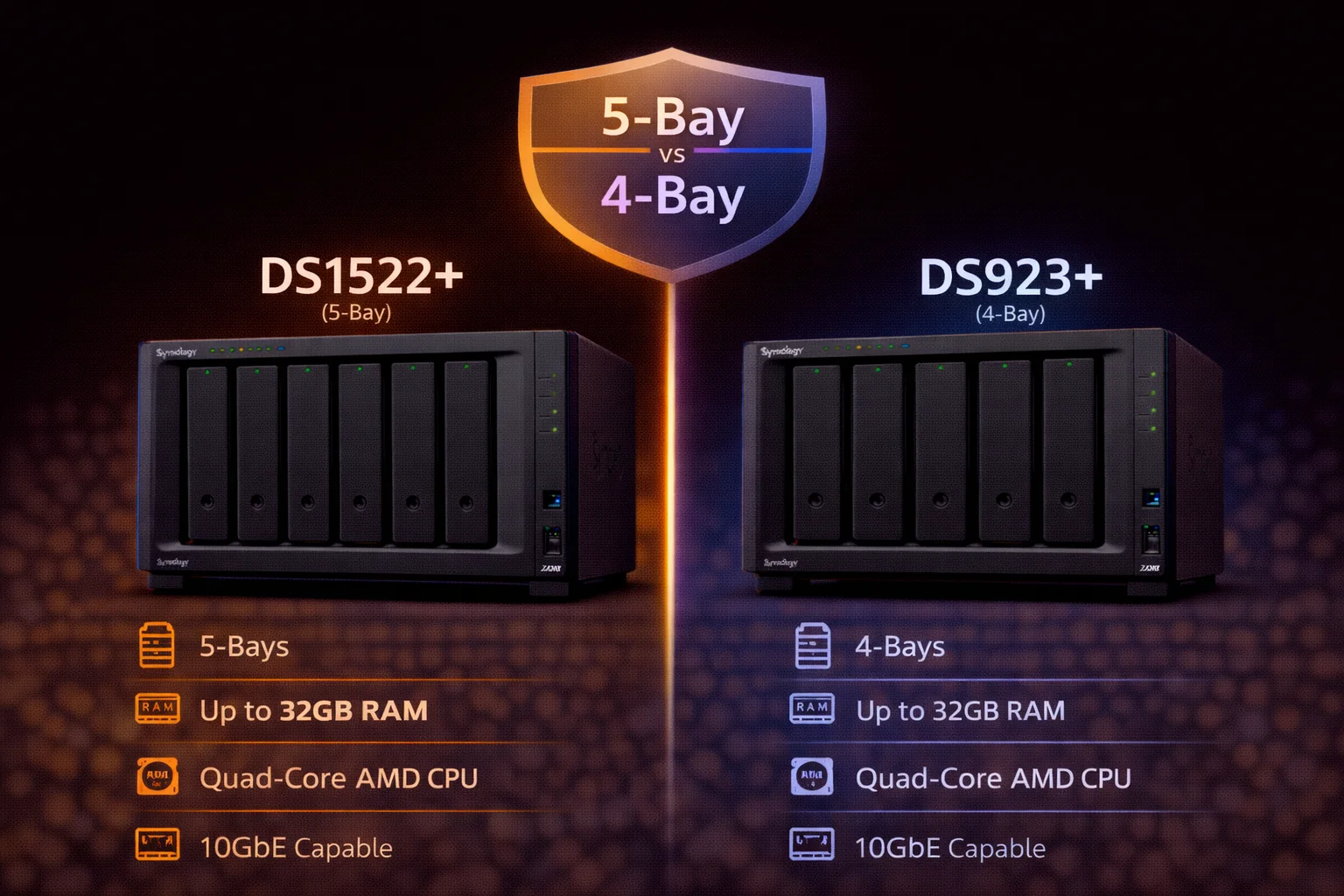
Quick Answer: The DS1522+ ($700) and DS923+ ($550) share the same AMD Ryzen R1600 CPU and features - the key difference is bay count (5 vs 4) and expansion potential. Choose DS1522+ if you need 5+ bays now or want maximum expansion (up to 15 drives). Choose DS923+ if 4 bays are sufficient and you want to save $150. Both offer 10GbE upgrades, NVMe caching, and ECC memory support.
The Synology DS1522+ and DS923+ are siblings sharing the same AMD Ryzen R1600 processor and core features. The primary differences are bay count (5 vs 4), expansion capability (15 vs 9 drives maximum), and price ($150 difference). This comparison helps you decide whether the extra bay and expansion potential justify the premium.
Specifications Comparison
| Specification | DS1522+ | DS923+ |
|---|---|---|
| Price | ~$700 | ~$550 |
| Drive Bays | 5 | 4 |
| CPU | AMD Ryzen R1600 (2-core, 2.6/3.1 GHz) | AMD Ryzen R1600 (2-core, 2.6/3.1 GHz) |
| RAM | 8GB DDR4 ECC (max 32GB) | 4GB DDR4 ECC (max 32GB) |
| M.2 NVMe Slots | 2 (cache only) | 2 (cache or storage pool*) |
| 1GbE Ports | 4 | 2 |
| 10GbE Option | ✅ E10G22-T1-Mini | ✅ E10G22-T1-Mini |
| PCIe Slot | PCIe 3.0 x8 | PCIe 3.0 x2 |
| USB Ports | 2× USB 3.2 | 2× USB 3.2 |
| eSATA Ports | 2 | 1 |
| Expansion Units | 2× DX517 (15 drives total) | 1× DX517 (9 drives total) |
| Max Raw Capacity | 90TB (270TB expanded) | 72TB (162TB expanded) |
| Max IP Cameras | 40 | 40 |
| Plex Transcoding | Limited (1-2 streams) | Limited (1-2 streams) |
| Hot Swappable | Yes | Yes |
| Warranty | 3 years | 3 years |
*DS923+ supports NVMe storage pools with Synology-branded SSDs; DS1522+ is cache-only.
What They Share: Identical Core Platform
Both models feature identical core components:
AMD Ryzen R1600 Processor
- Dual-core with 4 threads
- 2.6 GHz base / 3.1 GHz burst
- Excellent for Docker and light VMs
- Limited Plex transcoding (no Quick Sync)
ECC Memory Support
- Both support ECC DDR4 (error-correcting)
- Both expandable to 32GB
- DS1522+ ships with 8GB; DS923+ ships with 4GB
10GbE Upgrade Path
Both accept the E10G22-T1-Mini 10GbE module (~$110):
NVMe M.2 Slots
Both have 2× M.2 NVMe slots for SSD caching. With NVMe cache + 10GbE, both can achieve 1,000+ MB/s network transfers.
Key Differences Explained
1. Bay Count: 5 vs 4
The fundamental difference - one extra drive bay:
| Configuration | DS1522+ (5-bay) | DS923+ (4-bay) |
|---|---|---|
| 5× 8TB (SHR) | 32TB usable | N/A |
| 4× 8TB (SHR) | 24TB usable | 24TB usable |
| 5× 16TB (SHR) | 64TB usable | N/A |
| 5× 8TB (SHR-2) | 24TB usable | N/A (need 4+ for SHR-2) |
| Max raw (no expansion) | 90TB | 72TB |
Why 5 bays matter:
- SHR-2/RAID 6: More practical with 5 drives (3 for data, 2 for parity)
- Capacity headroom: ~33% more storage before expansion
- Upgrade flexibility: Add one drive at a time to 5-drive array
2. Expansion Capability
This is where the DS1522+ pulls ahead significantly:
- DS1522+: Supports 2× DX517 expansion units → 15 drives maximum
- DS923+: Supports 1× DX517 expansion unit → 9 drives maximum
Maximum expanded capacity:
- DS1522+: 15× 18TB = 270TB raw
- DS923+: 9× 18TB = 162TB raw
If long-term growth to 10+ drives is anticipated, the DS1522+ is the clear choice.
3. Stock RAM
- DS1522+: Ships with 8GB DDR4 ECC
- DS923+: Ships with 4GB DDR4 ECC
Both max out at 32GB. The DS1522+'s extra 4GB stock RAM is worth ~$30-40 if purchased separately.
4. Network Ports
- DS1522+: 4× 1GbE ports
- DS923+: 2× 1GbE ports
More 1GbE ports enable link aggregation for higher throughput without 10GbE, or separate networks for different services.
5. PCIe Slot
- DS1522+: PCIe 3.0 x8
- DS923+: PCIe 3.0 x2
The x8 slot offers more bandwidth for high-performance add-in cards (though most Synology accessories work fine with x2).
6. NVMe Storage Pools
Interestingly, the DS923+ has a feature the DS1522+ lacks:
- DS923+: Can use M.2 slots for storage pools (Synology SSDs only)
- DS1522+: M.2 slots are cache-only
This allows the DS923+ to create all-flash storage volumes - a niche but useful capability.
Performance Comparison
CPU Performance (Identical)
Same AMD Ryzen R1600 = identical compute performance for Docker, VMs, encryption, and file operations.
Storage Performance
With more drives, DS1522+ can achieve higher aggregate throughput:
| Scenario | DS1522+ (5 drives) | DS923+ (4 drives) |
|---|---|---|
| Sequential read (RAID 5) | ~550 MB/s | ~500 MB/s |
| Sequential write (RAID 5) | ~450 MB/s | ~400 MB/s |
| With 10GbE + NVMe cache | 1,100+ MB/s | 1,000+ MB/s |
Differences are modest and both exceed 1GbE limits (~115 MB/s).
Plex Performance (Both Limited)
Both have limited transcoding due to AMD CPU:
- Direct play: Unlimited
- Transcoding: 1-2 simultaneous 1080p streams
- 4K transcoding: Not recommended
For Plex transcoding, consider Intel models (DS423+) instead.
Pricing Analysis for Synology DS1522+ and Synology DS923+
Cost Per Bay
- DS1522+: $700 ÷ 5 bays = $140/bay
- DS923+: $550 ÷ 4 bays = $137.50/bay
Similar per-bay cost, but the DS1522+ includes more RAM and network ports.
The $150 Premium: What You Get
For $150 more, the DS1522+ provides:
- 1 additional bay
- 4GB more RAM (8GB vs 4GB)
- 2 more 1GbE ports (4 vs 2)
- Double expansion capacity (15 vs 9 drives)
- PCIe x8 vs x2 slot
- Extra eSATA port
Value assessment: The extra RAM alone is worth $30-40. Add the 5th bay and expansion capability, and the $150 premium is well-justified for users who need the capacity.
Use Case Recommendations
Choose DS1522+ If:
- You need 5+ bays now - More capacity from day one
- Long-term growth to 10+ drives - Supports 15 drives total
- SHR-2/RAID 6 is important - More practical with 5 bays
- Heavy Docker/VM workloads - Ships with 8GB RAM
- Need link aggregation - 4× 1GbE ports
- Small business file server - More capacity headroom
- Video editing workstation storage - Higher throughput with 5 drives
Choose DS923+ If:
- 4 bays are sufficient - Save $150
- Budget is a priority - Lower entry cost
- Expansion to 9 drives is enough - Most home users
- Want NVMe storage pools - DS923+ supports this, DS1522+ doesn't
- Home media server - 4 bays typically sufficient
- Smaller footprint preferred - Slightly more compact
The "5-Bay Sweet Spot" Argument
Many enthusiasts consider 5 bays the "sweet spot" for home/prosumer NAS:
- SHR-2 practical: 3 drives for data, 2 for redundancy
- Upgrade flexibility: Start with 3-4 drives, add over time
- Capacity balance: Significant storage without massive investment
- Cost efficiency: Better value than 8-bay for most users
The DS1522+ fills this niche perfectly.
Upgrade Paths Compared
DS1522+ Growth Path
- Start with 3-5 drives
- Add RAM (up to 32GB)
- Add NVMe cache
- Add E10G22-T1-Mini for 10GbE
- Add first DX517 (→ 10 drives)
- Add second DX517 (→ 15 drives)
- Maximum: 15 drives + NVMe cache + 10GbE + 32GB RAM
DS923+ Growth Path
- Start with 2-4 drives
- Add RAM (up to 32GB)
- Add NVMe cache (or storage pool)
- Add E10G22-T1-Mini for 10GbE
- Add DX517 (→ 9 drives)
- Maximum: 9 drives + NVMe + 10GbE + 32GB RAM
Frequently Asked Questions
Is the DS1522+ worth $150 more than DS923+?
For users who need 5+ bays or anticipate growing beyond 9 drives, yes. You get an extra bay, 4GB more RAM, 2 more network ports, and double the expansion capacity. For users satisfied with 4 bays and 9-drive maximum, the DS923+ saves money without sacrificing core features.
Do both support 10GbE?
Yes. Both support the E10G22-T1-Mini 10GbE upgrade module (~$110). Combined with NVMe caching, both can achieve 1,000+ MB/s network transfers. This is one of the key advantages of AMD-based Plus models over Intel models like DS423+.
Which is better for Plex?
Neither is ideal for Plex transcoding - both use AMD CPUs without Intel Quick Sync. For direct play, both work excellently. For transcoding, consider Intel models (DS423+, DS224+). The DS1522+'s extra bay provides more media storage, but transcoding performance is identical.
Can both use NVMe for storage (not just cache)?
Only DS923+ supports NVMe storage pools (with Synology-branded SSDs). DS1522+ M.2 slots are cache-only. This is an unusual case where the smaller model has a feature the larger one lacks. For most users, NVMe caching is more practical anyway.
How many drives can each support with expansion?
DS1522+ supports 2× DX517 expansion units for 15 total drives. DS923+ supports 1× DX517 for 9 total drives. This is the biggest differentiator for users planning significant long-term growth.
DS1522+ vs DS1821+: Should I go 8-bay instead?
DS1821+ offers 8 bays but uses an older AMD V1500B CPU (slower than R1600). DS1522+ has a faster CPU, supports 10GbE upgrade, and with 2× DX517 reaches 15 drives vs DS1821+'s 18 drives maximum. For most users, DS1522+ is the better modern choice unless you need 8 bays in the main unit.
Verdict: Capacity Needs Determine the Choice
| Choose DS1522+ (~$700) | Choose DS923+ (~$550) |
|---|---|
| Need 5+ bays now | 4 bays are sufficient |
| Want maximum expansion (15 drives) | 9 drives is enough |
| SHR-2/RAID 6 preferred | SHR/RAID 5 is fine |
| Heavy workloads (8GB RAM stock) | Budget priority |
| Need 4× 1GbE for link aggregation | Want NVMe storage pools |
| Small business/prosumer | Home user/enthusiast |
Summary: Both are excellent NAS units sharing the same powerful AMD platform. The DS1522+ is for users who need more capacity now or anticipate significant growth. The DS923+ is for users who want the same core features at a lower price point. Neither choice is wrong - it depends entirely on your storage requirements and growth expectations.
Related Resources
- Synology DS1522+ Review - Full 5-bay review
- Synology DS923+ Review - Full 4-bay review
- DS923+ vs DS723+ - 4-bay vs 2-bay comparison
- Best Synology NAS 2026 - Complete buying guide
- Synology Drive Compatibility Checker
- RAID Calculator - Plan your storage
Last Updated: February 2026 | Prices and specifications verified