Synology DS1621+ Review 2026: 6-Bay NAS for Business & Power Users

Quick Answer+
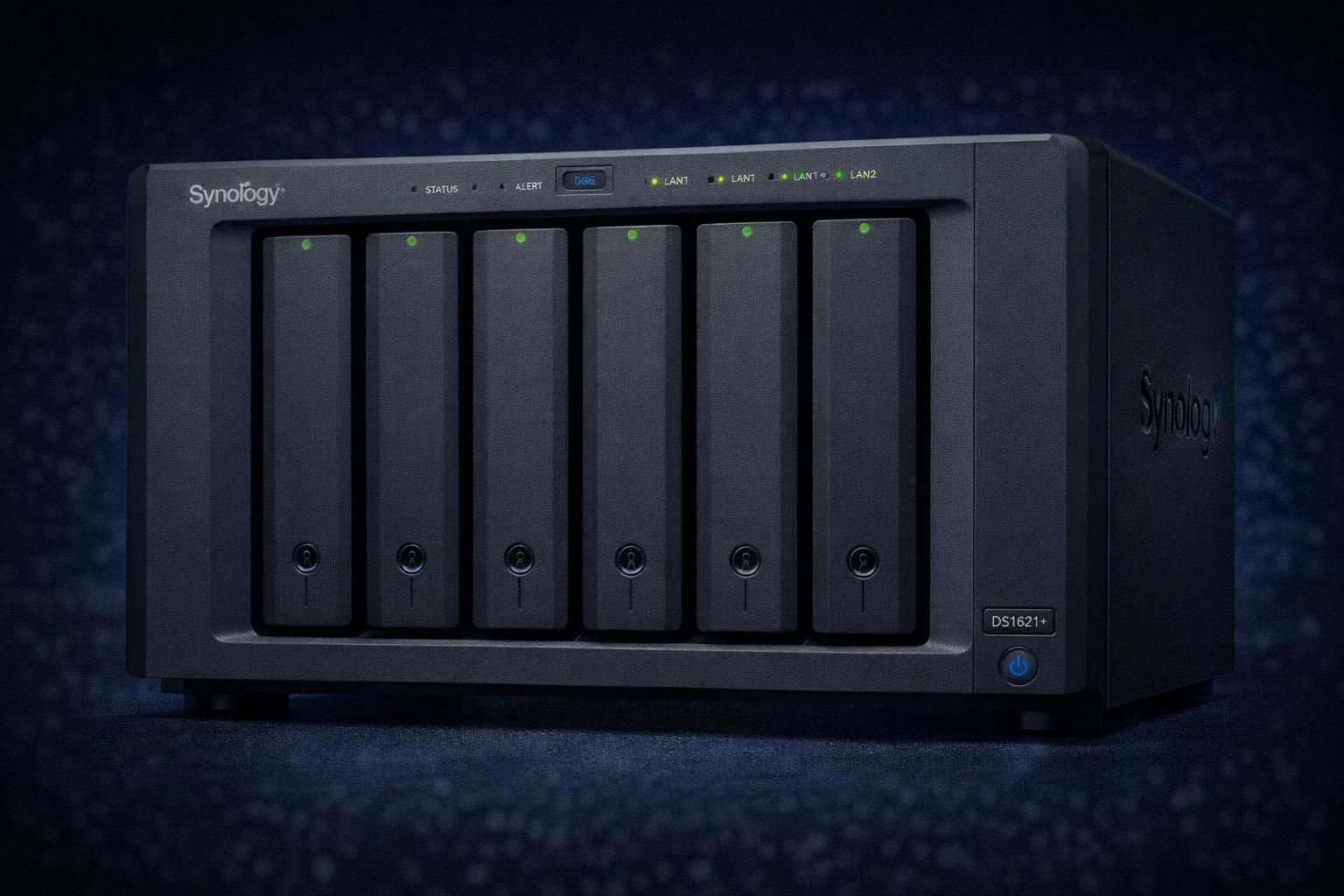
Quick Answer: The Synology DS1621+ is an excellent 6-bay NAS for businesses and power users needing serious storage capacity. With AMD Ryzen V1500B quad-core processor, expandability to 16 bays via DX517, 10GbE upgrade capability, and ECC RAM support, it bridges the gap between prosumer and enterprise. Ideal for SMBs, content creators, and anyone who’s outgrown 4-bay NAS devices.
When a 4-bay NAS like the DS923+ isn’t enough but rack-mount seems excessive, the DS1621+ fills the gap perfectly. This 6-bay desktop NAS offers enterprise-grade features in a familiar form factor, making it ideal for growing businesses and serious home users.
In this comprehensive review, we’ll cover specifications, performance testing, use cases, and how it compares to alternatives in the Synology lineup.
DS1621+ Specifications
| Specification | DS1621+ |
|---|---|
| Drive Bays | 6 (expandable to 16 with 2x DX517) |
| Processor | AMD Ryzen V1500B Quad-Core 2.2GHz |
| RAM | 4GB DDR4 ECC (expandable to 32GB) |
| Network | 4x 1GbE RJ-45 |
| PCIe Slot | 1x Gen3 x8 (for 10GbE/25GbE) |
| M.2 Slots | 2x NVMe (for SSD cache) |
| USB | 3x USB 3.2 Gen 1 |
| eSATA | 2x (for DX517 expansion) |
| Hot-Swap | Yes |
| Max Raw Capacity | 352TB (16 bays × 22TB) |
| File System | Btrfs, ext4 |
| Noise Level | 24.8 dB(A) |
| Power Consumption | 62W (access), 30W (HDD hibernation) |
| Dimensions | 166 × 282 × 243 mm |
| Warranty | 3 years (extendable to 5) |
Synology DS1621+
6-Bay | AMD Ryzen V1500B | 4GB ECC RAM | 4x 1GbE | PCIe x8 Slot | 2x M.2
The sweet spot between prosumer and enterprise. AMD Ryzen quad-core handles heavy workloads, ECC RAM ensures data integrity, and PCIe slot enables 10GbE upgrades. Expandable to 16 bays for massive storage growth.
Key Features Deep Dive
AMD Ryzen V1500B Processor
The V1500B is an embedded-class Ryzen processor designed for always-on systems:
- 4 cores / 8 threads: Handles multiple simultaneous tasks
- 2.2GHz base clock: Consistent performance without thermal throttling
- Zen architecture: Excellent performance per watt
- AES-NI: Hardware encryption acceleration
Note: The AMD Ryzen lacks Intel Quick Sync, so Plex hardware transcoding is limited. For heavy transcoding, consider Intel-based models like DS224+ or add a PCIe transcoding card.
ECC RAM Support
The DS1621+ uses ECC (Error-Correcting Code) RAM—a significant enterprise feature:
- Prevents silent data corruption: Detects and corrects single-bit errors
- Essential for ZFS/Btrfs: File systems that rely on data integrity
- Business requirement: Many compliance frameworks require ECC
- Expandable to 32GB: Sufficient for heavy workloads
Massive Expandability
The DS1621+ scales from 6 to 16 bays:
- Base: 6 bays (132TB with 22TB drives)
- +1 DX517: 11 bays (242TB)
- +2 DX517: 16 bays (352TB)
Synology DX517 Expansion
5-Bay | eSATA Connection | Hot-Swap | Tool-less Design
Add 5 more bays to compatible Synology NAS. Single eSATA cable connection. Seamlessly extends storage pool. Maximum 2 units per DS1621+.
PCIe Gen3 x8 Slot
The full-length PCIe slot enables serious networking upgrades:
- 10GbE: Synology E10G21-F2 or E10G22-T1-Mini
- 25GbE: For data center deployments
- Hardware transcoding: Add dedicated transcoding card for Plex
Quad 1GbE with Link Aggregation
Four Gigabit ports enable:
- Link aggregation: Up to 4Gbps aggregate bandwidth
- Failover: Network redundancy for uptime
- Network separation: Isolate management from data traffic
Performance Testing
Network Transfer Speeds
| Configuration | Sequential Read | Sequential Write |
|---|---|---|
| Single 1GbE | 112 MB/s | 110 MB/s |
| 4x 1GbE LAG | 380 MB/s* | 350 MB/s* |
| 10GbE (with E10G22) | 1,050 MB/s | 980 MB/s |
*LAG speeds require multiple simultaneous connections; single-client limited to ~112 MB/s
RAID Performance (6x 8TB IronWolf)
| RAID Level | Usable Capacity | Read Speed | Write Speed |
|---|---|---|---|
| SHR (5 drives parity) | 40TB | 550 MB/s | 480 MB/s |
| RAID 5 | 40TB | 560 MB/s | 490 MB/s |
| RAID 6 | 32TB | 520 MB/s | 420 MB/s |
| RAID 10 | 24TB | 620 MB/s | 550 MB/s |
Internal RAID speeds far exceed network limits. With 10GbE, you’ll actually benefit from this performance.
Plex Performance
| Scenario | Performance |
|---|---|
| Direct Play (4K) | Unlimited streams |
| Software Transcode (4K→1080p) | 1 stream (CPU limited) |
| Software Transcode (1080p→720p) | 2-3 streams |
For heavy Plex transcoding, the DS1621+ isn’t ideal due to AMD’s lack of Quick Sync. Consider Intel models or add a transcoding card.
Ideal Use Cases
Small/Medium Business
The DS1621+ excels in business environments:
- Active Backup for Business: Free backup for unlimited PCs, servers, VMs, Microsoft 365 (see our Active Backup guide)
- Synology Drive: Replace Dropbox/OneDrive for team file sharing (setup guide)
- Surveillance Station: Up to 40 camera licenses with expansion
- Virtual Machine Manager: Run Windows/Linux VMs
Content Creators
Video editors and photographers benefit from:
- Massive storage: 352TB max for 4K/8K footage
- 10GbE capability: Edit directly from NAS
- SSD cache: Accelerate small file access
- Synology Photos: Asset management with AI tagging (setup guide)
Home Lab / Power Users
- Docker containers: Run dozens of services
- Virtual machines: Test environments
- Large media libraries: Plex/Jellyfin server (direct play)
- Backup destination: Whole-home backup with Hyper Backup
Drive Recommendations
The DS1621+ supports any SATA drive, but NAS-optimized drives are recommended:
| Product | Capacity | Price | $ / TB | Price Drop | Brand | Interface |
|---|
Recommended Configurations
| Use Case | Configuration | Usable (SHR) | Approx Cost |
|---|---|---|---|
| Small Business | 6x 8TB IronWolf | 40TB | $2,100 |
| Media Production | 6x 16TB IronWolf Pro | 80TB | $3,500 |
| Maximum Capacity | 6x 22TB IronWolf Pro | 110TB | $4,200 |
Upgrade Recommendations
RAM Upgrade
The included 4GB is minimal for heavy workloads. Upgrade for:
- Multiple simultaneous users
- Virtual machines
- Large Docker deployments
- SSD caching
Synology D4ES01-8G
8GB DDR4 ECC | 2666MHz | For DS1621+/DS1821+
Official Synology ECC RAM module. Guaranteed compatibility. Required for warranty compliance on business-critical deployments.
10GbE Network Card
Synology E10G22-T1-Mini
10GbE RJ-45 | Low Profile | For DS1621+/DS923+
Official 10GbE upgrade using the PCIe slot. RJ-45 connector works with Cat6a cabling. Essential for video editing workflows.
SSD Cache Drives
WD Red SN700 500GB
NVMe Gen3 | 3,430 MB/s | 1,000 TBW | 5-Year Warranty
Purpose-built for NAS caching. High endurance handles constant cache writes. Install in M.2 slots for read/write cache acceleration.
DS1621+ vs Alternatives
DS1621+ vs DS923+
| Feature | DS1621+ | DS923+ |
|---|---|---|
| Bays | 6 | 4 |
| Max with Expansion | 16 bays | 9 bays |
| Processor | Ryzen V1500B | Ryzen R1600 |
| RAM | 4GB ECC | 4GB non-ECC |
| Network | 4x 1GbE | 2x 1GbE |
| PCIe | x8 | x4 |
| Price | ~$900 | ~$600 |
Choose DS1621+ if: You need 6+ bays, ECC RAM, or quad 1GbE ports. Choose DS923+ if: 4 bays (expandable to 9) is sufficient and budget matters.
DS1621+ vs DS1821+
The DS1821+ is essentially the DS1621+ with 8 bays instead of 6. Same processor, RAM, and features. Choose DS1821+ (~$1,050) if you need 8 bays from day one; otherwise, DS1621+ + DX517 provides more flexibility.
Software Highlights
The DS1621+ runs DSM 7, giving access to Synology’s full software ecosystem:
- Active Backup for Business: Free enterprise backup
- Hyper Backup: Offsite backup to cloud/USB
- Synology Drive: Dropbox alternative
- Synology Photos: Google Photos alternative
- Surveillance Station: IP camera NVR
- Virtual Machine Manager: Run VMs
- Container Manager: Docker support
Security Considerations
The DS1621+ benefits from Synology’s strong security track record. Follow our Synology Security Guide for hardening best practices including VPN setup, 2FA, and firewall configuration.
Frequently Asked Questions
For direct play, yes—unlimited streams. For transcoding, the AMD processor lacks Quick Sync hardware acceleration, limiting transcoding to 1-2 streams. Consider Intel-based models (DS224+, DS423+) for heavy transcoding, or add a PCIe transcoding card.
DS1621+ if you need ECC RAM, quad 1GbE ports, or plan to exceed 9 total bays. DS923+ + DX517 if 9 bays is sufficient and you want to save ~$300. Both expand with DX517 units.
352TB raw (16 × 22TB drives with two DX517 expansion units). With SHR-1, usable capacity is approximately 300TB. That’s enough for serious media production or enterprise archival.
Yes, via the PCIe Gen3 x8 slot. Install a Synology E10G22-T1-Mini ($110) or third-party 10GbE card. Essential for video editing or multi-user environments where 1GbE is a bottleneck.
ECC prevents silent data corruption—important for business data and when using Btrfs. For home use, non-ECC is typically fine. For business or archival, ECC provides peace of mind. The DS1621+ requires ECC; you cannot use non-ECC RAM.
24.8 dB(A) is quiet for a 6-bay NAS—comparable to a quiet room. Audible if in the same room as your desk but not intrusive. Replace stock fans with Noctua for near-silent operation.
Conclusion
The Synology DS1621+ is the perfect NAS for users who’ve outgrown 4-bay devices but don’t need (or want) rack-mount equipment. With AMD Ryzen power, ECC RAM, massive expandability to 16 bays, and PCIe slot for 10GbE, it delivers enterprise features in a desktop form factor.
It’s ideal for small businesses running Active Backup, content creators needing huge storage, and power users building comprehensive home labs. The main limitation is Plex transcoding—if that’s critical, pair it with an Intel model or transcoding card.
At ~$900 (diskless), it’s a significant investment, but the expandability means it can grow with you for years. Highly recommended for serious storage needs.
Related Resources
- Synology DS923+ Review
- Synology DS224+ Review
- Best Synology NAS 2026
- Synology Active Backup Guide
- Synology Hyper Backup Guide
- Synology Compatible Hard Drives
- Synology RAID Guide
- RAID Calculator
Last Updated: February 2026