WD My Cloud PR4100 Review: Best WD 4-Bay NAS (2026)

Quick Answer+
Quick Verdict: The WD My Cloud PR4100 is WD’s flagship NAS for serious storage needs. With 4 bays for RAID 5/10, Intel transcoding, expandable RAM, LCD display, and up to 88TB capacity, it’s the most capable My Cloud device. At ~$500 diskless, it’s ideal for Plex power users, creative professionals, and small businesses needing serious storage.
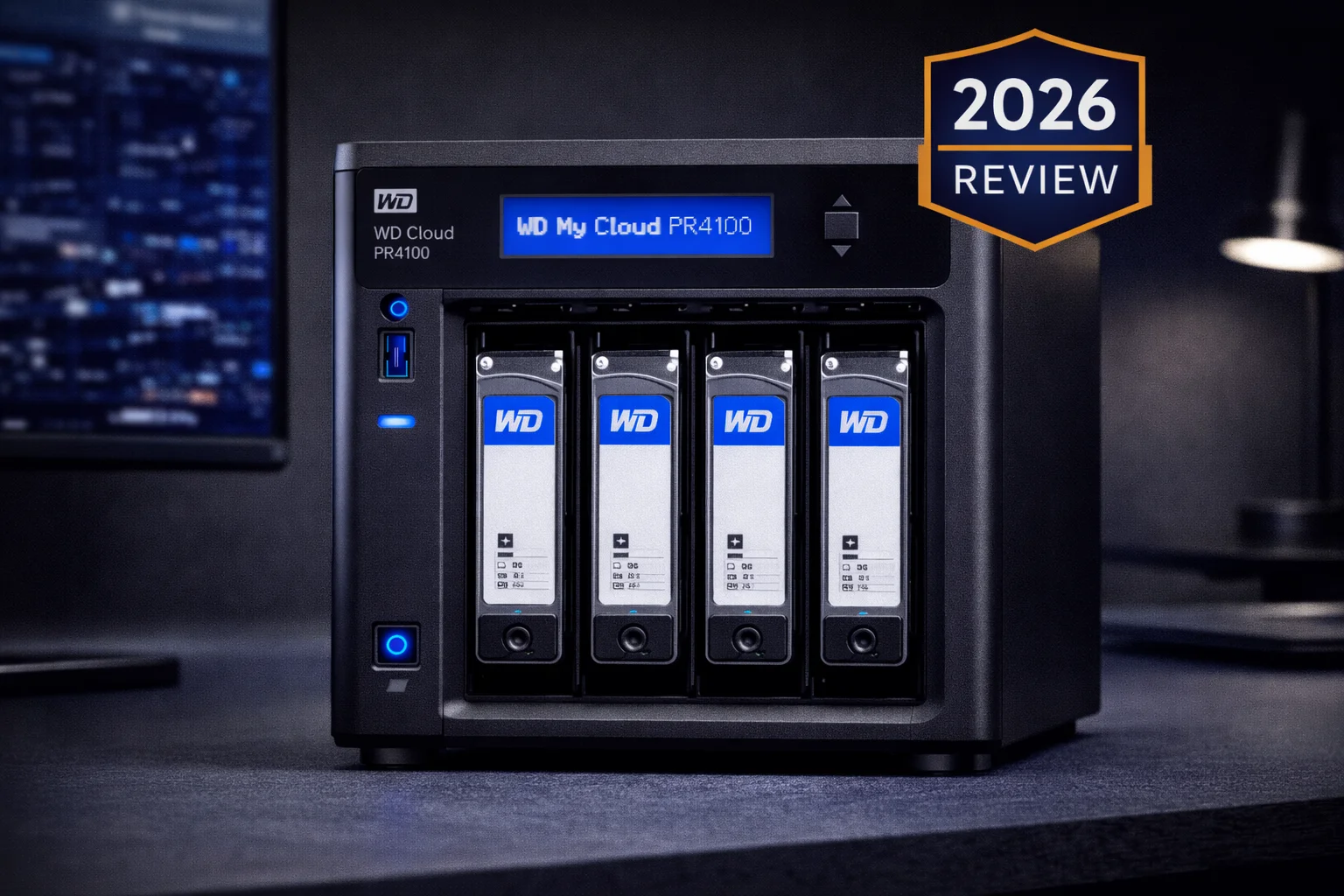
The WD My Cloud Pro Series PR4100 is Western Digital’s most powerful consumer NAS. This 4-bay unit shares the same Intel CPU as the PR2100 but adds RAID 5 support, expandable RAM, LCD status display, and room for four drives. This review covers whether the PR4100 is worth the upgrade.
WD My Cloud PR4100 (Diskless)
4-bay | Intel Pentium N3710 Quad-Core | 4GB RAM (exp.) | 2× 1GbE | LCD Display
WD’s flagship 4-bay NAS with Intel transcoding, RAID 5 support, expandable RAM, and LCD status display. Perfect for Plex servers and creative workflows.
WD My Cloud PR4100 Specifications
| Specification | WD My Cloud PR4100 |
|---|---|
| Drive Bays | 4× 3.5″ SATA (hot-swap) |
| CPU | Intel Pentium N3710 Quad-Core 1.6GHz (burst 2.56GHz) |
| RAM | 4GB DDR3L (expandable to 8GB) |
| Max Capacity | 88TB (4×22TB) |
| Network | 2× Gigabit Ethernet (link aggregation/failover) |
| USB Ports | 3× USB 3.0 (1 front, 2 rear) |
| LCD Display | Yes — shows status, IP, capacity |
| RAID Support | JBOD, RAID 0, 1, 5, 10, Spanning |
| File System | EXT4 |
| Hardware Transcoding | Yes (Intel Quick Sync Video) |
| Power Redundancy | Dual DC inputs (one PSU included) |
| Encryption | 256-bit AES volume encryption |
| Dimensions | 6.54 × 7.05 × 9.61 inches |
| Warranty | 2 years (diskless), 3 years (with drives) |
Current Prices
| Product | Capacity | Price | $ / TB | Price Drop | Brand | Interface |
|---|
PR4100 vs PR2100: Key Differences
| Feature | PR4100 | PR2100 |
|---|---|---|
| Drive Bays | 4 | 2 |
| Max Capacity | 88TB | 44TB |
| RAID Options | 0, 1, 5, 10, JBOD | 0, 1, JBOD |
| RAM | 4GB (expandable to 8GB) | 4GB (not expandable) |
| LCD Display | ✅ Yes | ❌ No |
| USB Ports | 3 | 2 |
| Price (Diskless) | ~$500 | ~$400 |
The $100 premium over the PR2100 buys you two additional bays, RAID 5/10 support, expandable RAM, and an LCD display. If you need more than 2 drives, the PR4100 is the obvious choice.
RAID 5: The Main Advantage
With 4 bays, the PR4100 supports RAID 5 — the sweet spot for home and small office NAS:
- One drive of fault tolerance: Any single drive can fail without data loss
- Good capacity efficiency: Lose only one drive worth of space (3 of 4 drives usable)
- Better read performance: Faster than RAID 1 for large files
RAID Configuration Examples
| Configuration | Total Raw | Usable (RAID 5) | Fault Tolerance |
|---|---|---|---|
| 4× 8TB | 32TB | 24TB | 1 drive |
| 4× 12TB | 48TB | 36TB | 1 drive |
| 4× 16TB | 64TB | 48TB | 1 drive |
| 4× 22TB | 88TB | 66TB | 1 drive |
For even more protection, RAID 10 provides two-drive fault tolerance at the cost of 50% usable capacity.
Design & Build Quality
The PR4100 shares the PR2100’s professional black aesthetic, just wider to accommodate four drive bays. It’s still compact enough for a desk but has more presence.
LCD Status Display
The front-panel LCD is surprisingly useful — it shows:
- Device IP address (no need to check your router)
- RAID status and health
- Storage capacity used/free
- Temperature warnings
- Error notifications
This is a significant convenience feature missing from the PR2100.
Expandable RAM
Unlike the PR2100, the PR4100’s RAM is user-upgradable to 8GB. This helps with:
- Running more simultaneous apps
- Better file caching performance
- Smoother multi-user experience
- More Plex transcodes
The RAM slot accepts standard DDR3L SO-DIMM modules.
Cooling & Noise
The PR4100 has a larger cooling fan than the PR2100, which it needs for four drives. Noise is moderate — audible in a quiet room but not distracting. During heavy RAID operations, the fan spins up noticeably.
Performance
The PR4100 shares identical CPU/RAM specs with the PR2100, so single-stream performance is the same. RAID 5 does add some overhead for parity calculations:
| Test | RAID 1 (PR2100) | RAID 5 (PR4100) |
|---|---|---|
| Sequential Read | ~113 MB/s | ~113 MB/s |
| Sequential Write | ~113 MB/s | ~100 MB/s |
| Plex Transcoding | 2-3 streams | 2-3 streams |
| RAID Rebuild (8TB) | ~8 hours | ~12-16 hours |
RAID 5 write speeds are slightly slower due to parity calculations. Read speeds remain network-limited. Both units saturate Gigabit Ethernet for sequential transfers.
Features
The PR4100 shares all features with the PR2100:
- Plex with hardware transcoding
- DLNA and iTunes servers
- iSCSI support
- Dual Gigabit Ethernet
- Acronis True Image backup
- Time Machine support
- Adobe Creative Cloud integration
- Remote access via My Cloud
Plus the PR4100-specific advantages:
- RAID 5 and 10 support
- LCD status display
- Expandable RAM (to 8GB)
- Third USB 3.0 port
Limitations
- No Docker: Still can’t run containers
- Limited app ecosystem: Same ~16 apps as other WD NAS
- Aging Intel CPU: N3710 is from 2016
- No NVMe cache: No M.2 slots
- No HDMI: Can’t connect directly to TV
- Gigabit only: No 2.5GbE or 10GbE
PR4100 vs Competitors
| Feature | PR4100 | Synology DS423+ | QNAP TS-464 |
|---|---|---|---|
| Price (Diskless) | ~$500 | ~$450 | ~$500 |
| CPU | Intel N3710 | Intel J4125 | Intel N5105 |
| RAM | 4GB (exp. 8GB) | 2GB (exp. 6GB) | 8GB |
| Transcoding | ✅ Yes | ✅ Yes (better) | ✅ Yes (best) |
| Docker | ❌ No | ✅ Yes | ✅ Yes |
| Network | 2× 1GbE | 2× 1GbE | 2× 2.5GbE |
| NVMe Cache | ❌ No | ❌ No | ✅ Yes (2 slots) |
The competition has caught up. Synology DS423+ offers Docker and a newer CPU for $50 less. QNAP TS-464 adds 2.5GbE and NVMe caching at the same price. The PR4100’s main advantage is WD’s simpler interface and ecosystem.
Who Should Buy the WD My Cloud PR4100?
✅ Good For:
- Plex users with large media libraries
- Users needing RAID 5 protection
- Creative professionals with 20TB+ storage needs
- Small businesses wanting simple file serving
- WD loyalists wanting maximum capacity
❌ Not Good For:
- Docker/container users
- Users wanting 2.5GbE or 10GbE networking
- Those wanting extensive app ecosystem
- Budget buyers (PR2100 or EX2 Ultra better)
Frequently Asked Questions
PR4100 if you need more than 44TB of storage or want RAID 5 protection. PR2100 if 2 bays with RAID 1 is sufficient. The ~$100 difference buys significant capability – if budget allows, the PR4100 is the better long-term investment.
The PR4100 accepts DDR3L SO-DIMM modules. You can upgrade to 8GB total. Popular choices include Crucial and Kingston DDR3L 1600MHz SO-DIMMs. Make sure to get low-voltage (1.35V) DDR3L, not standard DDR3.
12–16 hours for 8TB drives, and longer for larger capacities. During rebuild, performance is degraded and the array is vulnerable – another drive failure would cause data loss. This is normal for RAID 5 and one reason some users prefer RAID 10.
Yes. The Intel N3710 handles hardware transcoding well for 1080p content. Expect 2–3 simultaneous transcodes. 4K transcoding is possible but limited. For large media libraries, the 4-bay design provides ample storage.
Synology DS423+ offers a newer Intel CPU, Docker support, and a better app ecosystem for about $50 less. PR4100 wins on out-of-the-box RAM (4GB vs 2GB) and a simpler interface. For most users, Synology is the better value in 2026.
Yes. You can start with 2 drives in RAID 1, then expand to RAID 5 later by adding drives. The PR4100 interface guides you through the process. Note: expansion requires rebuilding the array and can take considerable time.
Final Verdict
| Category | Rating | Notes |
|---|---|---|
| Storage Capacity | ★★★★★ | Up to 88TB raw |
| RAID Options | ★★★★★ | Full RAID 5/10 support |
| Plex Performance | ★★★★☆ | Good 1080p transcoding |
| Build Quality | ★★★★★ | Professional, LCD display |
| Features | ★★★☆☆ | No Docker, limited apps |
| Value | ★★★☆☆ | Competitors offer more |
| Overall | ★★★★☆ | Best WD 4-bay NAS |
The WD My Cloud PR4100 is WD’s most capable NAS — RAID 5 support, expandable RAM, LCD display, and room for up to 88TB of storage. For Plex servers, creative workflows, and small business file serving within WD’s ecosystem, it’s the right choice.
However, the hardware is showing its age. Synology and QNAP offer newer Intel chips, Docker support, and better networking at similar prices. Unless you specifically want WD’s simpler interface, the competition provides better value in 2026.
Our recommendation: Buy the PR4100 if you want WD’s straightforward experience with maximum storage capacity. If you’re comfortable with slightly more complexity, the Synology DS423+ offers more features for less money.
Related Resources
- WD My Cloud PR2100 Review — 2-bay alternative
- WD My Cloud EX2 Ultra Review — Budget option
- Best WD My Cloud 2026 — Complete buying guide
- WD My Cloud Plex Setup Guide — Configuration tips
- WD My Cloud Compatible Drives — Drive recommendations
- RAID Calculator — Plan your storage configuration
Last Updated: February 2026 | Prices and specifications verified