2.5GbE switches Cyber Monday Deals 2026

Amazon.com · USDCyber Monday · November 30, 2026United KingdomDeutschlandFranceBlack Friday

Amazon Cyber Monday deals

As an Amazon Associate we earn from qualifying purchases. Prices and availability are accurate as of the time indicated and may change. The price and availability displayed on Amazon at the time of purchase apply.

Product and offerAmazon price
$85.49List Price $159.99Checked
Buy on Amazon
$189.98Typical price $249.98Checked
Buy on Amazon
$41.99List Price $54.99Checked
Buy on Amazon
$57.99List Price $74.99Checked
Buy on Amazon
$183.98Typical price $229.98Checked
Buy on Amazon
$183.98Typical price $229.98Checked
Buy on Amazon
$223.99Typical price $269.99Checked
Buy on Amazon
$279.99Typical price $332.99Checked
Buy on Amazon
$95.75Typical price $113.39Checked
Buy on Amazon
$64.59Typical price $76.49Checked
Buy on Amazon
$30.38Typical price $35.98Checked
Buy on Amazon
$50.39Typical price $59.49Checked
Buy on Amazon
$43.19Typical price $50.99Checked
Buy on Amazon
$28.10Typical price $33.12Checked
Buy on Amazon

Regular listings

Buying guide

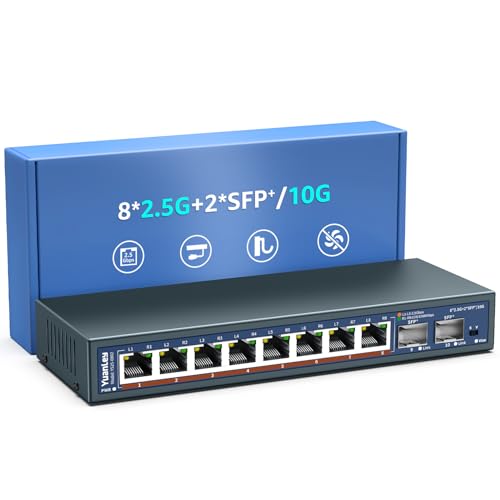
Looking to boost your home or small business network speed? 2.5GbE switches provide a cost-effective upgrade from gigabit models. This guide walks you through evaluating 2.5GbE switches on Amazon.com during Cyber Monday, covering port compatibility, cabling checks, and delivered costs. Take full advantage by reviewing device specs, network topology, and comparing SKU-level details before purchasing.

Verify Device and Port Compatibility First

Upgrading to 2.5GbE only benefits your network if both switch and connected devices support these faster speeds. Confirm your network cards, motherboards, and servers state explicit 2.5GbE support or 2.5GBASE-T in their documentation. Compare these requirements to the Amazon SKU and the listing’s detailed specs for both number and type of ports.

Most 2.5GbE switches are backward compatible with gigabit or even 100Mbps devices. However, be sure to verify all uplink ports and that endpoints use standard RJ45 connectors. Manufacturer specification sheets provide a compatibility matrix to ensure devices interoperate at the highest possible speed.

Cabling and Real-world Environment Checklist

Even if devices support 2.5GbE, older Ethernet cables might limit speed. While Cat5e often works for short 2.5GbE runs, Cat6 or better is recommended for reliable performance, especially at longer distances. Check your current cable labeling to avoid unnecessary speed drops or instability.

Physically audit your cables and replace any older or unidentified runs dated before 2010. Confirm that wall jacks or pass-throughs are certified for multi-gig and support required end-to-end speeds. Factor cable upgrades into your total purchasing plan if your environment needs improvement.

Compare Listings and Bundles by SKU

Amazon may list switches individually or in cost-saving multipacks. Carefully confirm whether your intended purchase is a single switch or multi-unit bundle and check per-port pricing based on the delivered total. Look for included accessories such as rack mounts or SFP modules, which may add extra value to certain listings.

Compare any Cyber Monday deal to weekend prices and prior listings, verifying the same part number and configuration. Review any included documentation or extended warranty offers. Exclude refurbished units unless you accept possible cosmetic flaws or limited support for your environment.

Buy Now or Wait and Reassess?

If your devices, cabling, and network design meet 2.5GbE requirements and the delivered price fits your plan, take advantage of the offer to avoid restocks or price jumps. Higher-speed models tend to have volatile availability, increasing the value of timely purchases.

If you discover incompatible hardware, insufficient cables, or unsatisfactory prices, delay your buy and reevaluate your upgrade path. Continue tracking the exact switch SKUs on Amazon for future deals, or pace your expansion to coincide with new device and cable acquisitions as the network ecosystem matures.

Frequently asked questions

How can I confirm my PC supports 2.5GbE speeds?

Check your computer’s technical manual for 2.5GBASE-T or 2.5Gbps Ethernet port mention. Search the model code for official driver or chipset documentation supporting these speeds.

Is Cat6 cabling needed for all 2.5GbE installs?

Cat5e is sufficient for most short runs up to 2.5GbE, but Cat6 or higher is recommended for best stability—especially over long cable distances or where signal interference is possible.

Related category guides

Browse all Cyber Monday categories