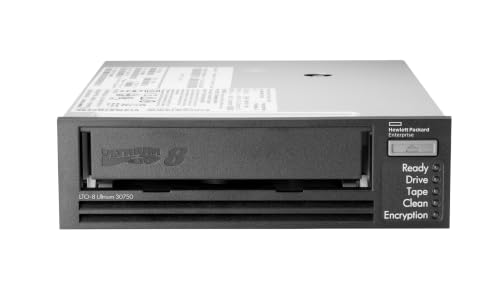
LTO tape drives Black Friday Deals 2026

Amazon US · USDAmazon sale dates · Nov 19–30, 2026

Amazon Black Friday deals

As an Amazon Associate we earn from qualifying purchases. Prices and availability are accurate as of the time indicated and may change. The price and availability displayed on Amazon at the time of purchase apply.

Amazon hasn’t reported a Black Friday deal for these listings. Check Amazon

Regular listings

Product and offerAmazon price
$175.00Checked
Buy on Amazon
$577.77Checked
Buy on Amazon
$1,095.00Checked
Buy on Amazon
$1,095.00Checked
Buy on Amazon
$1,095.00Checked
Buy on Amazon
$1,800.48Checked
Buy on Amazon
$4,699.99Checked
Buy on Amazon
$9,637.76Checked
Buy on Amazon
$11,638.74Checked
Buy on Amazon
$12,800.00Checked
Buy on Amazon

Related alternatives

For disk-based offline backups, compare these external drives and enclosures.

Product and offerAmazon price
$129.99$65.00/TBChecked
Buy on Amazon
Amazon Black Friday Deal 38% off
WD 20TB Elements Desktop External Hard Drive, USB 3.0 drive for plug-and-play storage - WDBWLG0200HBK-NESN

New · Amazon.com · 20 TB · Ends

$549.99List Price $879.99$27.50/TBChecked
Buy on Amazon
$199.99List Price $274.99$40.00/TBChecked
Buy on Amazon
$275.49$34.44/TBChecked
Buy on Amazon
Amazon Black Friday Deal 15% off
UnionSine 1TB Ultra Slim Portable External Hard Drive HDD-USB 3.0 | for PC, Mac, Laptop, PS4, Xbox one, Xbox 360-(Black)

New · KESHUO-US · 1 TB · Ends

$73.24List Price $86.17$73.24/TBChecked
Buy on Amazon

Buying guide

LTO tape drives offer scalable, long-term data archiving and offsite backup for demanding environments. Choosing the right LTO drive requires attention to generation compatibility, interface, workload patterns, and tape costs. This guide clarifies how to narrow choices, check documentation, and assess tradeoffs for standalone or library-ready LTO purchases, including practical criteria for buying or waiting.

Understanding LTO Generations and Compatibility

LTO drives are released in numbered generations, each with specific read-write capabilities. Remember that LTO-8 can read and write LTO-7 and 8 tapes; LTO-9 handles 8 and 9; and LTO-10 only works with generation 10 tapes. Backward compatibility is limited, so match drive and tape generation to your archive needs.

When reviewing listings, check the supported LTO generation and native versus compressed capacity. Most LTO-8 drives, for example, offer 12TB native and 30TB compressed per tape. Actual usable capacity depends on data compressibility. Review model documentation for confirmed generation compatibility, interface type (SAS, FC), and included cables.

Interface, System Integration, and Workload Considerations

Confirm the host interface matches your server or workstation: most modern LTO drives use SAS, but older generations or library drives may require Fibre Channel. Check for compatible SAS HBA or adapter if connecting to standard desktop or rackmount chassis.

Consider the workflow: standalone drives suit infrequent jobs or single-system use, while library-ready units support larger archival workflows and automation. Buy standalone models for small-scale deployments, or research compatible tape libraries and robotics for multi-slot, multi-tape workflows.

Concrete Checklist for Buying LTO Tape Drives

List your backup software, required features (WORM, encryption), and expected media rotation schedule. Cross-reference the drive model against your backup application’s hardware compatibility list before ordering. Review power supply requirements and rackmount options if integrating in an equipment rack or tight IT closet.

Check the included accessory pack: retail kits may include one test tape, cables, and cleaning media. Bare drives bought as replacements or spares often omit accessories. Compare cost per usable TB (drive plus tape costs) against alternative archival solutions. For used units, request logs of drive operating hours and error rates.

When to Buy or Wait for LTO Tape Drives

Buy when you need reliable offline archiving, whether for meeting compliance or protecting large data sets. Purchase if your current workload exceeds disk capacity or tape rotation is required soon. Demand can spike for higher LTO generations during new release cycles; check inventory levels and manufacturer warranty terms when available.

Wait if most of your backup workflows still fit well within online storage or if your organization is planning to standardize on disk-based backup appliances. Delaying for a generation jump may mean better tape density or speed, but may also require more expensive new media. Always review your long-term archiving policy and hardware roadmap before making a significant tape investment.

Frequently asked questions

What is the difference between native and compressed tape capacity?

Native capacity is the physical uncompressed storage a tape holds. Compressed capacity is estimated using standard data compression, which varies by data type. For planning, size your archive based on native capacity for accuracy.

Can I use an LTO-8 drive with LTO-6 or older tapes?

No, LTO-8 drives support only LTO-7 and LTO-8 tapes. For older media, you need an LTO drive from the appropriate generation that matches or is within one generation of your tape library’s media.

Related Black Friday guides

Browse all Black Friday categories