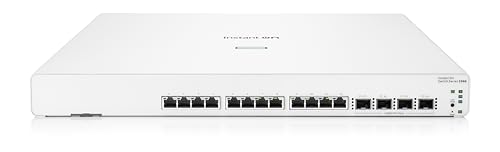
10GbE networking Black Friday Deals 2026

Amazon US · USDAmazon sale dates · Nov 19–30, 2026

Amazon Black Friday deals

As an Amazon Associate we earn from qualifying purchases. Prices and availability are accurate as of the time indicated and may change. The price and availability displayed on Amazon at the time of purchase apply.

Regular listings

Product and offerAmazon price
$26.99Checked
Buy on Amazon
$28.06Checked
Buy on Amazon
$69.99Checked
Buy on Amazon
$104.99Typical price $114.00Checked
Buy on Amazon
$129.99Checked
Buy on Amazon
$161.10Checked
Buy on Amazon
$180.00Checked
Buy on Amazon
$215.25Checked
Buy on Amazon
$278.39Checked
Buy on Amazon
$411.00Checked
Buy on Amazon
$601.81Checked
Buy on Amazon
$1,649.99Checked
Buy on Amazon

Buying guide

Upgrading to 10 Gigabit Ethernet (10GbE) can dramatically improve LAN throughput for demanding workflows like large file transfers, virtualization, and media editing. A successful 10GbE purchase means matching switches, network cards, cabling, and system compatibility. This guide provides a detailed framework for evaluating 10GbE options, use cases, and making an informed buying decision regardless of your current setup.

Assessing 10GbE Needs and Use Cases

Identify workloads that demand 10GbE, such as servers handling simultaneous virtual machines or editing 4K video over the network. Consider whether a single device or multiple endpoints require the upgrade. Analyze current bottlenecks by checking network utilization to ensure slower storage or CPU won’t limit gains and that 10GbE is the right investment versus lower-cost Gigabit or multi-Gig options.

Determine 10GbE scope: Are you connecting workstations to a main NAS, upgrading a backbone between switches, or future-proofing a single server? List every device on the proposed 10GbE path. Document their existing network speeds and slot types. This checklist drives everything from adapter choices to cable runs and helps avoid surprises with incompatible gear or missed components.

Switch and Endpoint Compatibility Considerations

Switch selection is critical. Check if your intended switch has true 10GbE ports—marked as SFP+, 10GBase-T, or 10GbE RJ45—and confirm the total number and type. Count available uplink and downlink ports, then verify whether you need SFP+ modules or if RJ45 copper is built-in. Review the switch’s documentation before purchasing to confirm slot configuration.

Endpoints must match the switch. For workstations or servers, confirm motherboard or chassis can accommodate a 10GbE NIC—either PCIe for desktops or compatible mezzanine modules for rack servers. Validate slot generation for full 10GbE throughput. For SFP+ NICs, account for needed transceivers. For 10GBase-T, standard Cat6a or Cat7 cabling suffices; with SFP+, use direct attach copper or fiber optics.

Cabling, Modules, and Cooling Requirements

With SFP+ hardware, budget for compatible modules—DAC, SR or LR transceivers—unless bundled. Use direct attach copper for short distances under 7 meters or OM3/OM4 optical fiber for longer runs. Always check the switch documentation for supported brands and part numbers to prevent costly mismatches and compatibility issues.

10GBase-T leverages familiar RJ45 and Cat6a cabling for up to 100 meters. For retrofitting existing environments, count total runs and check cable quality via cable testers or certification. Note that 10GbE can generate more heat in cards, switches, and cables. Ensure adequate airflow and follow manufacturer cooling and power supply recommendations, especially in dense rack deployments.

Evaluating Listings and Deciding When to Buy

On each offer, read the model code to confirm port type, speed, form factor, and included accessories such as SFP+ modules or cables. Avoid listings that fail to specify NIC chipset, port count or switch configuration. Consider well-documented used or refurbished enterprise gear for price savings if warranty, firmware, and support policies are clear.

Compare real-world needs and avoid over-buying. For example, connecting only a single server and NAS rarely requires a 24-port switch. Instead, purchase a smaller 2-4 port 10GbE switch and quality NICs. If SMB-grade gear lacks features, instead wait for enterprise gear releases or used stock to better fit demanding requirements and long-term support needs.

Frequently asked questions

Do I need SFP+ modules for every 10GbE port?

Yes, for SFP+ switches and NICs, each port requires its own compatible module or DAC cable. Always check the vendor’s compatibility list before buying modules to avoid issues with unsupported optics or cables.

Can I use Cat6 cabling for 10GBase-T connections?

Cat6 cabling works reliably for runs up to 37 meters at 10GbE speed. For longer cable runs up to 100 meters, Cat6a or better is recommended to ensure stable, error-free 10GbE connectivity without data loss.

Related Black Friday guides

Browse all Black Friday categories