Refurbished enterprise hard drives Black Friday Deals 2026

Amazon US · USDAmazon sale dates · Nov 19–30, 2026

Amazon Black Friday deals

As an Amazon Associate we earn from qualifying purchases. Prices and availability are accurate as of the time indicated and may change. The price and availability displayed on Amazon at the time of purchase apply.

Amazon hasn’t reported a Black Friday deal for these listings. Check Amazon

Regular listings

Product and offerAmazon price
$139.89New Price $232.93$23.31/TBChecked
Buy on Amazon
$244.00New Price $399.99$24.40/TBChecked
Buy on Amazon
$379.99$27.14/TBChecked
Buy on Amazon
$439.99Typical price $489.99$27.50/TBChecked
Buy on Amazon
$439.99$27.50/TBChecked
Buy on Amazon
46% below reference
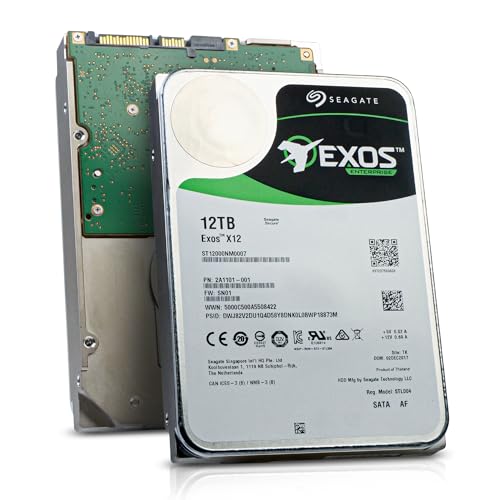
Seagate Exos x12 12TB SATA 6Gb/s 256MB Cache Enterprise Hard Drive 3.5in (ST12000NM0007) (Renewed)

Renewed · Worldwide Product Importer · 12 TB

$349.99New Price $645.59$29.17/TBChecked
Buy on Amazon
$419.99$30.00/TBChecked
Buy on Amazon
$689.99New Price $2,541.00$31.36/TBChecked
Buy on Amazon
$189.99$31.67/TBChecked
Buy on Amazon
$839.99New Price $1,352.99$32.31/TBChecked
Buy on Amazon
$779.99$32.50/TBChecked
Buy on Amazon
$779.99$32.50/TBChecked
Buy on Amazon
$589.99New Price $719.00$32.78/TBChecked
Buy on Amazon
$529.99$33.12/TBChecked
Buy on Amazon
$669.99$33.50/TBChecked
Buy on Amazon
$669.99$33.50/TBChecked
Buy on Amazon
$339.99$42.50/TBChecked
Buy on Amazon

Buying guide

Refurbished enterprise hard drives offer a cost-effective way to boost storage capacity for servers or backup systems. These drives are typically sourced from data centers after light use and tested for renewed reliability. Understanding what to check and how to compare pricing per terabyte helps ensure you maximize performance and value for demanding environments.

Comparing Dollars per Terabyte and Drive Condition

When shopping for refurbished enterprise hard drives, always calculate the cost per terabyte within the same drive condition category, such as 'refurbished' or 'recertified.' Single-drive prices can differ greatly from packs, and the latter may include bulk discounts or differences in warranty and packaging. Keep a spreadsheet to compare deals based on capacity, condition, and included warranty.

Drive condition descriptions are critical. Examine whether the listing specifies manufacturer refurbishment or third-party testing and refurbishment. Manufacturer-refurbished models often undergo more rigorous screening but may come at a slight premium. Also, review reported SMART data if available, such as power-on hours and reallocated sector count, to assess the remaining lifespan and reliability potential.

SATA, SAS, and Recording Type Explained

Enterprise hard drives commonly use either SATA or SAS interfaces. SAS drives offer higher reliability, faster sustained speeds, and dual-ported access, suited for enterprise and high-availability settings. SATA drives typically provide lower cost and are compatible with more general-purpose equipment. Always verify your system’s interface compatibility before purchase by checking your server or workstation documentation by model code.

Recording type further differentiates drives. CMR (Conventional Magnetic Recording) is preferred for consistency and RAID compatibility, while SMR (Shingled Magnetic Recording) packs more data but may slow write-heavy workloads. Confirm the recording type in the technical documentation or the drive’s datasheet by exact model—this is usually not upfront in listings, but crucial for the intended workload.

Checklist for Reviewing a Listing and Documentation

Begin by confirming the model number matches both listing description and photos. Cross-reference this code on the manufacturer's support site to verify interface, recording method, capacity, and firmware compatibility. Next, check the stated warranty length and refurbisher credentials. Reliable outlets will specify their testing process and sometimes include test reports or guarantee minimum SMART health percentages.

If considering a multiple-pack offer, inspect if the drives are matched in firmware and capacity. Mismatches can create headaches in RAID configurations. Take note of included accessories, such as drive trays or caddies, especially for hot-swap enterprise bays. Always ensure your chassis or enclosure has proper support in terms of hot-swappability, vibration control, and cooling for enterprise-class drives.

When to Buy or Wait: Evaluating Offers and Needs

Competitive pricing for refurbished enterprise drives can occur after large-scale data center upgrades. Look for offers from vendors listing large quantities of similar models, as these often signal recent batches becoming available. If specific models or capacities are scarce or climbing in price, it may be wise to wait for new listings unless you have an urgent capacity need.

Another clear buy signal is when you spot a reputable refurbisher with extensive positive feedback and a no-questions-asked return window. If you have flexibility, set alerts for models compatible with your system and track them over a few weeks to observe price movement. Avoid impulsive purchases if missing specifications or generic photos are present. Patience typically ensures better drive health and reliability guarantees.

Frequently asked questions

Are refurbished enterprise drives reliable for important data?

While reputable refurbished enterprise drives offer notable longevity, use them in redundant arrays and maintain independent backups. Always review test data and warranties for peace of mind before trusting them with mission-critical applications.

How do I match a refurbished enterprise drive with my server?

Reference your server or NAS documentation by model for supported drive form factors, interfaces, and power requirements. Always cross-verify with the drive’s exact model code and consult official compatibility lists when available.

Related Black Friday guides

Browse all Black Friday categories